When the display indicates "-" and the acoustic signal sounds 6 times, the
programme has ended.
1. Switch off the appliance (ON/OFF button).
2. Turn off the water.
3. CAUTION! Wait a few minutes before you open the door as hot damp
may escape.
4. Wait approx. 15 minutes before you take out the dishes. The dishes are still hot
and will break easily.
5. It is normal that the appliance is wet inside.
1. WARNING! Disconnect the appliance from the mains before you clean or
maintain it.
2. Always keep the appliance clean so that unpleasant odours do not occur.
3. Take off all rings and bracelets before cleaning or maintaining the appliance;
otherwise you will damage the surface of the appliance.
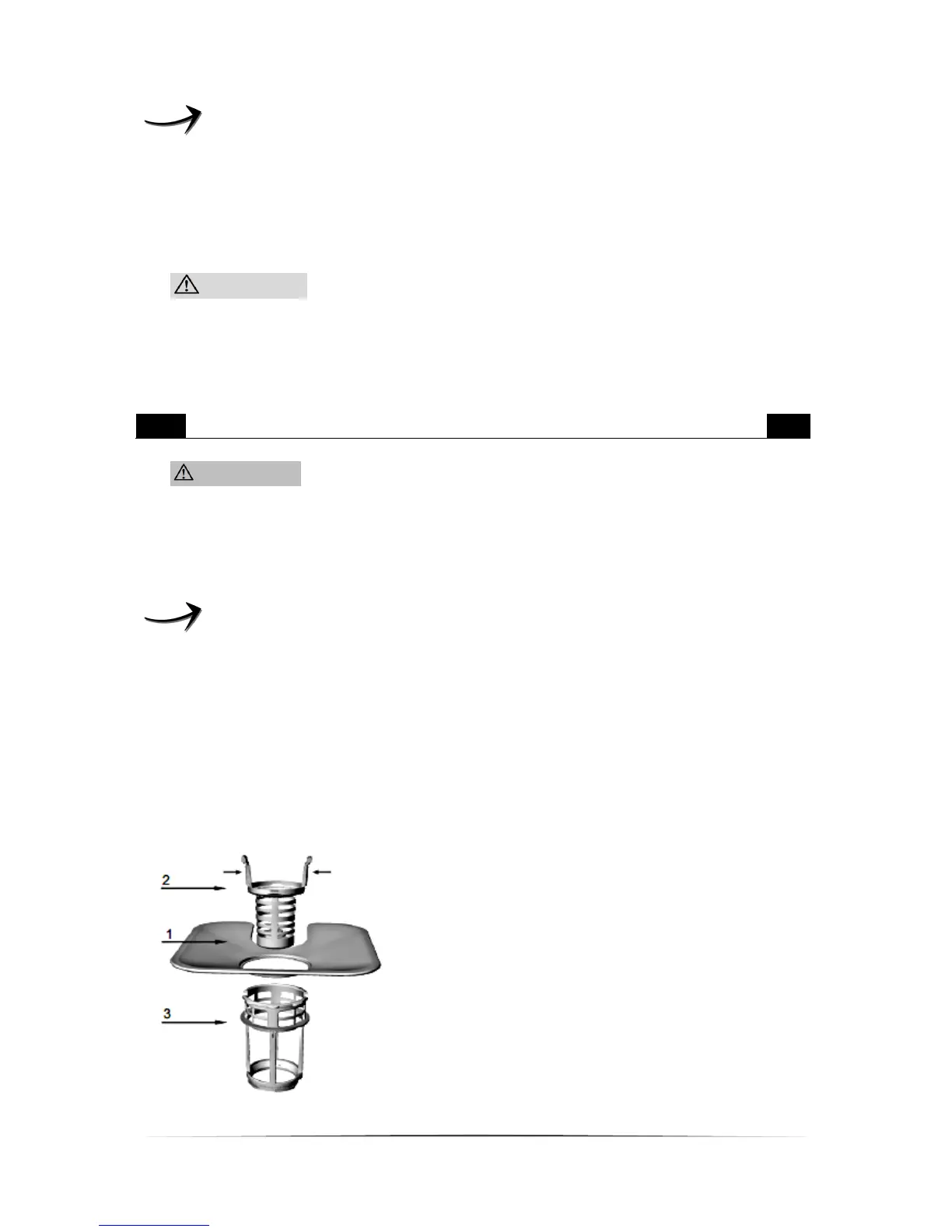
The filter system protects the pump against remnants of food and other objects.
These remnants can clog the filters after a while. The filter system comprises a
coarse filter, a flat filter and a micro filter.
Check the status of the filters after each programme.
When you remove the coarse filter, you can remove all filters of the system.
Remove any remnants and clean the filters with flowing water.
1. The flat filter catches remnants
by a special nozzle on the bottom
of the spray arm.
2. The coarse filter catches
remnants such as bones and glass
which may clog the drain. To
remove the remnants press the
upper pins and take out the coarse
filter.
3. The micro filter catches
remnants in the drain so they
cannot soil the dishes again.


 To Next Page