- 24 -
4. Installation and Removal of Transceiver Module
4-1 Installing the SFP/SFP+ Mini-GBIC Transceiver Module
Please follow these steps to install the SFP/SFP+ Mini-GBIC module:
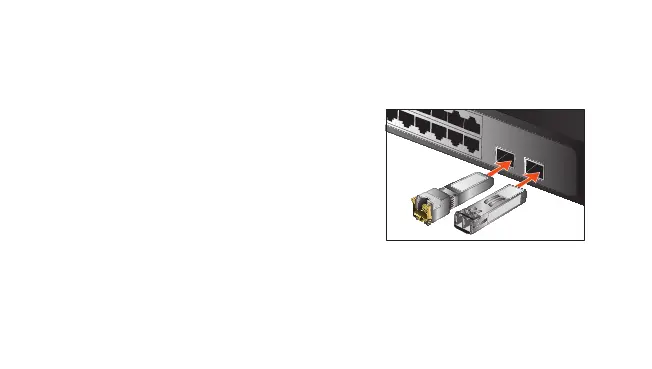
1. Power on the Switch and place the Switch on a
at surface. Install the new SFP/SFP+ Mini-GBIC
module by inserting it into the slot and sliding it in
until it stops (See Figure 1). Press it rmly until
you hear the module snap into place. Never force,
twist or bend the SFP/SFP+ Mini-GBIC module. The
SFP/SFP+ Mini-GBIC module slides in smoothly and
the Switch will automatically detect the new module.
SFP/SFP+
SFP/SFP+
Copper
Figure 1: Inserting the SFP/SFP+ Mini-GBIC Module
2. After the TP/Fiber connection is made successfully, check the LEDs to verify that if there is a link and
a proper connection at the port.
Please refer to the user’s manual for more about the Switch or module’s management.



 To Next Page