SIP Analog Telephone Adapter
65
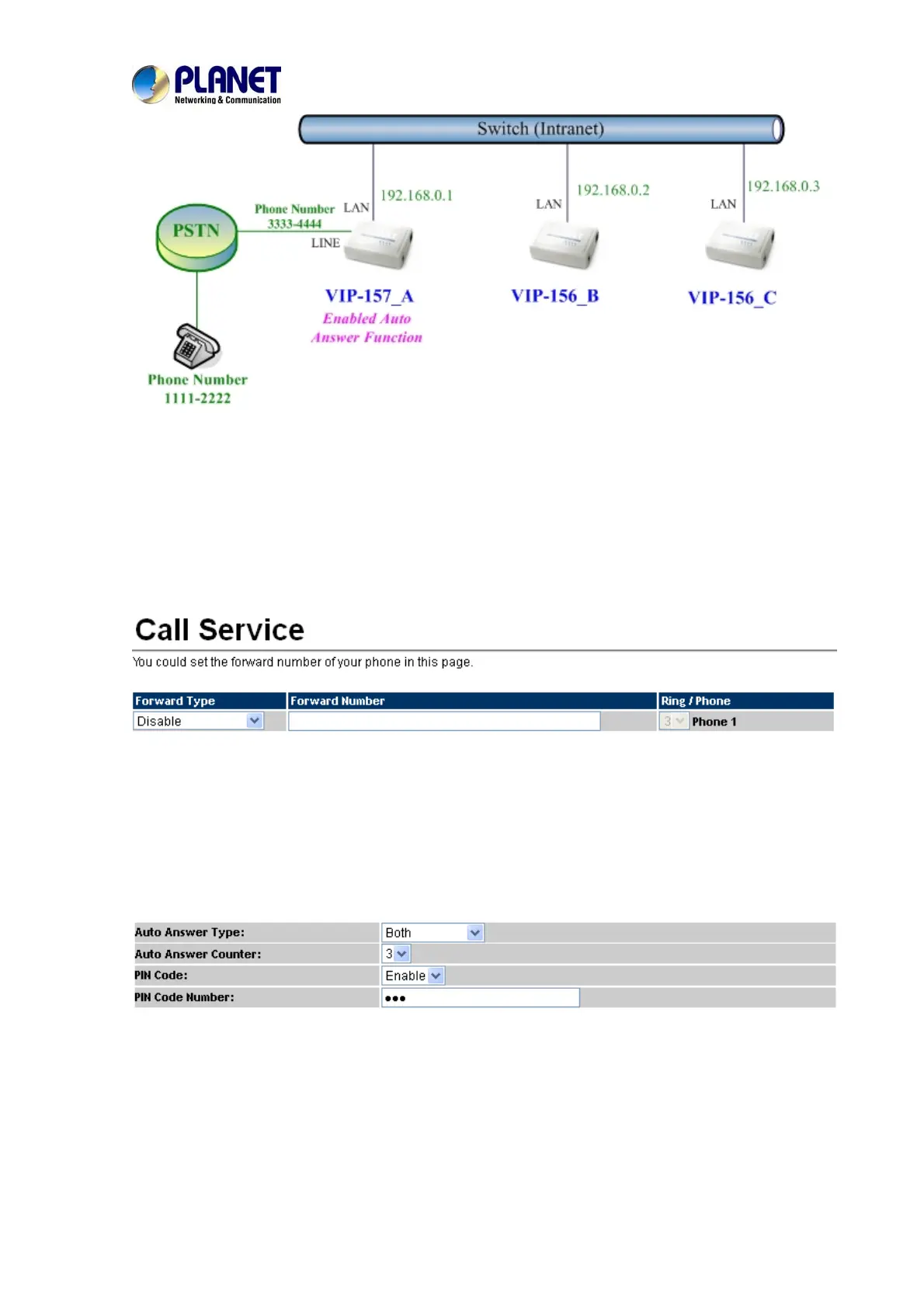
Machine configuration on the VIP-157:
STEP 1:
Please log in VIP-157_A via web browser and browse the Phone Settings menu and select
the Call service config menu. On the setting page, please disable All Forward function, and
then the sample configuration screen is shown below:
STEP 2:
Please log in VIP-157_A via web browser and browse the Phone Settings / General setting
menu and select the Auto Answer config menu. On the setting page, please enable the Auto
Answer and PIN Code Enabled function, then the sample configuration screen is shown
below:
Test the scenario:
1. VIP-156_C pick up the telephone
2. Dial the IP Address 192.168.0.1(VIP-157_A)
3. VIP-157_A will ring up but doesn’t answer the call
4. After 3 rings, the VIP-156_C will hear the prompt sounds and then input the password 123#
5. VIP-156_C will hear the dial tone from PSTN line and then input Phone Number 11112222



 To Next Page