
 Need help?
Do you have a question about the Plantronics Blackwire 3220 and is the answer not in the manual?
Connect the headset's USB cable to your computer for Unite Desktop application.
Install Plantronics Hub for Windows/Mac to enable full headset call control functionality.
Lists compatible Polycom and Yealink IP desk phone models for the headset.
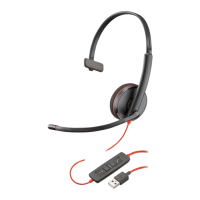
Explains the icons, LEDs, and functions of the headset's in-line control buttons.
Instructions on how to manage calls using the headset and Unite Desktop application.
Guidance on adjusting listening volume and headset microphone volume for softphones.
How to mute and unmute the headset microphone during calls.
Solutions for common issues like not hearing, callers not hearing, distorted sound, or echo.
 General
| Microphone | Yes |
|---|---|
| Wearing Style | Over-the-head |
| Sound Mode | Stereo |
| Compatibility | PC, Mac |
| Ear Coupling | Supra-aural |
| Frequency Response | 20 Hz - 20 kHz |
| Impedance | 32 ohms |
| Connectivity | USB Type-A |
| Inline Controls | Yes |
| Cable Length | 2.1 m |




 To Next Page