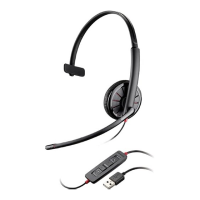
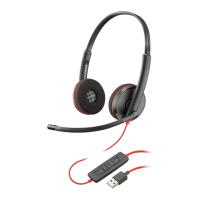
The Plantronics Blackwire 3200 Series is a range of wired headsets designed for communication, particularly in professional and office environments. These headsets are primarily intended for use with computers and mobile devices, offering a straightforward plug-and-play experience for various communication needs. The series emphasizes ease of use, comfort, and reliable audio performance for calls and other audio applications.
Function Description
The core function of the Blackwire 3200 Series headsets is to provide clear and consistent audio for both listening and speaking during calls, virtual meetings, and multimedia consumption. They are designed to integrate seamlessly with softphones and other communication platforms, offering intuitive controls for managing calls.
The headset connects to devices primarily through two methods:
- USB-A/USB-C Connector: This connection type is suitable for computers and some mobile devices. When connected via USB, the headset typically offers full call control functionality, allowing users to answer/end calls, adjust volume, and mute the microphone directly from the inline controller. It's important to note that headset call control functionality may vary when used with mobile devices.
- 3.5 mm Connector: Certain models within the Blackwire 3200 Series (specifically the 3215/3225) also feature a 3.5 mm connector. This provides broader compatibility with mobile phones, tablets, and other devices that have a standard audio jack. However, when using the 3.5 mm connection, headset call control functionality is generally not available, meaning users would manage calls directly from their connected device.
The headset's inline controller is a central component for managing audio and calls. It includes dedicated buttons for:
- Call Button: This button is used to answer incoming calls, end active calls, and in some cases, redial the last number. Its LED indicator flashes green for an incoming call and remains solid green when on an active call.
- Volume Up (+) Button: Increases the listening volume of the headset.
- Volume Down (-) Button: Decreases the listening volume of the headset.
- Mute Button: Toggles the microphone mute function. When the microphone is muted, the LED on the mute button illuminates solid red.
For optimal performance and full call control with softphones, the installation of Plantronics Hub software for Windows/Mac is recommended. This software enhances the headset's capabilities by enabling features such as call answer/end and mute functionality, especially with various softphone applications. Without Plantronics Hub, users might need to manage calls directly through their softphone application after pressing the headset's call button.
Usage Features
The Blackwire 3200 Series is designed with user comfort and convenience in mind, offering several features that enhance the overall experience:
- Comfortable Fit: The headband is adjustable, allowing users to lengthen or shorten it until the ear cushions sit comfortably over the center of their ears. This ensures a secure yet comfortable fit for extended periods of use.
- Flexible Boom Microphone: The microphone boom is designed to be positioned on either the left or right side of the head, accommodating individual preferences. Users can rotate the boom to align it with their mouth for optimal voice pickup. A crucial aspect of its design is the caution against rotating the boom more than 180 degrees to prevent damage.
- Adjustable Microphone Position: Beyond rotating the boom, users can gently bend the boom in or out. The recommended distance is approximately two finger widths from the corner of the mouth, which helps in capturing clear audio while minimizing background noise.
- Inline Call Control: The inline controller provides quick and easy access to essential call management functions. This includes answering and ending calls with a single tap, adjusting listening volume, and muting the microphone. For users not on an active call, a double key press of the call button can redial the last number. Pressing and holding the call button for 2 seconds can put a call on hold.
- Softphone Integration (with Plantronics Hub): When Plantronics Hub is installed, the headset offers seamless integration with various softphone applications. This allows for direct call control from the headset, improving workflow and user efficiency.
- Microphone Volume Adjustment (Softphone): Users can adjust their headset microphone volume through their softphone application. Placing a test call and adjusting both the softphone volume and PC sound volume accordingly helps achieve optimal outgoing audio levels.
- Troubleshooting Guidance: The user guide provides clear troubleshooting steps for common issues such as not hearing the caller, callers not hearing the user, distorted sound, or echo. These steps often involve checking volume settings, ensuring the headset is set as the default audio device, correctly positioning the microphone boom, and verifying mute status.
- Multi-Device Connectivity: The option to connect via USB or 3.5 mm jack provides versatility, allowing the headset to be used with a wide range of devices, from desktop computers to mobile phones.
Maintenance Features
While the Blackwire 3200 Series is a relatively low-maintenance device, certain aspects contribute to its longevity and continued performance:
- Software Updates (via Plantronics Hub): Plantronics Hub serves as a central point for managing the headset. One of its key maintenance features is the ability to update the headset's firmware. Regular firmware updates can introduce new features, improve performance, and resolve potential bugs, ensuring the headset remains up-to-date and functions optimally.
- Feature Management (via Plantronics Hub): Plantronics Hub allows users to turn various headset features on or off. This customization can help tailor the headset's behavior to individual preferences and specific use cases, indirectly contributing to its perceived performance and user satisfaction.
- User Guide Access (via Plantronics Hub): The Plantronics Hub also provides convenient access to the user guide, which is a valuable resource for understanding all features, troubleshooting issues, and ensuring proper usage. This readily available information helps users maintain their device effectively.
- Physical Care: Although not explicitly detailed as "maintenance features" in the provided text, the design implies standard care practices for electronic devices. This includes careful handling of the microphone boom to avoid breakage (as highlighted by the 180-degree rotation warning) and ensuring proper connection to devices. Keeping the headset clean and stored safely when not in use would also contribute to its lifespan.
- Troubleshooting Support: The comprehensive troubleshooting section in the user guide acts as a first line of defense for maintenance. By guiding users through common problems and their solutions, it empowers them to resolve minor issues independently, reducing the need for external support and potentially extending the functional life of the headset. For instance, ensuring the headset is set as the default audio device in system settings is a common "maintenance" step for audio devices.
In summary, the Plantronics Blackwire 3200 Series is a user-friendly, versatile wired headset designed for clear communication across various platforms. Its intuitive inline controls, comfortable design, and software-enhanced features make it a reliable tool for daily use, supported by accessible troubleshooting and maintenance options through the Plantronics Hub.

 Need help?
 General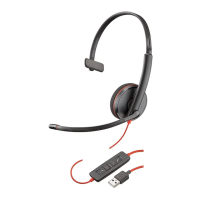



 To Next Page