5
Plantronics Voyager 815
EN ENGLISH
CHARGING
Before you use your headset for the first time, charge it for at least 1 hour.
It takes approximately 3 hours to fully charge your headset.
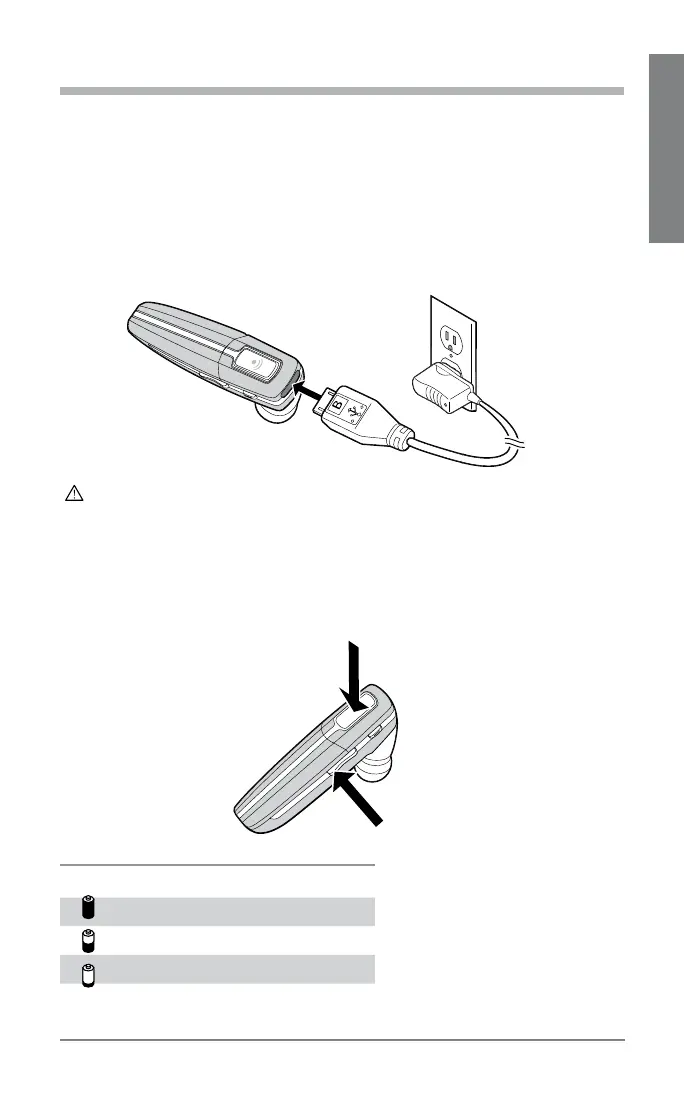
Connect the charger cable to the headset.
Plug the charger into a power outlet.
While your headset is charging the indicator glows red. When your
headset is fully charged, the indicator turns off.
WARNING: Do not use your headset while it is connected to the charger.
CHECK THE CHARGE LEVEL
When your headset is on, simultaneously press and hold the call control
button and the volume down button for about two seconds. The indicator
flashes red to show the charge level.
1.
2.
Battery Level Red Flashes
More than 2/3 full 1
1/3 to 2/3 full 2
Less than 1/3 full 3






 To Next Page