15
SETTINGS
SETTINGS SETTINGS
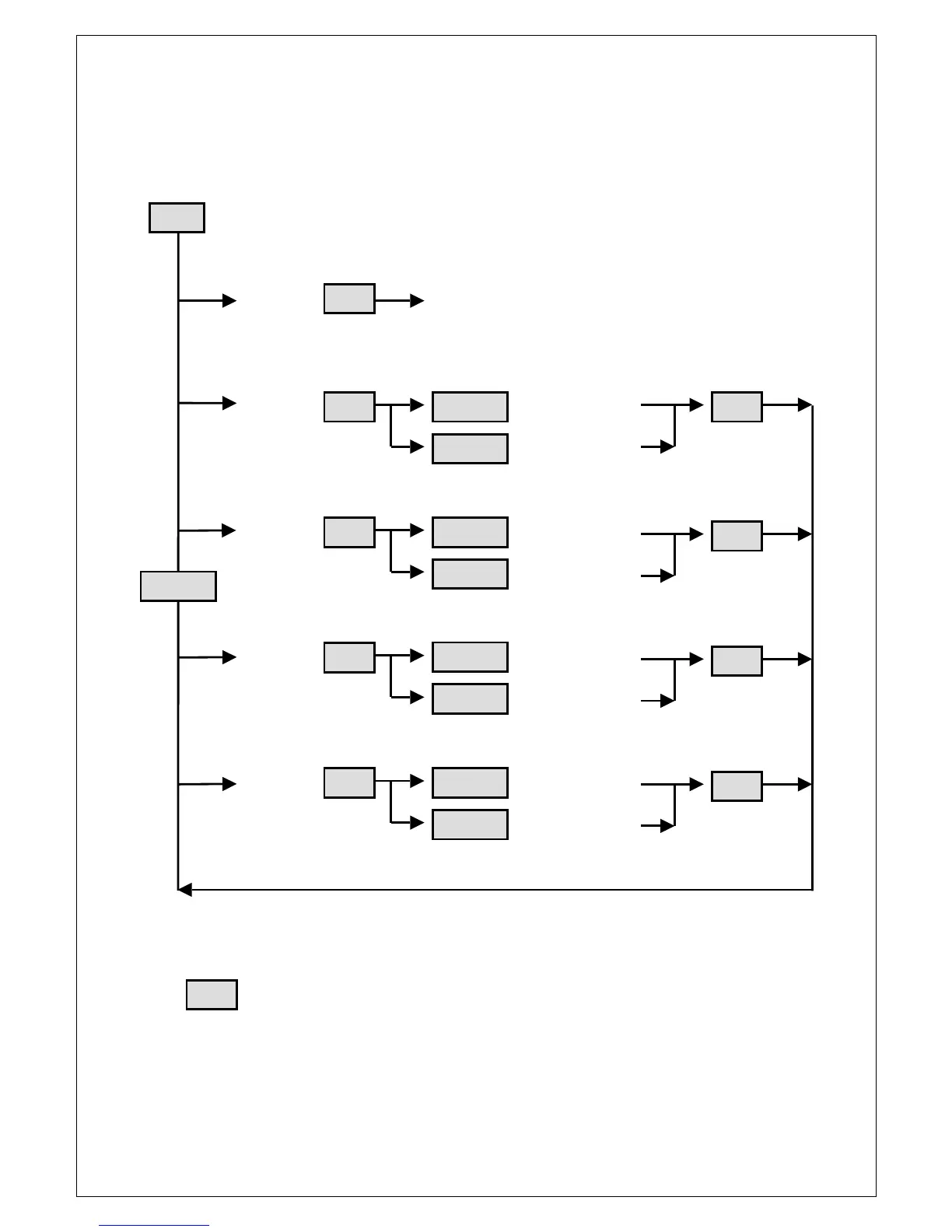
SETTINGS MENU DIAGRAM
MENU DIAGRAMMENU DIAGRAM
MENU DIAGRAM
EXIT M8 returns to Main Screen
BALANCE Balance Left -dB
Balance Right -dB
BYPASS Balance Bypassed
Balance Enabled
DISPLAY Display Level 31
Display Level 1
CD MODE CD Single Ended
CD Balanced
Denotes a button press
Up or Down can be held down to perform repetitive key presses
Press and hold Up and Down together within Balance sub-menu to return to centre position
After 15 seconds of inactivity in any sub-menu the preamplifier will return to the Main Screen
If the preamplifier does auto exit the menu system, your settings are not saved
Menu
Enter
Enter
Enter
Enter
Enter
U


 To Next Page