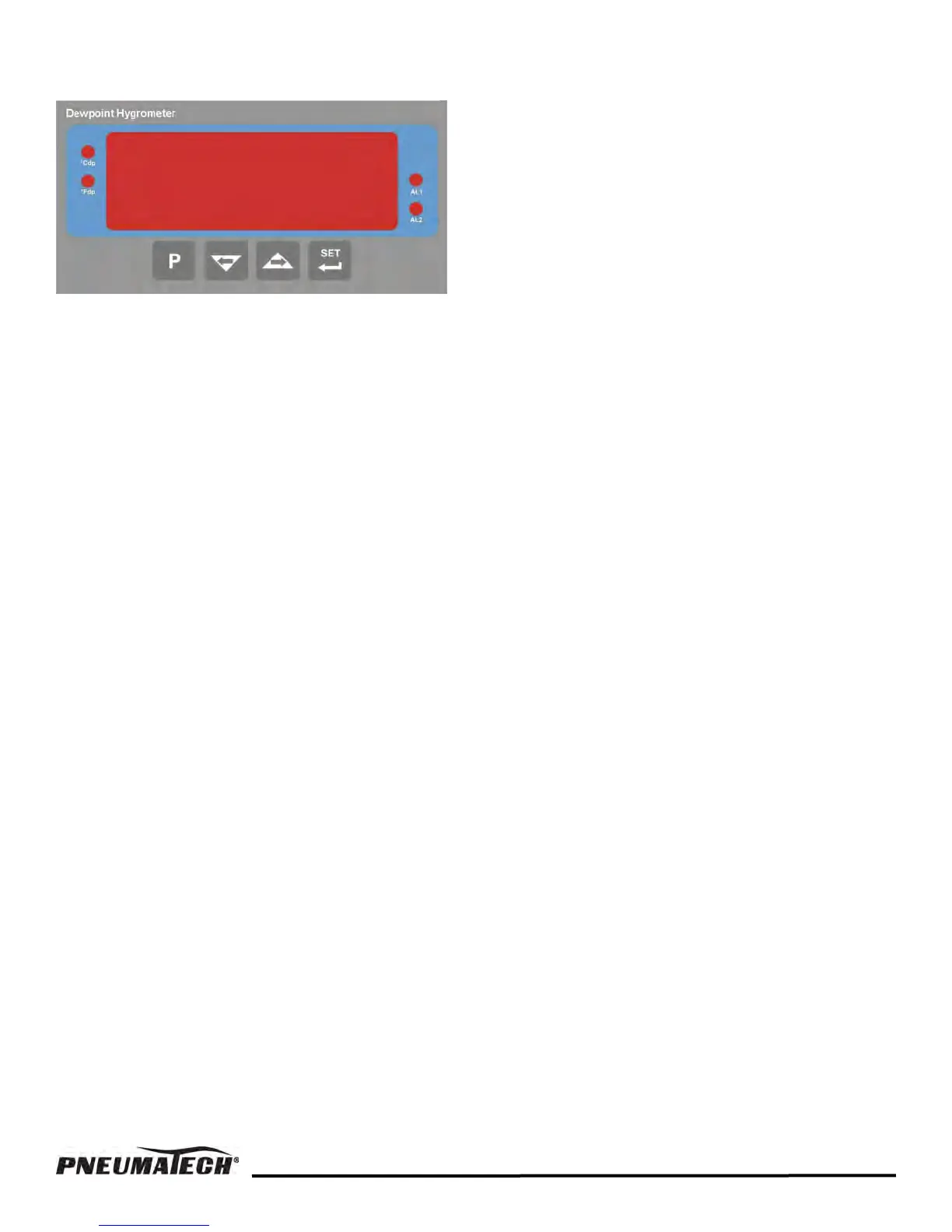
DEWPOINT DISPLAY KEY FUNCTIONS
MEASUREMENT RANGE
1. Max. value: +68
o
F
2. min. value: -148
o
F
Error Messages.
ErrL = Open circuit, Sensor disconnected.
ErrH = Over Range.
FIGURE 5 — DIGITAL DISPLAY
SETPOINT PROGRAMMING
Dryer with dew point demand option:
Alarm set-point values are refereed to as ALr1 and ALr2
in the menu. To access the relevant alarm set-point,
press the SET button once for ALr1 and twice for ALr2.
To adjust the set-point press one of the ARROW
buttons. The display will now flash the current set-point.
Use the ARROW buttons to adjust to the required value.
Press the SET button and the new value will be saved.
Pressing the P button will exit the alarm setting mode
without saving the new value.
Standard setting:
1. ALr1: -20
o
F (high humidity alarm)
2. ALr2: -40
o
F (dew point demand)
Setting for models with low dew point option:
1. ALr1: -70
o
F (high humidity alarm)
2. ALr2: -100
o
F (dew point demand)
17


 To Next Page