EN
12
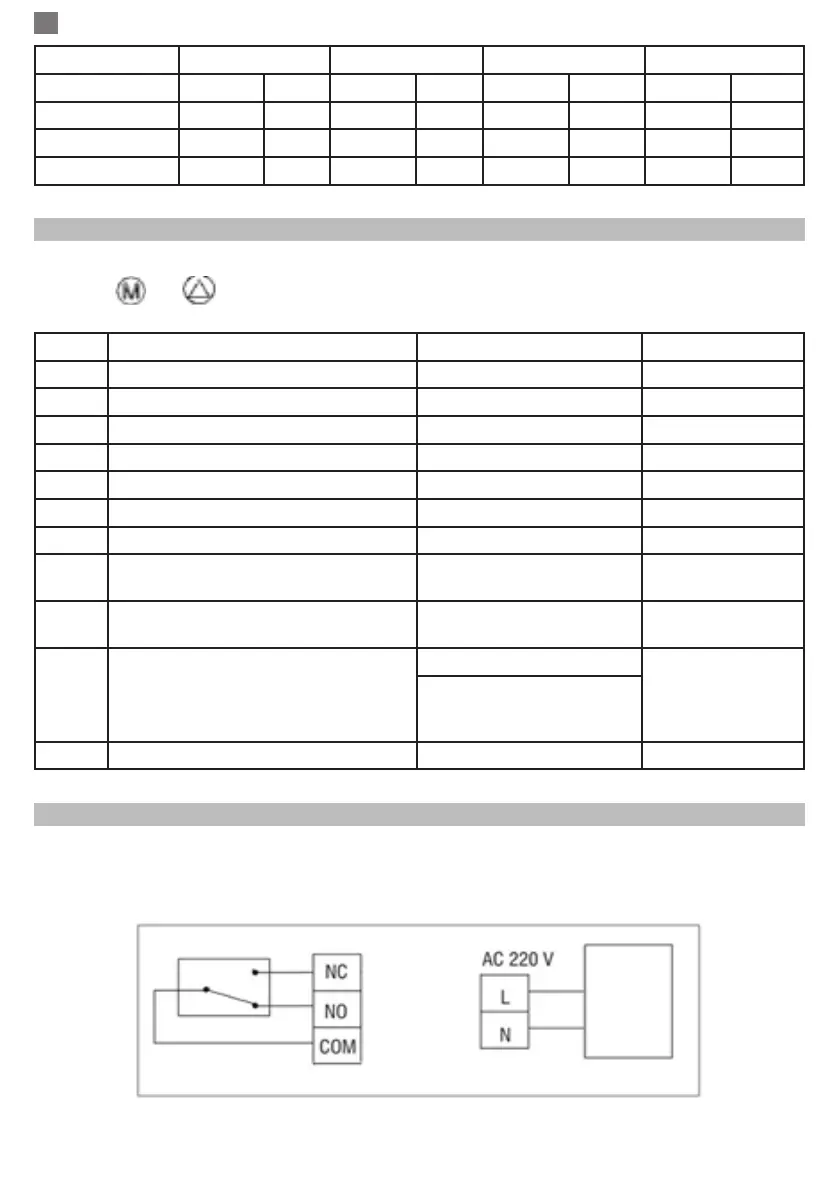
Period 1 2 3 4
Hour Temp Hour Temp Hour Temp Hour Temp
12345 (Mon-Fri) 7:00 22
o
C 8:30 19
o
C 17:00 22
o
C 22:00 19
o
C
6 (Sat.) 8:00 22
o
C 8:30 22
o
C 17:00 22
o
C 22:00 19
o
C
7 (Sun.) 8:00 22
o
C 8:30 22
o
C 17:00 22
o
C 22:00 19
o
C
ADVANCED PARAMETER SETTINGS
Turn the thermostat screen Off by pressing the On / Off button. With screen Off, press and hold in the
same time and buttond for parameters settings.
MENU Description Range Defalt value
01 Temp. calibration for internal sensor -8
o
C ~ 8
o
C 0
o
C
02 Set Point Max. 5
o
C ~ 35
o
C 35
o
C
03 Set Point Min. 5
o
C ~ 35
o
C 35
o
C
05 Frost Protection Temp. 5
o
C ~ 15
o
C 5
o
C
09 Histerezis ( Deadzone) 0
o
C ~ 3
o
C 0
o
C
12 Open window detect function-OWD 1: ON 0: Off 0
13 OWD - Detect time 2 ~ 30 minutes 15 minutes
14 OWD - Drop temp. select ( within
detect time)
2,3,4
o
C 2
o
C
15 OWD - Delay time select
(Return to previous working status)
10 ~ 60 minutes 30 minutes
17 Factory reset 0 : No 0
1: Yes, and then press
On/off button for 5s,wait
until thermostat restart.
Software Version 5055-02
RECEIVER WIRING DIAGRAM
The operation of connecting the receiver unit with 230 V power supply and central heating system must be
performed only by qualied personnel and only after consulting the thermostat and boiler documentation.
The receiver unit has a NO/NC relay (Normal Open and Normal Clos) that support closing of a circuit with
a maximum current of 10 A.


 To Next Page