EasyManua.ls Logo

PNI Escort HP 8500 - User Manual

PNI Escort HP 8500
182 pages
Print Icon
To Next Page IconTo Next Page
Loading...
PNI Escort HP 8500
CB radio & MP3 Player/CB радио и MP3 плейър/CB-Radio & MP3-
Player/Radio CB y reproductor MP3/Radio CB et lecteur MP3/CB rádió és
MP3 lejátszó/Radio CB e lettore MP3/CB-radio & MP3-speler/CB radio i
odtwarzacz MP3/Statie radio CB si MP3 player
EN User manual ............... 3
BG
Ръководство за употреба ........
19
DE Benutzerhandbuch ............ 37
ES Manual de usuario ............ 54
FR Manuel utilisateur ............ 71
HU Használati utasítás ............ 88
IT Manuale utente ............. 104
NL Handleiding .............. 120
PL Instrukcja obsługi ............ 137
RO Manual de utilizare ............ 153
Question and Answer IconNeed help?

Do you have a question about the PNI Escort HP 8500 and is the answer not in the manual?

Overview

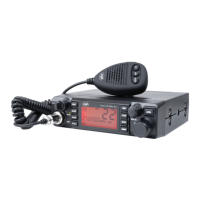
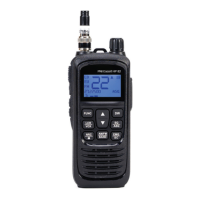
The PNI Escort HP 8500 is a multifunctional device that combines the features of a CB radio and an MP3 player with an FM function.

Function Description:

The device offers both CB radio and MP3 player functionalities. The CB radio allows for communication on various channels with selectable AM/FM modulation. The MP3 player supports playback from USB sticks and micro SD cards, and includes an FM radio function and Bluetooth connectivity for streaming audio from mobile phones.
Important Technical Specifications:

CB Radio:

  • Modulation: AM/FM
  • Frequency Range: 26.965 - 27.405 MHz
  • Frequent Error: ±300 Hz
  • Supply Voltage: 12 V/24 V
  • Dimensions: 180 x 160 x 52 mm
  • Frequency Control: PLL synthesizer
  • Working Temperature: -26°C ~ +80°C
  • Current: TX: 4W max. 2 A; RX: SQ open max. 0.7 A
  • Antenna Connector: UHF, SO-239
  • Emission Power: max. 4 W AM/FM
  • Background Noise Emissions: < 4W (-54 dBM)
  • Frequency Response: 300-3000 Hz
  • Modulation Signal Distortion: <8%
  • Impedance: 50 Ohm
  • Sensitivity: 0.25uv@12dB
  • Reject Image: 70 dB
  • Reject Adjacent Channel: 60 dB
  • Squelch: < 1µV
  • Audio Output: max. 40W

MP3 Player:

  • Micro SD Card Slot: max. 32Gb
  • Supported Audio Files: MP3, WMA, APE, FLAC, AAC, MP4, M4A, WAV, AIF
  • FM Frequency: 87.5 – 108.0 MHz
  • FM Radio Distortion: <5%
  • Bluetooth: Yes
  • Maximum Bluetooth Communication Distance: 10 meters

Usage Features:

General Operation:

  • On/Off: Long press the POWER key for about 2 seconds to turn the device on or off.
  • Mode Switching: A CB/MP3 switch allows users to toggle between CB radio and MP3 player modes.

CB Radio Mode:

  • Volume Control: Briefly press VOL- or VOL+ to adjust volume (25 levels). Long press for rapid adjustment.
  • Channel Selection: Briefly press CH UP SCAN or CH DN SCAN to change channels. Long press for rapid scrolling (10 channels at a time).
  • Squelch Adjustment (SQ): Briefly press ASQ to enter SQ mode. Use SQ/ASQ- or SQ/ASQ+ to adjust the squelch level (28 levels, 00-28). Level 00 is fully open, higher levels receive stronger signals.
  • Automatic Squelch Adjustment (ASQ): Briefly press ASQ to enter ASQ mode. Use SQ/ASQ- or SQ/ASQ+ to adjust the ASQ level (5 levels, 01-05). Level 00 is fully open.
  • AM/FM Modulation: Press M3/AM/FM to switch between AM and FM modulation. Note that AM modulation may not be supported in all regions; refer to the frequency band chart.
  • Key Lock (LOCK): Long press M4/LOCK to activate/deactivate key lock.
  • Dual Watch (DW): Briefly press DW/M2 to activate Dual Watch (monitoring two channels simultaneously). Long press to set the function.
  • Channel Scan (SC): Press MEM/FUNC + CH UP SCAN or MEM/FUNC + CH DN SCAN to activate channel scanning. Scanning stops on signal reception or PTT press.
  • Channel Storage:
    • To save: Set the radio to the desired channel, briefly press MEM/FUNC, then long press RFG/M1 (for M1 memory) or other memory keys (DW M2 for M2, M3 AM/FM for M3, M4 LOCK for M4). All channel settings are saved.
    • To recall: Briefly press MEM/FUNC, then briefly press the corresponding memory key (RFG/M1, DW M2, M3 AM/FM, M4 LOCK).
    • To exit memory mode: Briefly press CH UP SCAN or CH DN SCAN.
    • To delete: Enter the memory, then briefly press MEM/FUNC again, followed by 3 brief presses of RFG/M1.
  • Menu Settings (MEM/FUNC): Long press MEM/FUNC to access additional settings:
    • Key Tone (BP): Switch between OFF (no beep) and ON (with beep) using CH UP SCAN/CH DN SCAN.
    • Auto ON (AUT): Enable/disable auto power-on (if ACC wire is connected).
    • RF Gain (RF): Deactivate RF Gain (OFF) or adjust level (01-06) using CH UP SCAN/CH DN SCAN. Quick access via brief press of RFG/M1.
    • Automatic RF Gain (ARF): Switch between OFF and ON using CH UP SCAN/CH DN SCAN.
    • Screen Backlight Color (BLC): Select one of 7 colors (blue, red, purple, green, cyan, yellow, light blue) or OFF (no backlight) using CH UP SCAN/CH DN SCAN.
  • Change Standard (Band): Turn off the device, then press and hold PTT and CH DN SCAN simultaneously while restarting (long press POWER). Use CH UP SCAN/CH DN SCAN to change the standard.
  • Reset: Turn off the device, then press and hold VOL+ and CH UP SCAN simultaneously while restarting. The device returns to factory defaults.

MP3 Player Mode:

  • Volume Control: Rotate the main knob on the right side of the front panel.
  • Playback Source: Press MODE to switch between BT (Bluetooth), USB, SD, and FM (FM Radio).
  • USB Mode: Insert a USB stick. The player automatically switches to USB mode. Use ◄◄ or ►► to navigate songs. Press the volume control button to pause/resume.
  • SD Mode: Insert a micro SD card (FAT32 format). The player automatically switches to SD mode. Use ◄◄ or ►► to navigate songs. Press the volume control button to pause/resume.
  • FM Mode: Press MODE to switch to FM mode. FM-ON icon and radio frequency are displayed. Press BAND to manually search for frequencies.
  • Bluetooth Mode: Press MODE to switch to BT mode. BT-ON icon is displayed. Enable Bluetooth on your phone, search for "PNI-HP-8500", and connect to play audio.

Maintenance Features:

  • Fuse Replacement: Use a 2A 250V type F fuse. Do not use a higher value fuse.
  • Repairs: No user-serviceable components. Contact an authorized service center for repairs.

PNI Escort HP 8500 Specifications

General IconGeneral
BrandPNI
ModelEscort HP 8500
CategoryRadio
LanguageEnglish

Related product manuals