EN
5
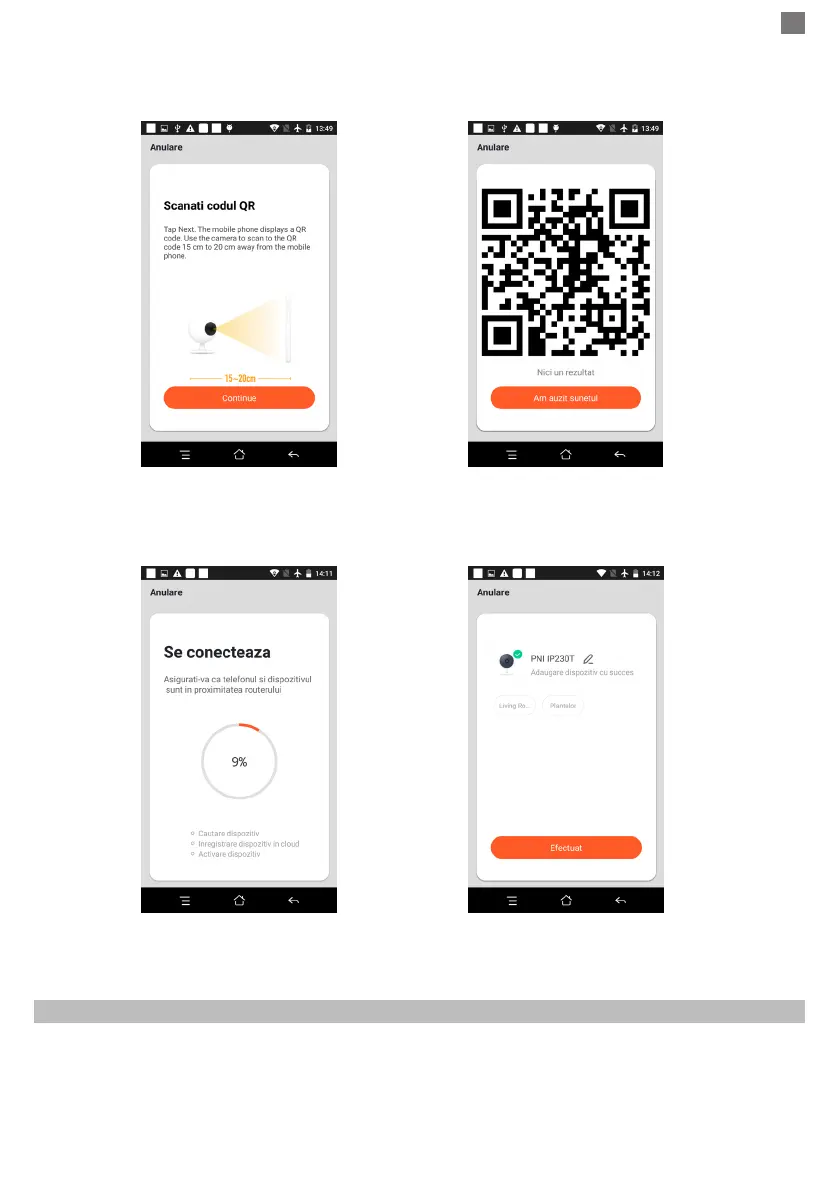
● Hold the mobile phone screen in the front of the camera (gure 5), the distance between the two should be
15 to 20 cm. (gure 6) Try not to shake the mobile phone during the scanning.
Figure 5 Figure 6
● When you hear “Connect Router”, click “Connect Internet”, and wait for connecting (gure 7).
● Device added successfully (gure 8), you can choose the device name and room scene.
Figure 7 Figure 8
4.2 QR WIFI Fast Connection Distribution Network can be connected according to the
above steps, skipping Fig. 5 and Fig. 6.
5. FUNCTION DESCRIPTION
Real-time preview interface
1. Setting & Management 2. Wi-Fi signal strength
3. Sound switch 4. SD/HD
5. Full screen 6. Screenshot
7. Voice chat 8. Record live view
9. Playback of video


 To Next Page