14
EN
For more detailes about the app please see Xmeye user manual on
the CD.
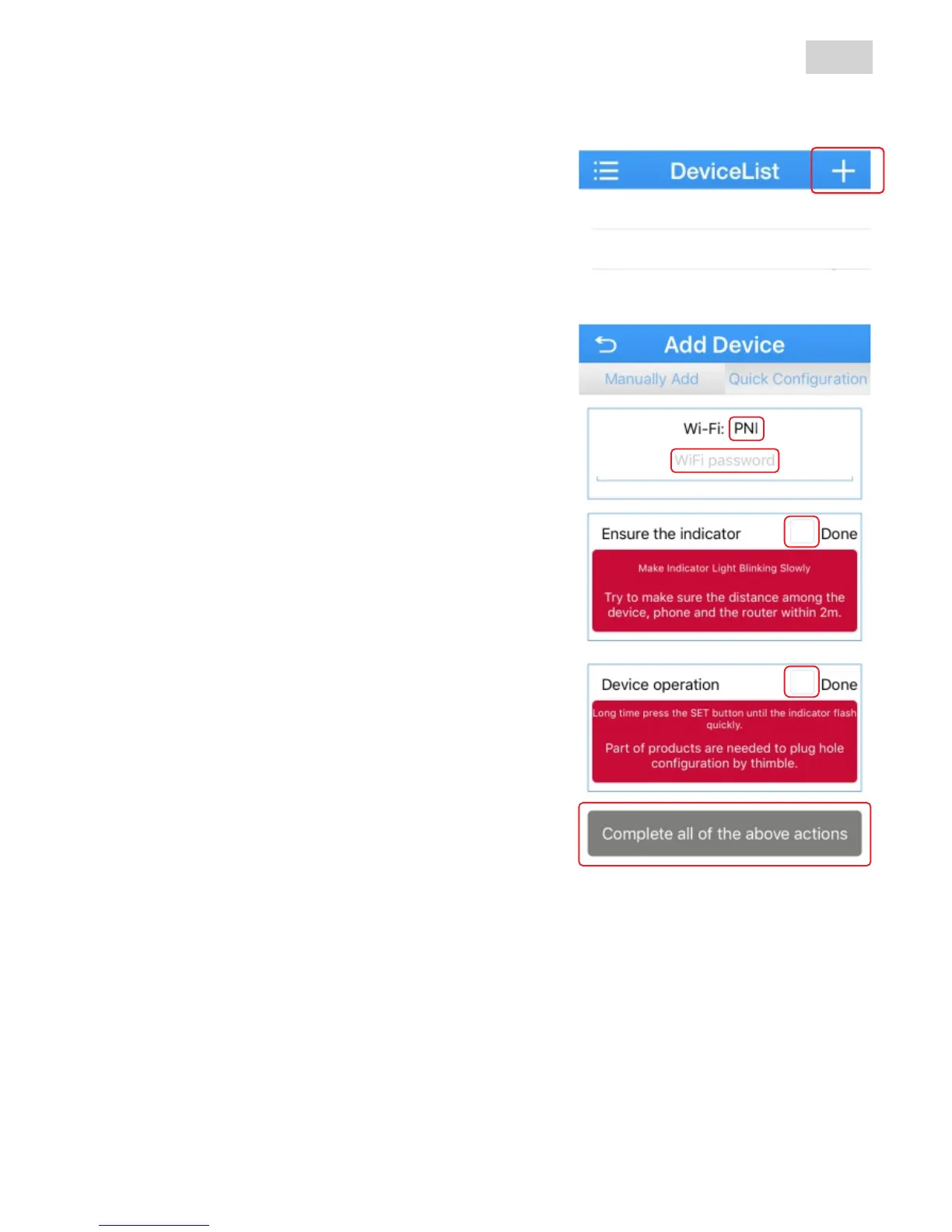
Next press “+” button to add a new
camera in the device list.
Select option “Quick Configuration
(iOS) / WiFi Config (Android)”
M a k e s u r e t h e s m a r t p h o n e i s
connected to the same Wi-fi network as
the camera. Check the name of the Wi-fi
network (1) to be the same as your
network (2) then insert network password.
If this is the first time using this
camera proceed as bellow:
x short press Reset button on the
bottom of the camera and wait for the
confirmation message (wait to be
configured); if you don’t hear this
mesaje reset the camera (bellow
procedure) then start again.
x read the 2 messages on the screen
and check the 2 boxes (3)
x press “Done/Complete all the above
operations” button to continue the
setup (4)
NOTE: this camera does not have a
LED indicator for Wi-fi connection.
1
2
33
3
4
If you already tried setting the camera and it was unsuccessful
reset the camera:
ź long press Reset button until you hear the confirmation message
(restore to factory settings)
ź the reset procedure will take severall minutes, please wait for the
confirmation sound
ź repeat the setup procedure



 To Next Page