EN
8
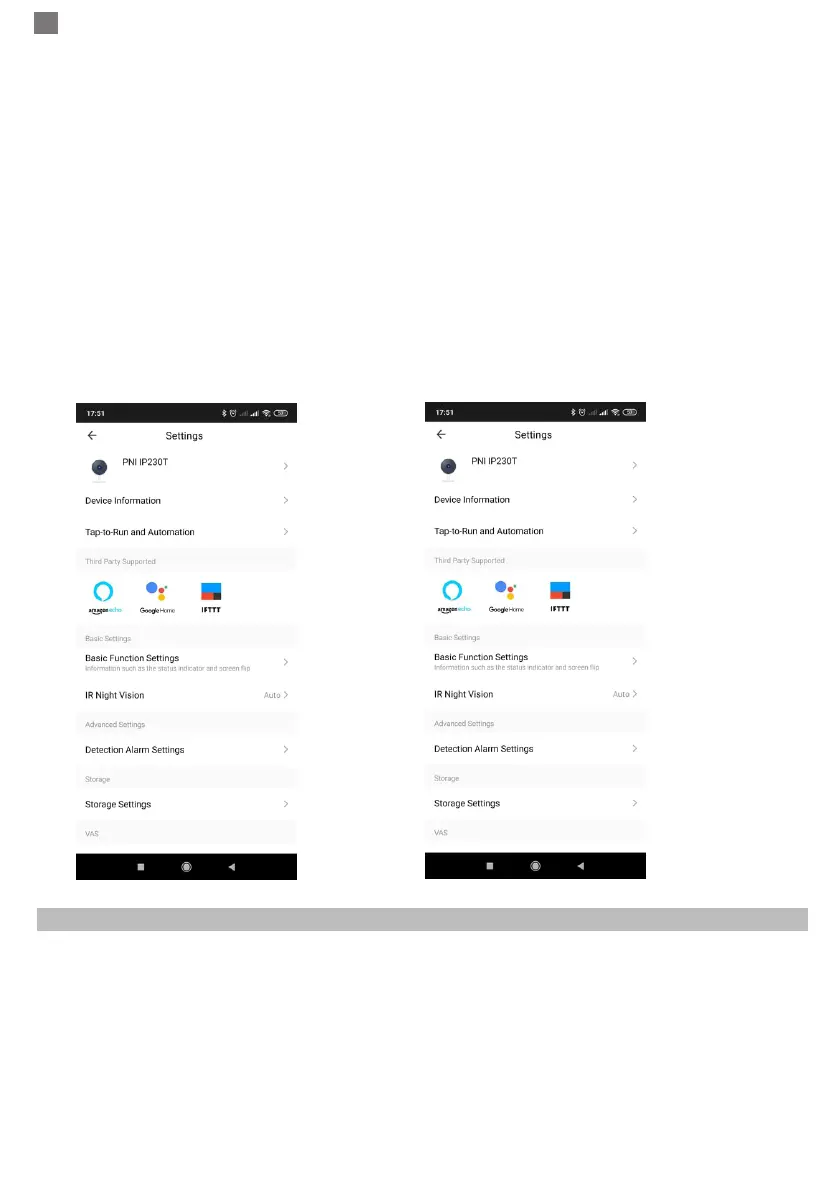
● Third Party Supported - Compatible smart services
● Basic Settings - Basic settings of camera
● Advanced Settings - Detection Alarm Settings - can set the motion detection switch, motion detection
alarm sensitivity and motion tracking function
● Storage settings - Shows microSD card informations, and settings for Local Recording mode.
● VAS - Value-added service : you can purchase separately video cloud storage service for this camera for
monthly fee (optional according to customer needs)
● Offline Notification - Activates an alarm is camera goes Offline
● Share Device - can share this device to other people, enter the people’s e-mail or mobile phone number;
(Note: the entered e-mail / mobile phone number should be registered with a Tuya App account).
● FAQ & Feedback - Questions and solutions for any problems with product behaviour.
● Firmware Information - Support OTA Remote Upgrade (Do not disconnect during upgrading).
7. CLICK “ME” ON THE HOME SCREEEN OF TUYA APP FOR MORE SERVICES
1. Home Management
2. Message Center
3. FAQ & Feedback
4. More Services
- Free Services: IFTTT , Google Assistant, Alexa, etc;
- Value-added Services : you can check the purchasing record of purchased value-added services: Cloud
Storage for Cameras, AI Filtered Notications etc;
5. Settings and informations for your Tuya app account: Sound, Notications, Network, Cache



 To Next Page