EN
7
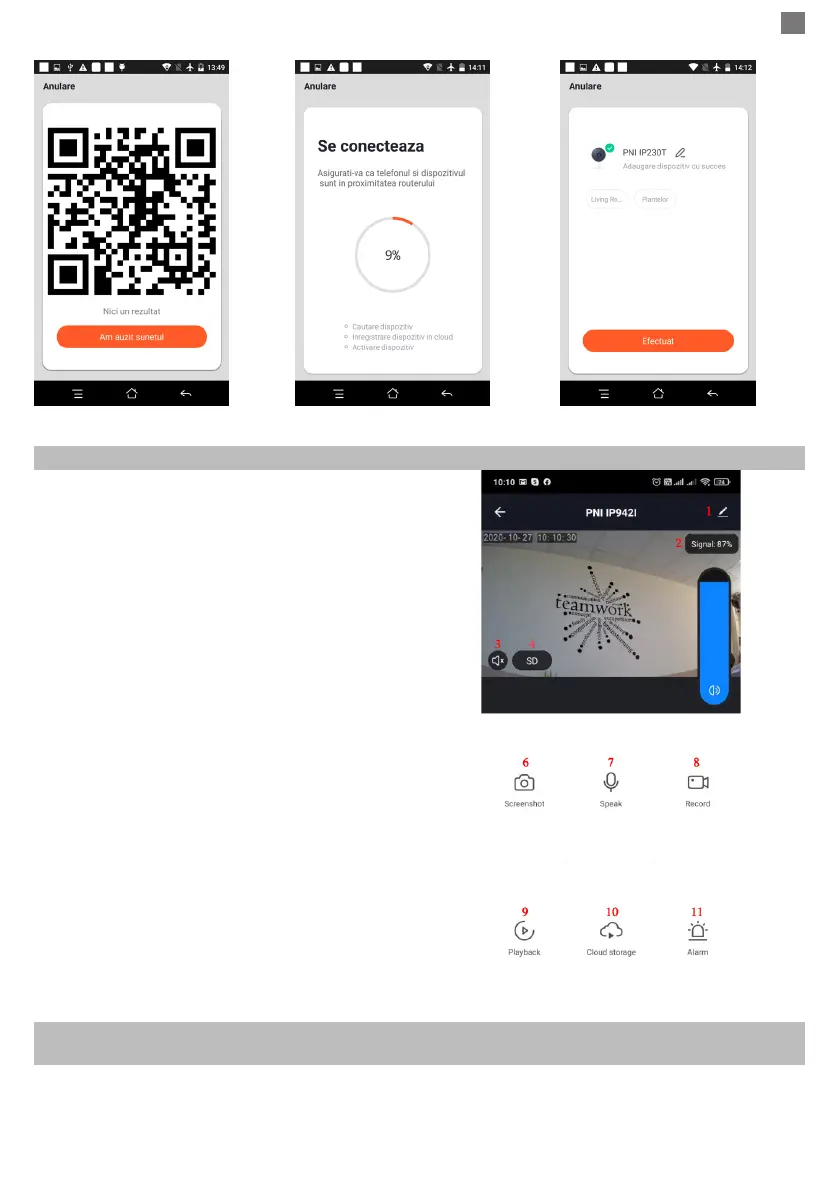
Figure 6 Figure 7 Figure 8
5. FUNCTION DESCRIPTION
Real-time preview interface
1. Setting & Management
2. Wi-Fi signal strength
3. Sound switch
4. SD/HD
5. Full screen
6. Screenshot
7. Voice chat
8. Record live view
9. Playback of video
10. PTZ control (The camera can be arbitrarily rotated
to give you a different perspective. You can move it up
and down, capture any corner you want to view)
11. Motion detection alarm (abnormal report notication
through intelligent detection of anomaly in home. You
can go out to work and play condently. To set the alarm level according to the camera’s led of view can
make the alarm more accurate)
6. CLICK “ 1 “ IN THE UPPER RIGHT CORNER OF THE CONTROL PAGE FOR THE MANAGEMENT
AND SETTING OF THE DEVICE.
● Device Name - can modify the device name and device location;
● Device Information - to view: Device ID, Wi-Fi signal strength, IP address, Mac address, Device time zone.
● Tap-to-Run and Automation - View automations and scenaries created for this device



 To Next Page