EN
9
8. FREQUENTLY ASKED QUESTIONS
Q:Fail to add device during net-pairing?
A:Please make sure the mobile phone and device are connected to 2.4GHz router. Make sure the correct
Wi-Fi password is entered. Make shure you have activated GPS Location from your Phone.
Q:Still fail to add device after re-scanning?
A:If fail to add device, it is recommended to restart the device or power off the device, and try again.
Q: The device cannot preview?
A:Check for weak Wi-Fi signal. You can place the camera closer to the router. If it still doesn’t work, reset the
device, and add it again.
Q:Why the device is still on the list after resetting the device?
A:The device resetting only resets the camera’s network conguration and cannot change the conguration
on the App. You must log in the App to delete the camera from the list.
Q:How to connect the camera to another router?
A:First log in the App to delete and reset the device, and congure the device again through the App.
Q:Why the device cannot identify SD card?
A:It is recommended to power Off and On the device after inserting the SD card. Check if the SD card is
under normal service conditions and the format is FAT32. The App shall suggest “”could not nd SD card””
under unstable network of the mobile phone or the device.
Q:The device is online and has an alarm event, but the mobile phone cannot receive the information?
A:First conrm that App allows notication in the settings of your mobile phone.
Under normal circumstances, when an anomaly is detected, a message will appear in the notication bar of
your mobile phone. You should set a notication sound or vibration in your mobile phone.
In addition, when viewing real-time video in the App you cannot receive alarm from the camera being viewed.
Because the device default function the camera being viewed indicating that the user is focusing on the
monitoring video, and there is no need for an alarm.
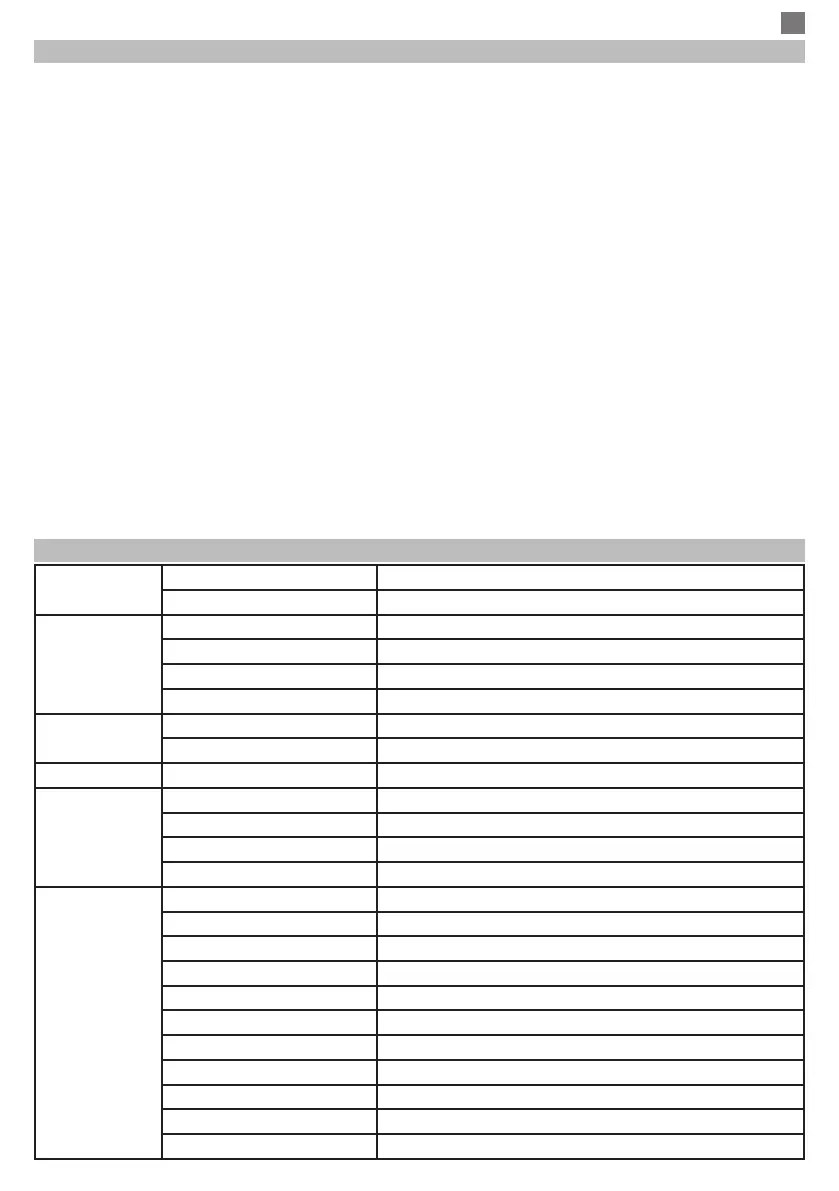
9. PRODUCT SPECIFICATIONS
Camera
image sensor 1/3" CMOS
Application TUYA Smart / Smart Life
Video
High Denition 1920 x 1080
Video Compression Smart H.264
low illumination 0.1LUX
picture/video Capture Support
Lens
Illumination
Camera lens 4 MM xed lens
Lamp board 4 pcs IR Array LED - max 25 m
Audio Two-way Speech Support / G.711
Rcord
Record Mode Manual record, motion detection record, scheduled record, alarm rec
Video storage TF Card ( Max 64 Gb) / Cloud
Wake-up mode call button wake-up, PIR detection wake-up, mobile phone active wake
Alarm trigger Alarm recording, screen shot capture
General
Solar panel 6W
Rechargeable batteries 4 x 18650 pack included
Working Temperature –10°C to +50°C
Humidity 5%--95% non-condensing
Material ABS for outdoor use
Size / Weight 220 x 80 x 85 mm / 1.18 Kg
WIFI 802.11b/g/n
transmission mode P2P, Smart Cloud Sever
WIFI connection Sweep QR code
Reset key Support
Power DC 5V 1A


 To Next Page
 Loading...






