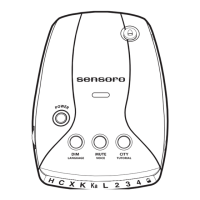
Functions and Modes
VOLUME/OFF
Use the VOLUME/OFF thumb wheel located on the side
of the RX5000 to turn the unit on or off, or to adjust
volume level.
DIM Mode
Press the DIM button repeatedly less than 2 seconds each
time to toggle between the four levels of brightness
modes.
Note: DIM mode reduces the brightness of the display.
When a signal is detected, alerts are displayed with
full brightness regardless of DIM mode, then the display
returns to the previously selected dimmer setting.
MUTE Mode
Press the MUTE button repeatedly less that 2 seconds
each time to toggle between MUTE ON and
MUTE OFF.
You may also adjust the audio level by using the
VOLUME/OFF thumb wheel.
MUTE ON will silence the audio alarm for the
duration of the existing signal and any new alert received
within 30 seconds of the last signal. Then, the unit
automatically resets itself to MUTE OFF so the
next signal threat can be received. MUTE OFF
will manually restore the audio alert of radar signals.
RADAR OPERATION
7


 To Next Page