If you need to adjust the time or date, tap “Config”. Please note, once the transmitter is
synchronized, you will not be able to go back and change the time or date setting.
4. Once you are satisfied with the time and date setting, tap “Sync” to synchronize the Transmitter
and Receiver to each other.
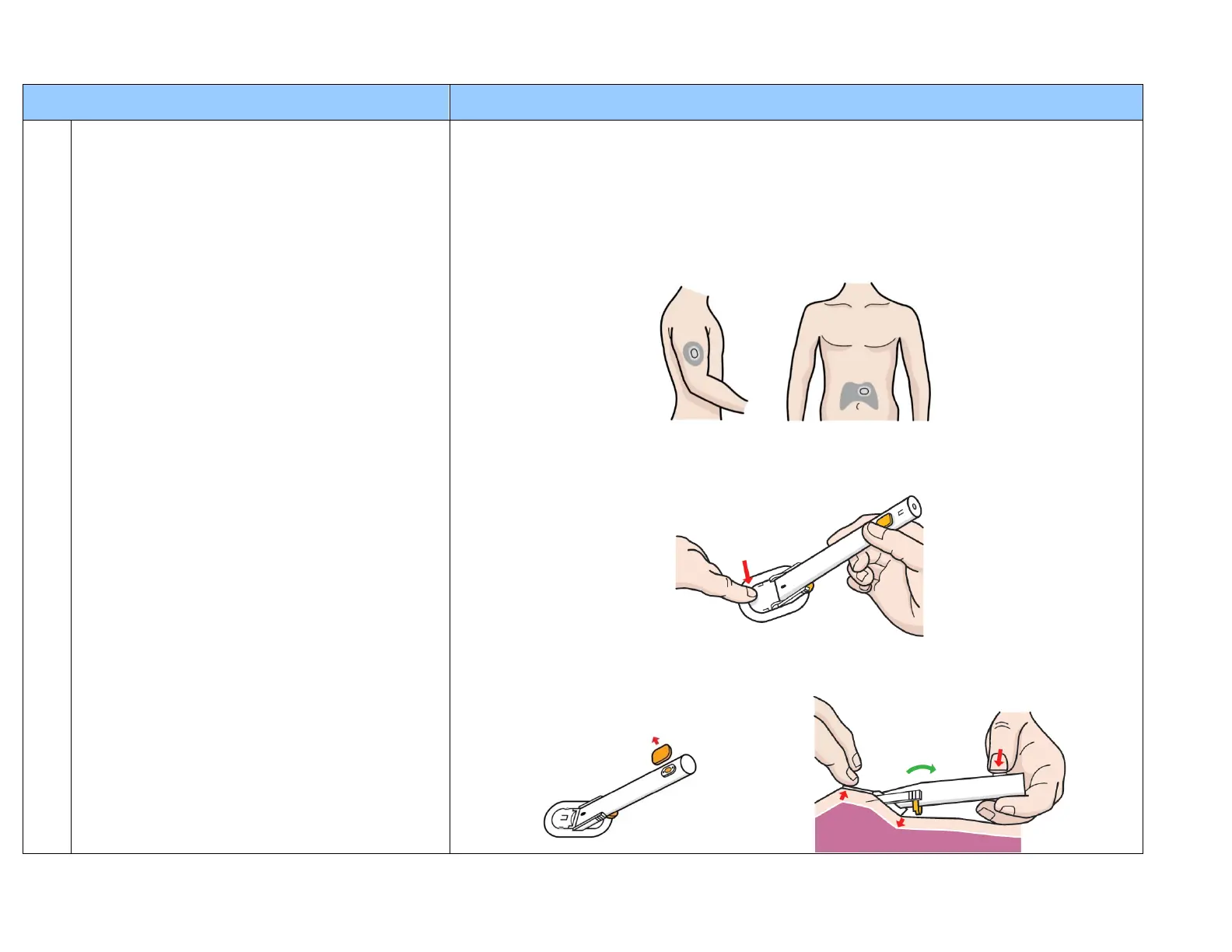
5. Next you will prepare your skin for applying the sensor. Choose upper arm or abdomen for the
sensor location. Then use alcohol wipes (or pads) to clean the skin.
6. You are now ready to apply the sensor. Be sure that you have given the sensor time to warm to
room temperature. Take the sensor from the package and remove the protection film on the
sensor base adhesive tape. Place the sensor on the selected area of cleaned skin, and press the
sensor base firmly onto the skin to secure the adhesive.
7. Remove the orange protection cap from the release button. Adjust the inserter handle until the
skin under the front end of the sensor lifts up slightly. Press the release button to insert the
sensor. You will hear a “click” from the spring release of the insertion.


 To Next Page
 Loading...