EN - 22
Semi-automatic time adjustment
(cooking period)
This function helps you to cook for a fixed
period of time. A time range between 0 and
10 hours can be set. Prepare the food for
cooking and put it in the oven.
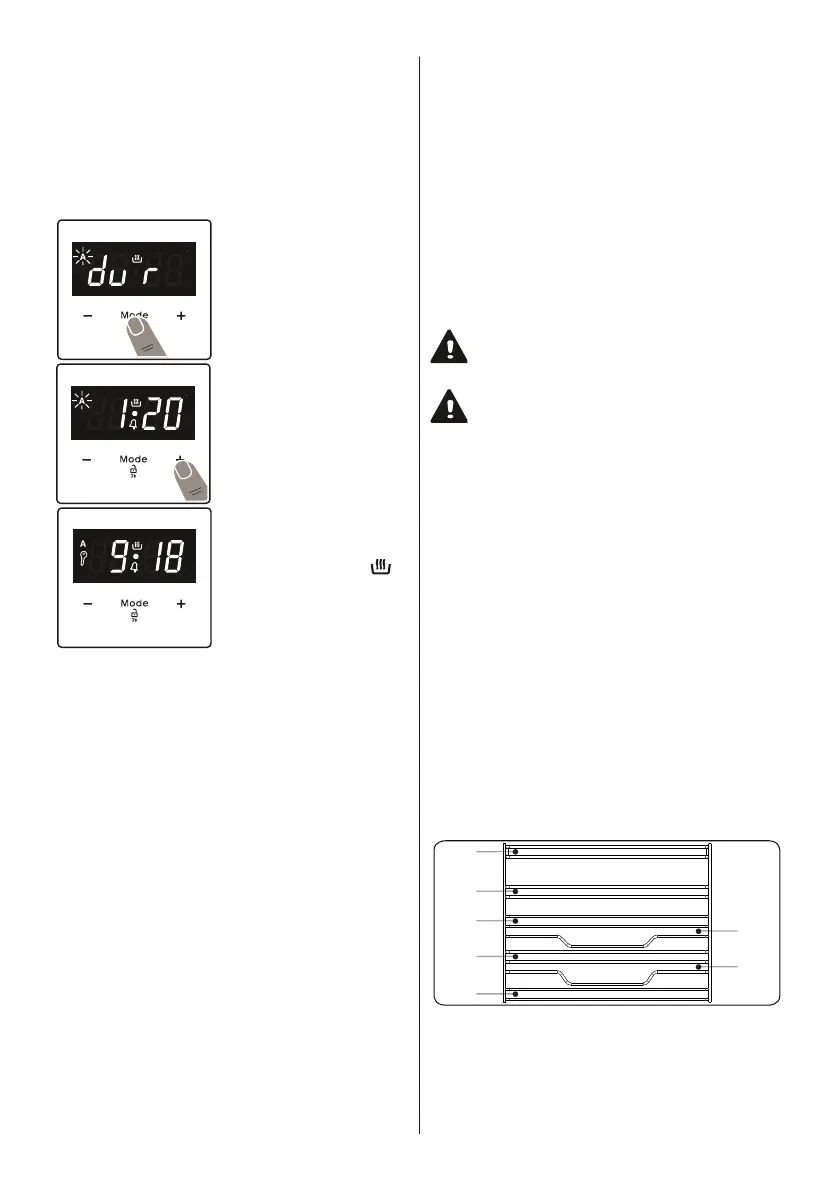
1. Select the desired cooking function and
the temperature using the control knobs.
2. Press “MODE” until
you see “dur” symbol
on the display screen.
The symbol “A” will
flash.
3. Select the desired
cooking time period
using the “+” and “-”
keys.
4. The current time will
reappear on the
screen, and the
symbols “A”, and “ ”
will remain illuminated.
When the timer reaches zero, the oven
will switch off and an audible warning will
sound. The symbol “A” will flash. Turn both
control knobs to the “0” position and press
any key on the timer to stop the warning
sound. Press “MODE” for 2 seconds the
“A” symbol will disappear and the timer will
switch back to manual function.
Sound Adjustment
T
o adjust the volume of the audible warning
sound, while the current time of day is
displayed, press “+” and “-” keys and the
dot in the middle of the screen will start
to flash. Press “MODE” to display current
signal sound. After this, each time the “-”
button is pressed, a different signal will
sound. There are three different types of
signal sounds. Select the desired sound
and do not press any other buttons. After
a short time, the selected sound will be
saved.
4.5
• Your oven has steam cooking feature.
• The water poured into the water
reservoir on the base of the oven
creates hot steam during cooking and
allows you to obtain a better cooking
result from your food.
• Steam cooking reduces the loss of
moisture in meats, keeping the inside
more juicy and the outside becoming
more crispy. For pastries, the steam
makes the foods more puffy and crispy
and creates a better crust.
Warning:Steam cooking can only be
performed with the functions specified
in the manual.
Warning:The water reservoir capacity
on the base of the oven is 300 ml
maximum. Do not add more than 300
ml of water.
To use steam cooking;
• Fill the specified amount of water into
the water reservoir located in the base
of the oven.
• Place the food on the recommended
shelf.
• Start your cooking by setting the
function, temperature and time
according to the food in the steam
cooking table. For foods not included in
the table, you can set the temperature,
cooking function and time yourself.
4.6
The EasyFix Wire Rack
Clean the accessories thoroughly with
warm water, detergent and a soft clean
cloth on first use.
T2
5
4
3
2
1
T1
• Insert the accessory to the correct position
inside the oven.
• Allow at least a 1 cm space between the
fan cover and accessories.
• Take care when removing cookware and/or


 To Next Page
 Loading...