EN - 32
3 USING THE APPLIANCE
3.1 Information on the Frost Free
Technology
The Frost Free refrigerators have a
dierent operating system to static
refrigerators.
In normal (static) fridges, the humidity
entering the fridge due to opening the
door, and the humidity inherent in the
food, causes frost build-up in the freezer
compartment. To defrost the frost and
ice in the freezer compartment, you are
required to periodically switch o the fridge,
place the frozen food in a separate cooled
container, then remove the ice gathered in
the freezer compartment.
The situation is completely dierent in
No-frost fridges. A built-in fan blows dry
and cold air evenly throughout the cooler
and freezer compartments. The cold air
disperses uniformly between the shelves,
ensuring all your food is cooled equally,
thus preventing humidity and frost build-up.
Therefore, your No-frost fridge allows ease
of use, in addition to its huge capacity and
stylish appearance.
3.2 Display and Control Panel
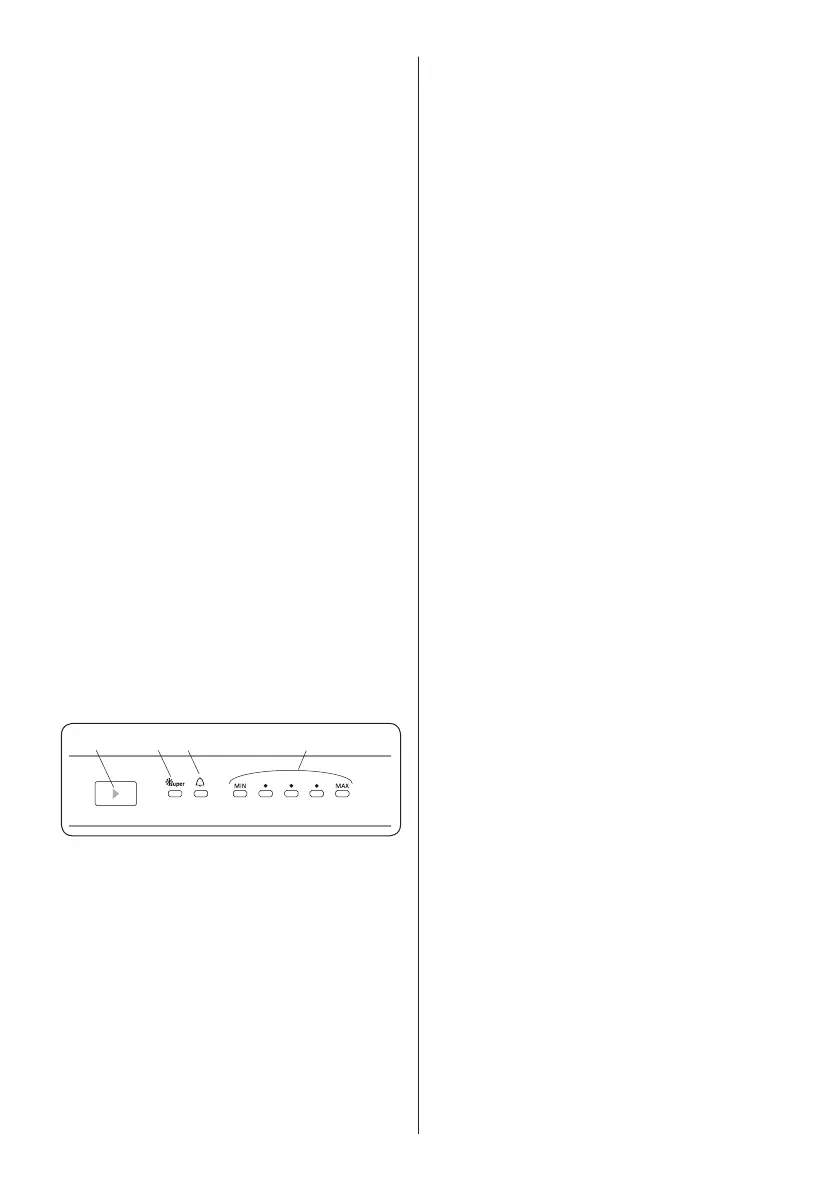
1 2 3 4
Using the Control Panel
1. Temperature set button
2. Super cooling symbol (Super cooling
LED)
3. Alarm symbol (Alarm LED)
4. Adjusted temperature indicator
3.3 Operating your Fridge Freezer
Lighting (If available)
When the product is plugged in for the
rst time, the interior lights may turn on 1
minute late due to opening tests.
3.3.1 Temperature Set Button
This button allows setting temperature of
the fridge. In order to set values for fridge
partition, press this button. Use this button
also to activate super cooling mode.
3.3.2 Temperature Settings
• It ensures that the temperature
settings in the cooling and freezing
compartments of your refrigerator are
performed automatically. It may be set
to any value ranging from MIN to MAX
and super cooling mode. As you press
temperature set button from MIN to MAX,
the temperature decreases. To save
energy in winter months, operate your
refrigerator in a lower position.
• Initial temperature setting for refrigerator
is at the middle point.
• Every time you press temperature set
button, setting temperature will decrease
until super cooling symbol and if you
keep on pressing the set temperature will
be min set temperature again.
3.3.3 Super Cooling Mode
When Should It Be Used?
• For cooling huge quantities of food.
• For cooling fast food.
• For cooling food quickly.
• For storing seasonal food for a long time.
How To Use?
• If you press temperature set button until
super cooling symbol is displayed on the
display and you do not press any button
within the following 3 seconds, super
cooling will blink.
• Super cooling led will light during this
mode.
• For optimal appliance performance
in maximum cooling capacity, set the
appliance to active Super Cooling mode 5
hours before you put the fresh food into the
fridge.
During this mode:
If you press temperature set button, the
mode will be cancelled and the setting will
be restored from MAX.


 To Next Page