Need help?
Do you have a question about the Polar Electro Stride Sensor Bluetooth Smart and is the answer not in the manual?
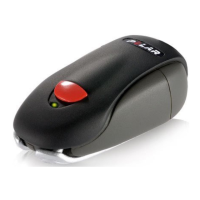
The Polar Stride Sensor Bluetooth® Smart is a device designed to enhance running technique and efficiency by providing accurate and highly responsive measurements of speed, distance, leg cadence, and stride length. It utilizes sensitive inertial sensors to gather this data, making it a valuable tool for runners looking to improve their performance.
The primary function of the Polar Stride Sensor is to track and transmit running data wirelessly to compatible receiving devices. By attaching the sensor to a running shoe, it captures detailed information about a runner's movement, which can then be used for real-time feedback or post-run analysis. The sensor is compatible with Bluetooth® Smart Ready devices that support the Bluetooth® Running Speed and Cadence Service, allowing it to connect with a wide range of fitness apps and Polar products. This broad compatibility ensures that users can integrate the stride sensor into their existing fitness ecosystems, whether they prefer to use a smartphone app, a dedicated sports watch, or a computer-based web service like Polar Flow. The data collected by the sensor helps runners understand their pace, the total distance covered, how quickly their legs are moving (cadence), and the length of each step, all of which are crucial metrics for optimizing running form and preventing injuries.
Getting started with the Polar Stride Sensor involves a few simple steps. Before initial use, a red plastic insulator must be removed from the battery compartment to activate the device. This is done by opening the battery cover with a coin, removing the insulator, and then securely closing the cover.
Pairing the stride sensor with a receiving device is essential for data transmission. This process typically involves activating Bluetooth on the receiving device (e.g., smartphone, sports watch) and following the pairing instructions provided by the device's user guidance material or mobile application. Once paired, the sensor can begin transmitting data.
Calibration is a critical step to ensure the accuracy of the speed, pace, distance, and stride length measurements. It is highly recommended to calibrate the stride sensor before its first use, and also if there are significant changes in running style or if the sensor's position on the shoe is altered (e.g., new shoes, switching from right to left foot). Calibration should be performed at the user's normal running speed and is typically initiated through the receiving device or mobile application. This process fine-tunes the sensor's readings to match the individual runner's gait and shoe setup, leading to more reliable data.
Attaching the stride sensor to a shoe is designed to be secure and stable. The sensor comes with a holder that is placed on top of the shoe's tongue. Shoelaces are threaded through the holder's side holes and out through a bottom hole, with a small flap on the tongue ensuring the holder remains in place during activity. After tightening the laces, the front part of the sensor is fitted into the holder, and the rear is pressed to fasten the flap. It is crucial to ensure the sensor does not move and is aligned with the foot, as a secure fit directly impacts the accuracy of speed and distance measurements.
The stride sensor operates in three power modes to optimize battery life: Measuring, Stand By, and Deep Sleep. In Stand By mode, the sensor is discoverable by receiving devices, allowing for a connection. Once connected, it enters Measuring mode to actively collect data. When disconnected, it reverts to Stand By mode. If left undisturbed for a few minutes, it enters Deep Sleep mode to conserve power, waking up with the slightest movement. This intelligent power management helps extend the time between battery changes.
Battery replacement is a straightforward maintenance task. When the battery needs changing, the user can open the battery cover by turning it counterclockwise with a coin. The old battery is removed, and a new CR2430 battery is placed inside the cover with the positive (+) side facing up. It's important to ensure the sealing ring is properly seated in its groove to maintain water resistance. The cover, with the new battery, is then pressed into the sensor and closed by turning it clockwise. To maximize the lifespan of the battery cover, it should only be opened when changing the battery. If the sealing ring is damaged, it should be replaced with a new one, which can be purchased from Polar retailers or authorized service centers. The battery level of the stride sensor is displayed on compatible receiving devices that support the Bluetooth® Battery Service, providing a convenient way to monitor battery status.
The stride sensor is designed to be water-resistant, making it suitable for use in the rain. However, it is not intended for underwater activities and should not be immersed in water. To ensure its longevity, the sensor should not be exposed to direct sunlight for extended periods.
Proper storage is also important for maintenance. The stride sensor should be kept in a cool and dry place. It should not be stored in damp environments, in non-breathable materials like plastic bags or sports bags, or with conductive materials such as wet towels, as these conditions can potentially damage the device.
For more complex service needs, such as repairs beyond battery replacement, it is recommended to use an authorized Polar Service Center, especially within the two-year guarantee/warranty period. This ensures that any service is performed by qualified technicians, preserving the product's warranty and functionality.
 General
| Type | Stride Sensor |
|---|---|
| Connectivity | Bluetooth Smart |
| Water Resistance | Water-resistant |
| Stride Sensor | Yes |
| Compatibility | Polar devices and other Bluetooth Smart compatible devices |


 To Next Page