5
CHANGING THE BATTERY
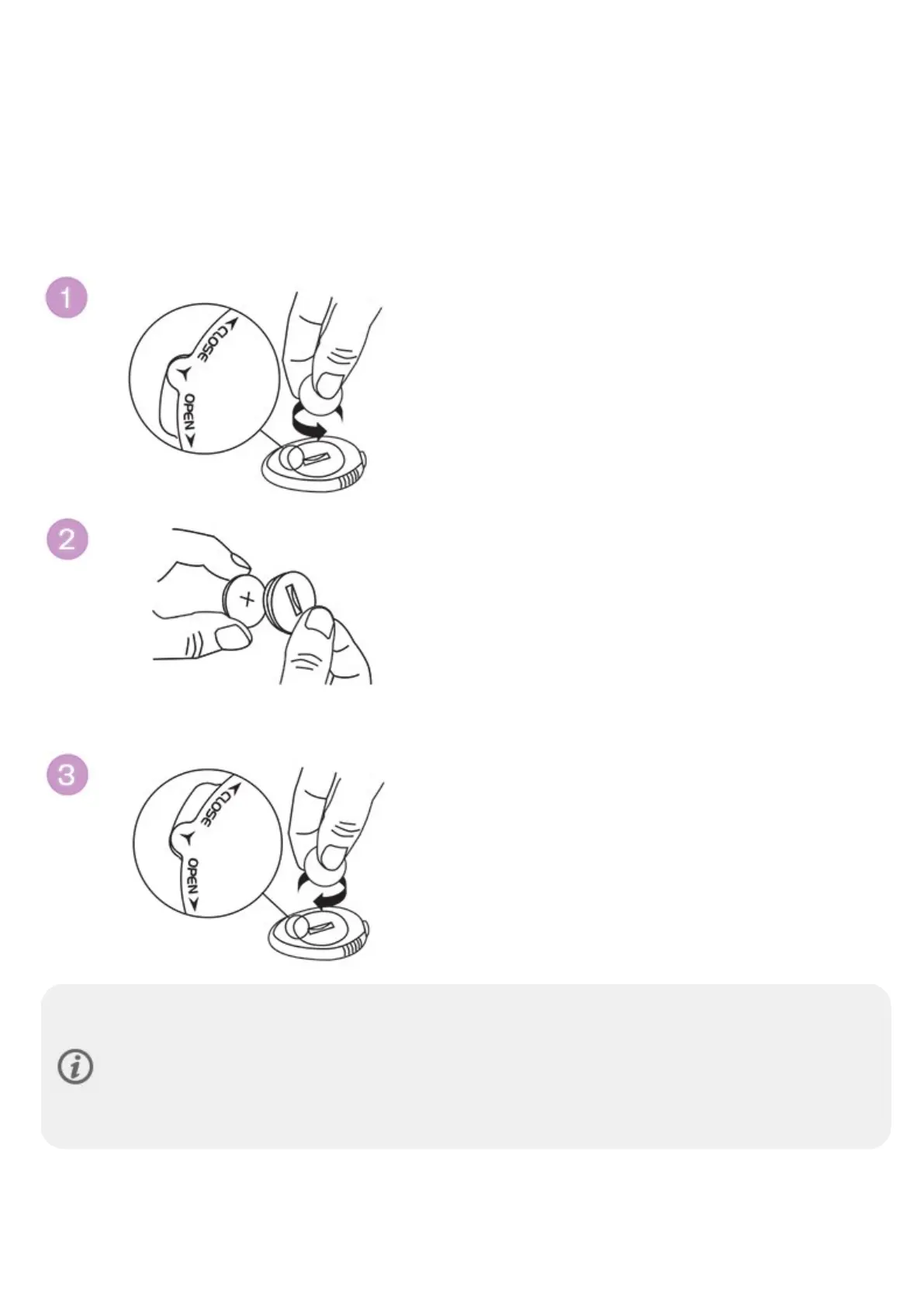
1. Open the battery cover by turning it counterclockwise to OPEN using a coin (picture 1).
2. Place the battery inside the cover with the positive (+) side facing the cover (picture 2). Make sure the sealing
ring is in the groove to ensure water resistance.
3. Place the cover with the battery inside it into the sensor.
4. Press the cover in place and close it by turning clockwise from OPEN to CLOSE using a coin (picture 3).
To increase battery life, Polar Stride Sensor Bluetooth® Smart has three different power modes:
Measuring, Stand By and Deep Sleep mode. In Stand By mode, the sensor is visible to the receiving device
and a connection is possible. When connected to the receiving device, the sensor goes to Measuring
mode. When disconnected, the sensor returns to Stand By mode. If the sensor is not touched during the
next couple of minutes, it goes to Deep Sleep mode. The slightest movement will make the sensor return
to Stand By mode.



 To Next Page