Button Functions
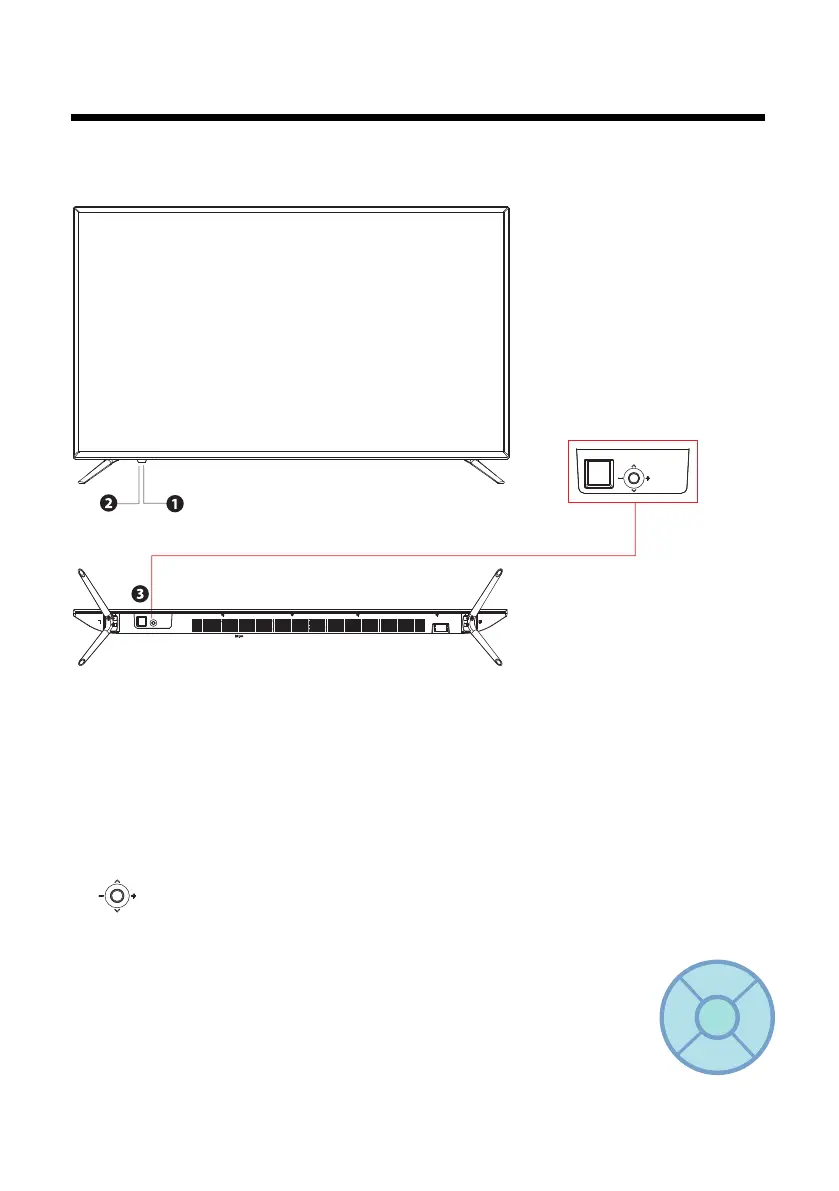
1. POWER LED: illuminates green when the TV is turned on. illuminates red when the TV is in
standby mode.
2. IR(Infrared Receiver):
3.
POWER ON: Press the middle button.
CH+: Push forward to choose the next higher channel in the channel list.
CH-: Pull back to choose the next lower channel in the channel list.
VOL+: Push right to increase the volume.
VOL-: Push left to decrease the volume.
QUICK MENU:Press the middle button for 2~5 seconds.
MUTE:Press “ ^ ” to select press the middle button to enter.
POWER OFF:Press “ ” to select press the middle button to turn off.
MENU:Press “ - ” to select press the middle button to enter.
INPUT:Press “ + ” to select press the middle button to enter.
7
Receives IR signals from the remote control.
DO not put anything near the sensor, as its function may be affected.
^
MUTE
POWER
MENU INPUT
Front/Back View
NOTICE:There is a square glue to protect the IR model,it can be removed after instal the base.



 To Next Page
 Loading...