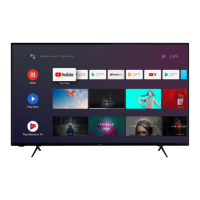
This document describes the Polaroid TCSAND70UHDPR04 Android TV, a 70-inch 4K UHD television (SERIE 8000).
The television features a 70-inch LED display, offering clear vision and low radiation. It supports automatic TV scanning and reception of digital programs, along with a TV Guide function and Teletext (Europe) function. For multimedia, it includes USB multimedia playback and a multi-language on-screen display. The device comes with a full-function remote control. Connectivity options include HDMI, ANT, RJ45, USB, AV, and CI inputs, as well as HEADPHONE and OPTICAL outputs. The TV has a detachable stand holder, an external antenna jack, and built-in speakers.
Technical Specifications:
- Model: TCSAND70UHDPR04
- Screen Size: 70 inches (176 cm; 69 inch)
- Resolution: 3840x2160 pixels (4K UHD)
- Color Depth: 1 billion colors
- Contrast Ratio: 4000:1
- Aspect Ratio: 16:9
- Tuner: DVB-T, DVB-C, DVB-T2
- TV Rated Voltage: 100-240V~50/60Hz 3A
- Power Consumption: 220W
- Dimensions: 1563x317x973mm
- Weight: Approx. 20.5 kg
- Stand: 2 pieces, removable
- Operating Temperature: 5-35°C
- Remote Control Power: 1.5 V x 2 (batteries not included)
- Loudspeakers: 2x10W
- Inputs: 4x HDMI, ANT, CI, 3x USB, RJ45, AV
- Outputs: 1x HEADPHONE, 1x OPTICAL
- USB Functions: Yes
- Compatible Multimedia Formats (via USB):
- Film: FLV, MKV, MPEG, MOV, AVI, H.264
- Music: MP3, WAV, M4A, AMR
- Photos: JPG, BMP, PNG, JPEG
- Text: TXT
- VGA Supported Formats: N
- Frequency Range:
- BT: 2402MHz-2480MHz
- Wi-Fi: 2400MHz-2483.5MHz/5150MHz-5350MHz/5470MHz-5825MHz
- Max RF Power Output: 100mW
- Energy Efficiency Grade (SDR): G
- On Mode Power Demand (SDR): 153kWh/1000h
- Electrical Consumption in Sleep Mode: <0.5W
- Electrical Consumption in Off Mode: N/A
Usage Features:
The TV's initial setup guides the user through basic settings, including language selection, remote control pairing (Bluetooth), connecting an Android phone, Wi-Fi network setup, and accepting Google Terms of Service. Users can also set a 4-digit password for security.
The home screen provides access to Google Assistant for voice or keyboard search, favorite applications (customizable), a list of all installed apps, notifications, input source selection, network configuration (Wi-Fi), and various system settings.
Channel Management:
The TV supports different channel installation modes (Antenna or Cable) and allows for automatic or manual channel scanning. Users can update scans for new frequencies and manually search for analog channels.
Device Preferences:
This section allows users to configure various settings, including:
- About: View TV information and settings.
- Date & Time: Set automatic date and time, adjust date, time, time zone, and 24-hour format.
- Timer: Configure power-on and power-off timers, including type (ON/OFF/ONCE) and specific times.
- Language: Select the system language.
- Keyboard: Manage current keyboard, Gboard settings, and keyboard management.
- Inputs: Select input sources and control HDMI settings (HDMI Control, Device auto power off, TV auto power on, HDMI EDID-version, CEC Device List).
- Power: Configure automatic device shutdown, automatic TV power on, sleep timer, picture off, power-off timer, and automatic shutdown in the absence of a signal.
- Picture: Adjust picture mode (Custom, Standard, Vivid, Sport, Movie, Game, Energy Saving), backlight, brightness, contrast, saturation, HUE, sharpness, gamma (Dark, Middle, Bright), color temperature, and advanced video settings. Users can also reset picture settings to default.
- Sound: Adjust sound style (Custom, Standard, Vivid, Sport, Movie, Music, News), balance, surround sound, equalizer details, speakers (TV Speaker, External Audio System), digital output (Auto, Bypass, PCM, Dolby Digital Plus, Dolby Digital), SPDIF delay, automatic volume control, and downmix modes (Stereo, Surround). Users can also reset sound settings to default.
- Storage: View internal shared storage and manage removable storage (external devices if available).
- Home Screen: Configure channels, applications, and open source licenses.
- Retail Mode: Enable or disable retail mode.
- Google: Set searchable apps, safe search filter, block offensive words, and open source licenses.
- Chromecast Built-in: View information and settings for Chromecast.
- Screen Saver: Configure screen saver settings (Turn screen off, Backdrop, Colors) and when to start (5, 15, 30 minutes, 1, 2 hours).
- Location: Manage location status (Use Wi-Fi to estimate location, off).
- Usage & Diagnostics: Send diagnostic information to Google.
- Accessibility: Configure audio description, visually impaired settings, spoken subtitle, captions, and high contrast text.
- Reset: Reset all settings to factory defaults.
Remote Control:
The remote control allows users to power on/off the TV, select input sources, navigate channels (CH+, CH-, number keys), adjust volume (VOL+, VOL-), mute/unmute sound, access the source list, configure video format (ASPECT), and access various menu options. It also has dedicated buttons for Netflix and YouTube. Bluetooth pairing is available for enhanced control.
The TV includes a multimedia player (MMP app) to display video, photo, audio, and text files from a connected USB flash drive.
Maintenance Features:
- Cleaning: Use a dry, soft cloth for cleaning. For extremely dirty surfaces, wipe with a weak soap-water solution, wring out thoroughly, and then wipe again with a dry cloth. Do not use alcohol, benzene, thinner, cleaning fluid, or other chemicals. Do not use compressed air.
- Safety: Do not insert objects or liquids into ventilation areas. Avoid touching the power cable with wet hands. Keep away from water sources and open flames.
- Stand Installation: The stand is detachable and installed by aligning it with the TV bottom and securing it with screws.
- Wall Mounting: Contact a professional for assistance. Ensure the wall mount can safely support the TV's weight. Use standard M6*16mm screws (4 pieces) for mounting.
Important Safety Instructions:
The TV carries a risk of electric shock and should not be opened by unauthorized personnel. It is designed for indoor use only in temperate climates. Proper ventilation (at least 10 cm clearance) is required to prevent overheating. In case of smoke, unusual odor, or strange noise, disconnect the power cord and contact customer service. Always unplug the TV during thunderstorms or when not in use for extended periods. Batteries should be inserted correctly, kept away from heat sources, and disposed of safely. Children and pets should be kept away from batteries. Prolonged listening at high volume should be avoided to prevent hearing damage. The TV is a Class II electrical device with double insulation.
Warranty:
The product is guaranteed for 2 years. For support, contact customer service at 0 900 778 899. Proof of purchase and photos of the appliance may be required. Damage due to improper installation, misuse, lack of maintenance, natural disasters, unauthorized repairs, normal wear and tear, modifications, corrosion, or external power supply problems are not covered. The warranty covers repair or replacement, not indirect damages or commissioning costs.
Pixel Policy:
In accordance with ISO 13406-2, a product is considered defective if the number of dead or lit pixels exceeds 3.

 Need help?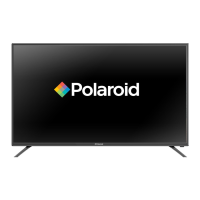




 To Next Page
 General