14
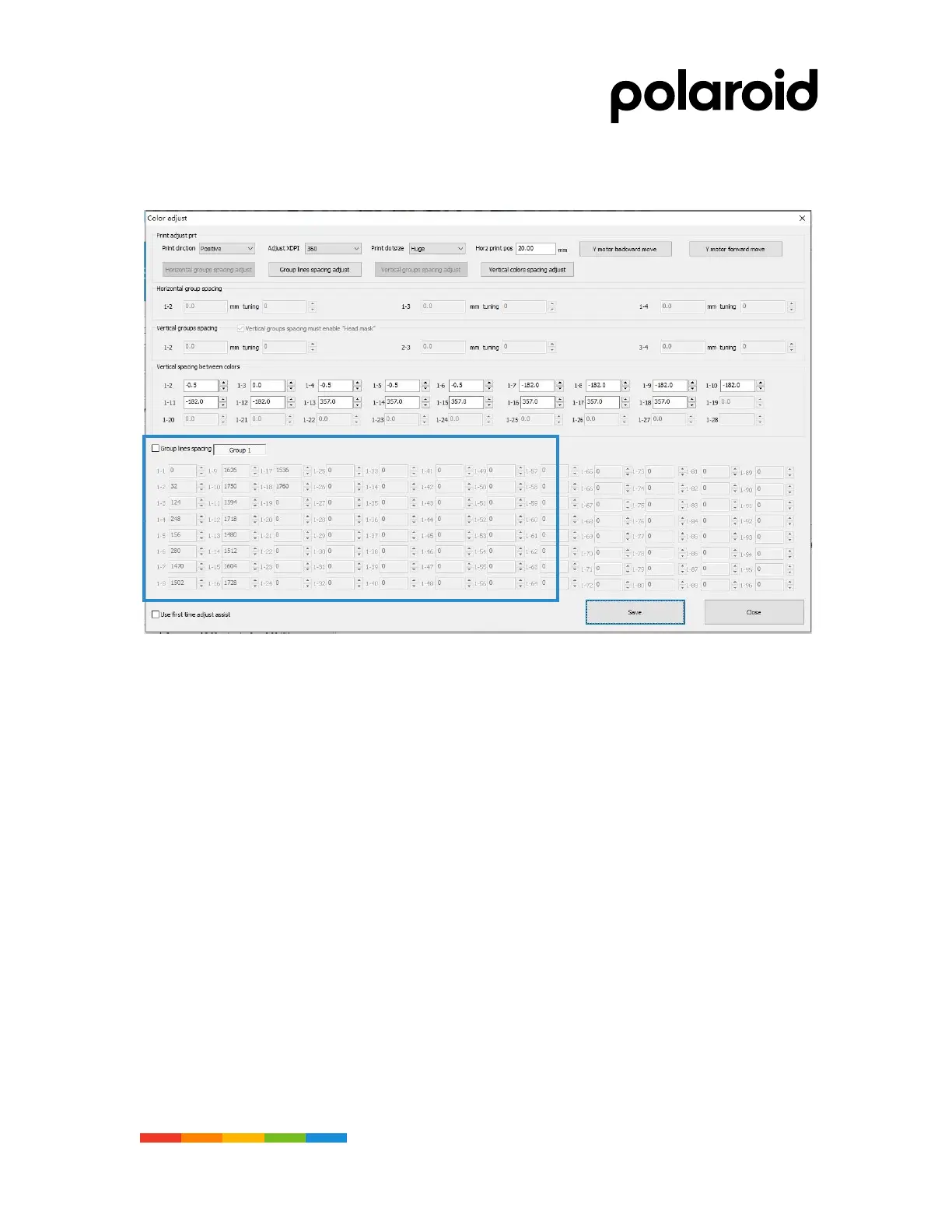
Color calibration interface
Nozzle color calibration paremeters fill
01. Correction parameter: When correcting the para meters, you need to check the “Color
Calibration” dialog box to take effect. By printing the nozzle calibration chart, fill in the
parameters that need to be corrected and fill in the corresponding dialog box in Figure 4.74
above, 1-2 / 1-3 / 1-4 / 1-5 / 1-6 / 1-7 / 1-8....;
02. Row number: The first row is the Printhead 1 calibration parameter, and so on, fill in the
corresponding color calibration interface. For the same nozzle, the factory default parameter has
been set, according to the physical position deviation, fine-tuning during de bugging, as shown in
the figure above.
03. Copy function: After calibrating the parameters in one direction forward or one direction in the
above way, you can use the automatic copy function to copy the adjusted parameters to
another direction or copy to another set of nozzles, some of which need to be fine-tuned. Perform
the corresponding nozzle calibration chart for printing
04. One-way forward an done-way reverse parameter filling: After one-way forward calibration, use
one-way reverse copy function: select “print calibration map” direction to print reverse, and
check “color calibration”, “open first time” Calibration assist fills in the default parameters.
"According to the arrow 1.2.3 steps in the figure, the fine adjustment needs to print the correction
again, and the saved parameters take effect, as shown in the figure below.



 To Next Page