EN-10
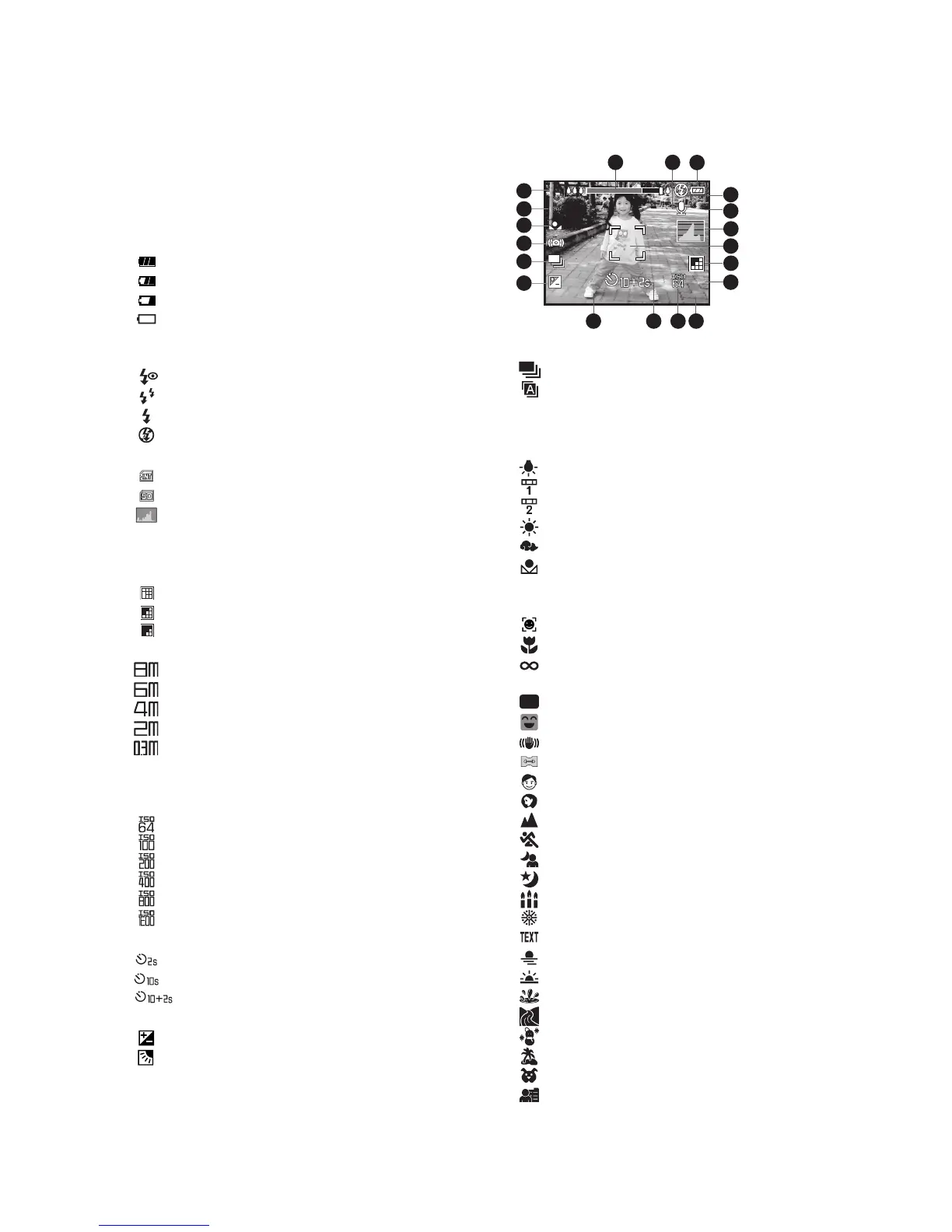
LCD Monitor Display
Capture mode
1. Zoom status
2. Voice memo
3. Battery condition
[ ] Full battery power
[ ] Medium battery power
[ ] Low battery power
[ ] No battery power
4. Flash mode
[Blank]Auto Flash
[ ] Red-eye Reduction
[ ] Pre-flash
[ ] Always ON
[ ] Flash Off
5. Storage media
[ ] Internal memory (no card)
[ ] SD/SDHC memory card
6. [ ] Histogram
7. Main focus area (When the shutter
button is pressed halfway)
8. Image quality
[ ] Fine
[ ] Standard
[ ] Economy
9. Image size resolution
[ ] 3264 x 2448
[ ] 2816 x 2112
[ ] 2272 x 1704
[ ] 1600 x 1200
[ ] 640 x 480
10. Available number of shots
11. ISO
[Blank] Auto
[ ] ISO 64
[ ] ISO 100
[ ] ISO 200
[ ] ISO 400
[ ] ISO 800
[ ] ISO 1600
12. Self-timer icon
[ ] 2 sec.
[ ] 10 sec.
[ ] 10+2 sec.
13. Date and time
14. [ ]Exposure compensation
[]
Backlight correction
(Adjust exposure value with the
e
/
f
buttons)
15. Capture mode icon
[Blank] Single
[ ] Continuous
[ ] Auto Exposure Bracketing
16. Slow shutter warning
17. White balance
[Blank] Auto
[ ] Incandescent
[ ] Fluorescent 1
[ ] Fluorescent 2
[ ] Daylight
[ ] Cloudy
[ ] Manual
18. Focus setting
[Blank] Auto focus
[ ] Face detection
[] Macro
[ ] Infinity
19. Scene mode
[ ] Program AE
[ ] Smile Shot
[ ] Anti Shake
[ ] Panorama
[ ] Portrait Man
[ ] Portrait Lady
[ ] Landscape
[ ] Sports
[ ] Night Portrait
[ ] Night Scene
[ ] Candlelight
[]Fireworks
[] Text
[ ] Sunset
[]Sunrise
[ ] Splash Water
[ ] Flow Water
[]Snow
[]Beach
[]Pets
[ ] User Setting



 To Next Page
 Loading...








