EN-27
MENU OPTIONS
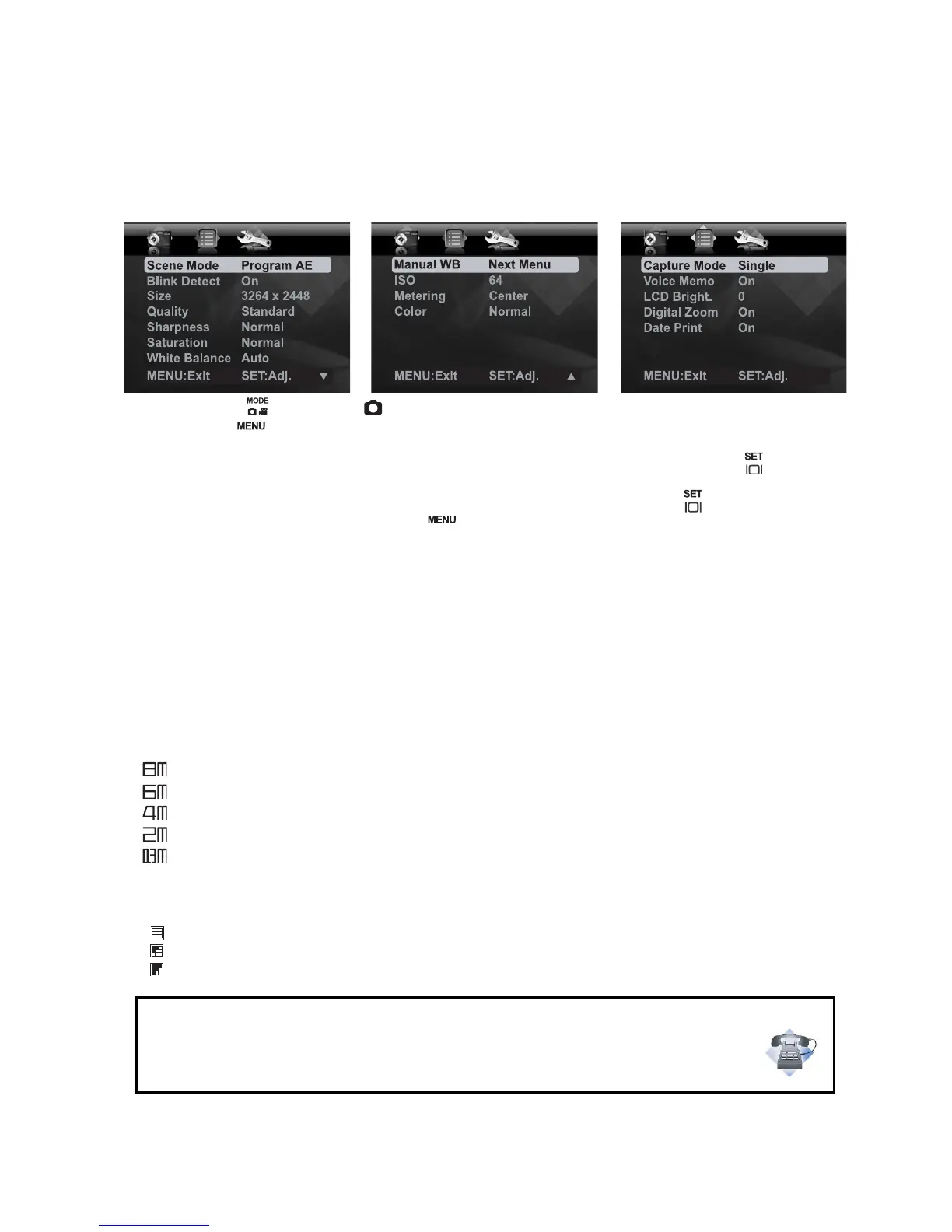
Capture Menu
This menu is for the basic settings to be used when capturing still images.
1. Toggle the button to [ ].
2.
Press the button, and select the [Capture] / [Function] / [Setup] menu with the e
/ f button
s
.
3. Select the desired option item with the c / d buttons, and press the button to
enter its respective menu.
4. Select the desired setting with the c / d buttons, and press the button.
5. To exit from the menu, press the button.
Scene Mode
Select from 21 different scene modes in accordance with the shooting conditions.
* Program AE / Smile Shot / Anti Shake / Panorama / Portrait Man / Portrait Lady / Landscape
/ Sports / Night Portrait / Night Scene / Candlelight / Fireworks / Text / Sunset / Sunrise /
Splash Water / Flow Water / Snow / Beach / Pets / User Setting
Blink Detect
Refer to section in this manual titled "Blink Detection Feature" for further details.
Size
This sets the size of the image that will be captured.
* [ ] 3264 x 2448
* [ ] 2816 x 2112
* [ ] 2272 x 1704
* [ ] 1600 x 1200
* [ ] 640 x 480
Quality
This sets the quality (compression) at which the image is captured.
* [ ] Fine
* [ ] Standard
* [ ] Economy
Questions?
Call our toll-free customer service number. Look for the insert with this icon:
Or visit www.polaroid.com.













 To Next Page