7
Setting Up the PoolBot
Before first use
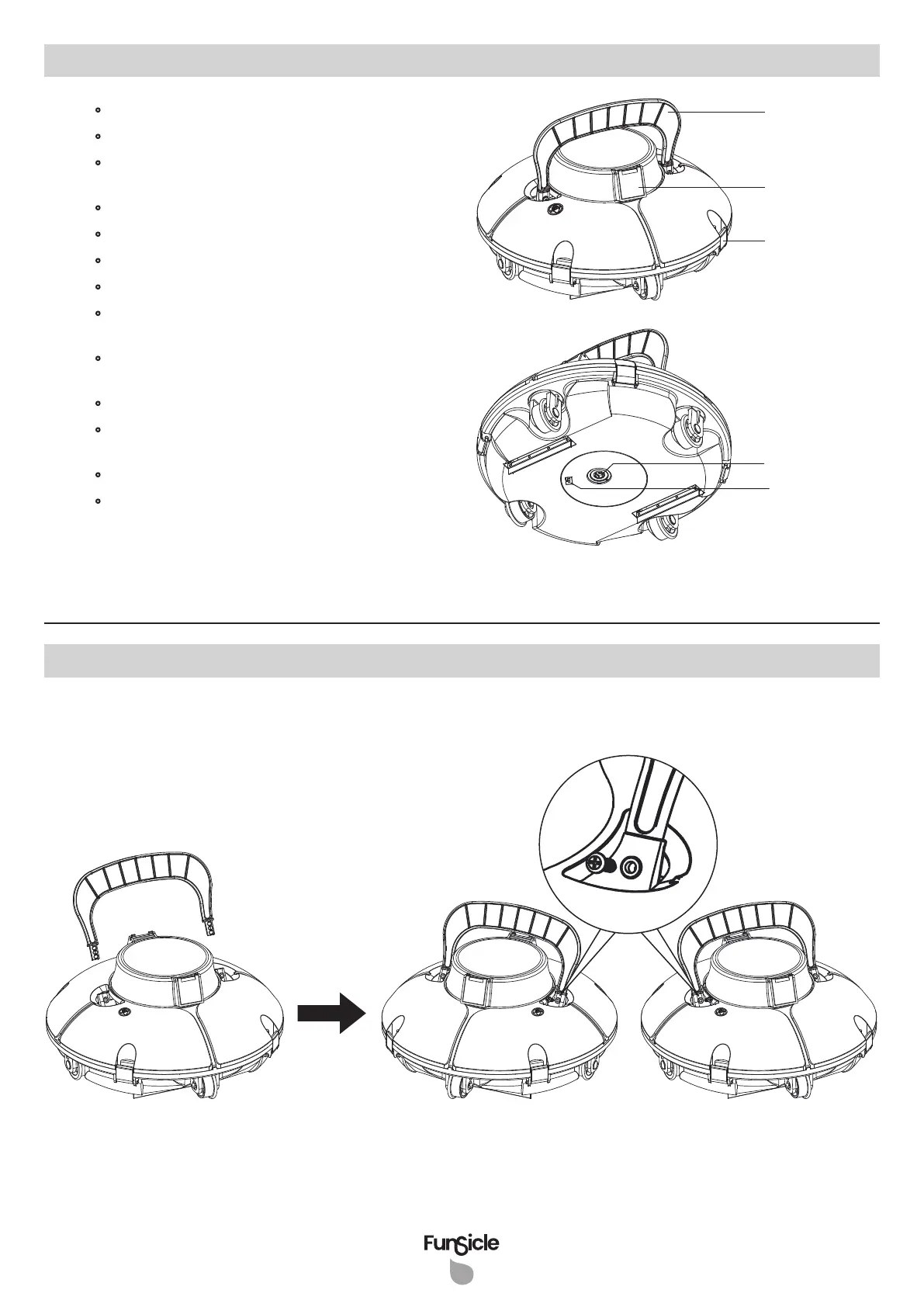
1. Attach the flipper and fix it with the screws provided.
•
Model: P56000F24
• Output voltage of adapter: 12.6 V DC
• Rated input voltage of adapter:
100 V AC - 240 V AC
• Battery runtime: Approximately 45 minutes
• Charging time: 3 - 4 hours
• Battery capacity: 2600 mAh
• Maximum cleaning surface: 500 ft
2
(46.4 m
2
)
• Optimal pool water temperature:
50°F - 95°F (10°C - 35°C)
• Charging environment temperature:
41°F - 95°F (5°C - 35°C)
• Maximum pool depth: 6 ft (1.8 m)
• Size: 13" L x 13" W x 9" H
(330 mm L x 330 mm W x 230 mm H)
• Weight: 7.3 lb (3.3 kg)
• Storage condition:
41°F - 95°F (5°C - 35°C), RH <75%
Flipper
Nozzle
Power Button
Charging
Socket
Lock Latch
Specifications


 To Next Page