8 9
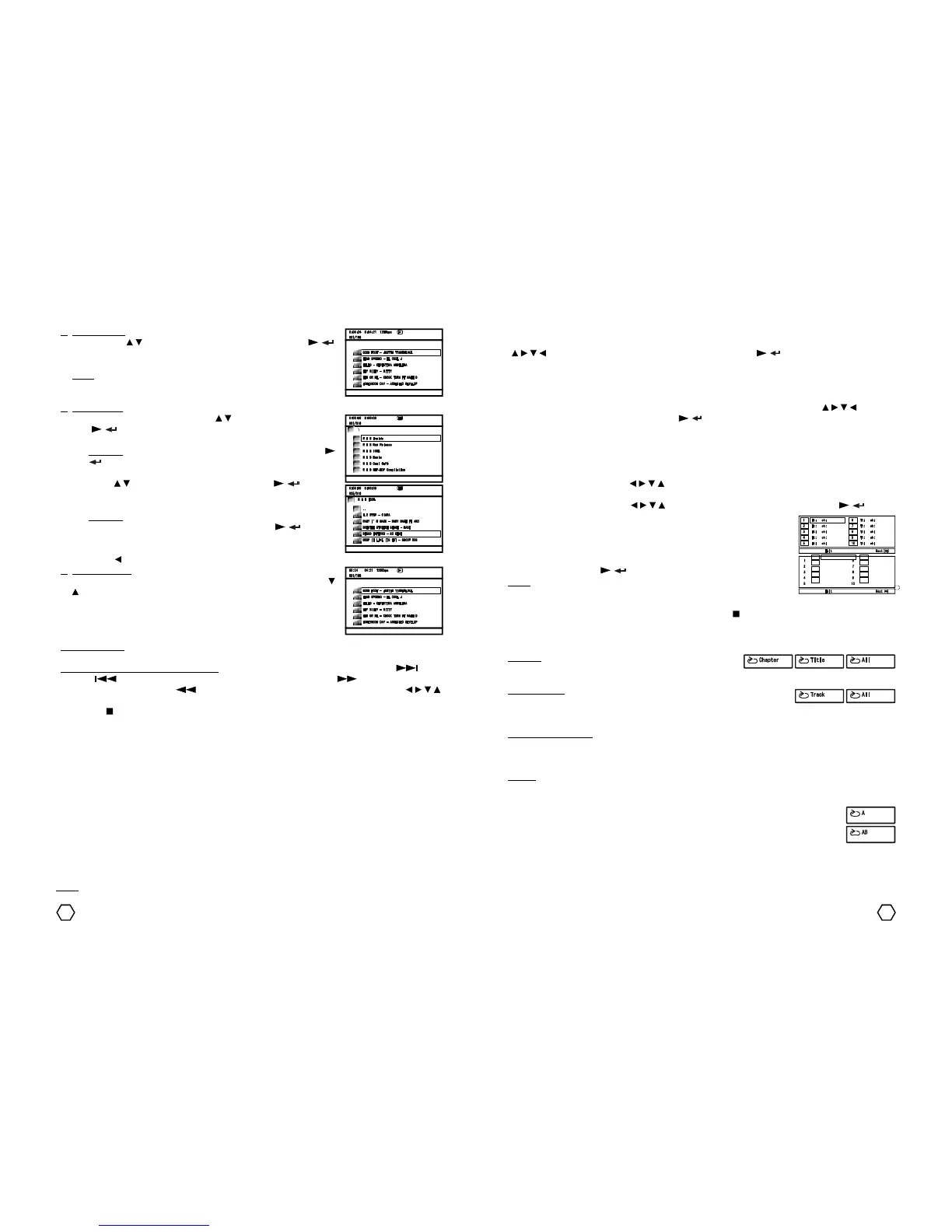
1. FILELIST mode : Used to play MP3/MPEG4/JPEG disc continuously, not per
folder. Press “ / ” navigator button to select track, then press “ / ”
to play it. Track can also be selected using “0” - “9” numeric buttons,
press “0” - “9” numeric buttons according to the track number.
Note : If in one disc containt MP3/MPEG4/MPG/JPEG files, when in stop
condition press “PROG” button repeatedly to display MP3/MPEG4/MPG/
JPEG files on the browser.
2. FOLDER mode
- Highlight preferred directory using “ / ” navigator button, then press
“ / ” to select. Or directly select the folder using “0-9” numeric
buttons.
Example : To select “R & B Inside” press “1” button, then press “ /
”.
- After you select a folder, the content will be displayed.
- Press “ / ” navigator button to select track, press “ / ” to play it.
You also can select track using “0-9” numeric buttons. Press numeric
buttons according to the track number.
Example : To select 4th track “DISCO INFERNO - 50 CENT”, press “5”
button once (as sequence line from top), then press “ / ” button to
play it. To select 168th track, press “1”, “6”, and “9” numeric button in
sequence.
- Press “ ” navigator button to back to source folder.
3. PLAYLIST mode : Playlist only can be accessed if you has store some
track/file. To store track/file, go to the Folder or Filelist operation, press “ /
” navigator button to select track then press “CLEAR” button. With this
operation, you can play memorized tracks pereviously on the MEMORY (list
of file on the playlist). To running this operation, press “PROG” button
repeatedly until Playlist appear.
Another function : Function like VOLUME, PAUSE, FAST FORWARD, FAST REVERSE, NEXT, PREVIOUS and
others can be used when playing MPEG4/MP3 disc.
Additional function while playing JPEG disc : Function of the remote control button as follow : “ ” : Next
Picture, “ ” : Previous Picture, ZOOM : ZOOM (Switch ZOOM Mode), “ ” : ZOOM IN, to enlarge
picture when in ZOOM mode, “ ” : ZOOM OUT, to shrink picture when in ZOOM mode, “ / / / ”
navigator : to change the picture position when in ZOOM mode. To return to the track list menu, Press
“MENU” or “ ” (stop) button at remote control.
Playing MP3/MPEG4/JPEG files through USB Flashdisk or SD/MMC/MS (certain model only)
You can playing MPEG4/MP3/JPEG/certain files that storage previously on the USB Flashdisk or SD/MMC/MS
card through USB connector or SD/MMC/MS card slot of the unit. Plug the storage media that you used to
stored MPEG4/MP3/JPEG files to the according terminal.
1. USB terminal :
a. Plug the USB Flashdisk contains MPEG4/MP3/JPEG files to USB terminal.
b. Press “MULTIMEDIA” button on the remote control until display displayed USB to select USB mode. The
unit will read the attached equipment for a moment.
c. For next operational, please refer to the “Playing MPEG4/MP3/JPEG disc” topic.
2. SD/MMC/MS card terminal (certain model only) :
a. Insert SD/MMC/MS card contains MPEG4/MP3/JPEG files to the SD/MMC/MS card slot of the unit.
b. Press “MULTIMEDIA” button on the remote control until display displayed CRD to select CARD mode.
The unit will read the attached equipment for a moment.
c. For next operational, please refer to the “Playing MPEG4/MP3/JPEG disc” topic.
Note : For the safety of the data that is stored inside the USB Flashdisk or SD/MMC/MS card, you are
suggested to change the function to the DVD mode first before unplug it from its terminal.
Program play
Enable you to play your favourite track-track with your preferrable order.
1. Press “PROG” button to enter to PROGRAM.
2. In PROGRAM menu, press “ / / / ” navigator button, then use “0-9” numeric buttons to fill title,
chapter or track number.
3. To start the PROGRAM, use “ / / / ” navigator button to select START, then press “ / ” button.
4. If the disc being played is DVD, on the TV screen will display :
5. If the disc being played SVCD/VCD, on the TV screen will display :
6. To exit from PROGRAM menu, press “PROGRAM” until cursor is in EXIT
position, then press “ / ” button.
Note :
If there is only 1 title in DVD disc, the PROGRAM menu will be the same as
PROGRAM menu SVCD/VCD/CD disc. To exit from the PROGRAM operation, press “PROG” to enter to program
menu, select STOPthen select EXIT. Other way, press “STOP( )” button twice.
Menu Play (DVD disc)
Disc Menu will be displayed automatically after DVD disc is read. When TV screen displaying the menu, use
“ / / / ” navigator button on the remote control to select and use “ / ” button on the remote control to
confirm. If there is numeric choice, use “0-9” numeric buttons on the remote control to select directly. To
displaying the disc menu while playing, press “MENU” button on the remote control.
Title Play (DVD disc)
While playing DVD disc, press “TITLE” on the remote control to go to DVD title. Use “ / / / ” navigator
button on the remote control to select and use “ / ” button on the remote control to confirm. Other ways,
you can use “0-9” numeric buttons on the remote control to select directly.
Repeat
This function is used for repeating a specified title/chapter/track or entire disc.
DVD disc : When playing DVD disc, title/chapter and entire disc
can be repeated. Press “REPEAT” button repeatedly to select
repetition mode : CHAPTER / TITLE / ALL / REPEAT OFF (Off the repeat function).
SVCD/VCD disc : When playing SVCD/VCD disc, REPEAT function is used to
repeat one track or entire disc. Before use this function, for SVCD/VCD 2.0
disc, PBC condition must be in OFF condition. Press “REPEAT” button repeatedly to select repetition mode :
TRACK / ALL / REPEAT OFF (Off the repeat function).
MPEG4/MP3/JPEG disc : When playing MPEG4/MP3/JPEG/CD disc, available repeating mode are : REPEAT
ONE (repeat the current track continuously), REPEAT FOLDER (repeat all tracks in the folder continuously),
RANDOM (play all tracks in the current played folder randomly) and CONTINUE (play all tracks in the current
folder continuously). Press “REPEAT” button repeatedly to select one of the mode.
CD disc : When playing CD disc, available repeating mode are : TRACK, ALL, RANDOM and CONTINUE.
Repeat A-B
This function is used to repeat a certain part of track/chapter/title that you have determined
before between starting point and certain end point by pressing “A-B” button. Press “A-B”
once to determine the beginning point (A) that will be repeated. Press “A-B” once again to
determine the last point (B) that will be repeated. To cancelling REPEAT A-B function, press
“A-B” button again.



 To Next Page
 Loading...