Popcorn Hour Transformer Media Computer
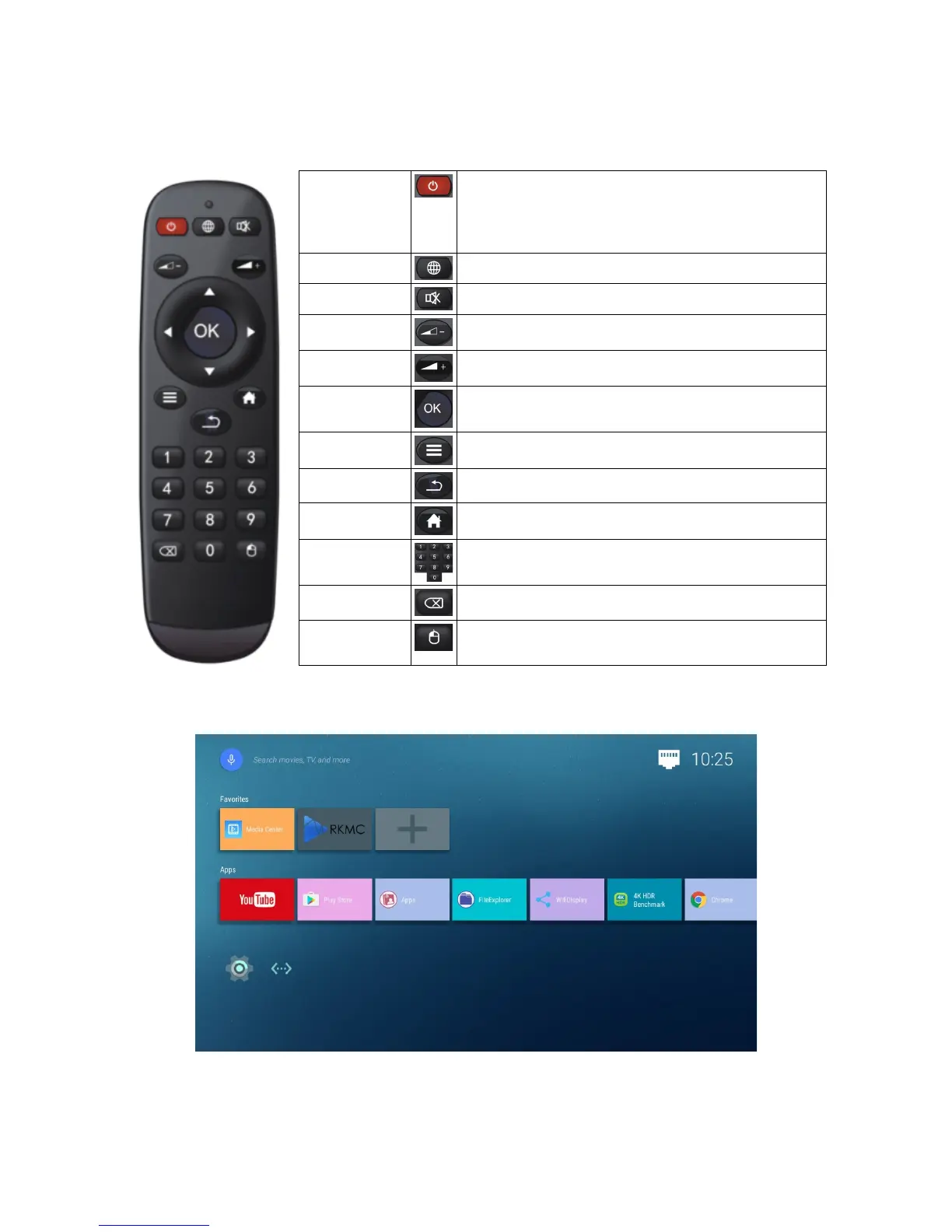
6. Remote Control
POWER In STANDBY mode:
Press once to turn ON the device.
In ON mode:
Press once to turn the device to STANDBY.
INTERNET Go to web browser.
MUTE Mutes the audio output.
VOL- Decreases the volume during media playback.
VOL+ Increases the volume during media playback.
OK Confirm selection.
Play/pause media playback.
MENU Bring up Android context menu.
BACK Go back to previous screen.
HOME Press HOME to return to main screen.
0-9 NUMERIC
KEYPAD
Allows users to input numeric values.
BACKSPACE To erase character during input.
MOUSE
MODE
Switch from Highlight mode to Mouse mode and
vice versa.
7. Android Home
This is the Home screen for the Stock Android. It contains a list of default applications under the
Apps category.
• YouTube - Famous YouTube video streaming app
© 2001 - 2018 Cloud Media. All Rights Reserved 6


 To Next Page