CD mode 21
Loading an individual CD
1. Press the button if necessary.
2. Select the empty slot that is to be loaded with
a CD (press the SoftKey briefly).
The message "Please insert CD" will appear.
3. Insert the CD into the CD slot with the printed
side upwards, pushing as far as necessary for
the automatic loading mechanism to engage.
Ejecting an individual CD
1. Press the button if necessary.
2. Select the desired slot that already has a CD
loaded (press the , or SoftKey
briefly).
3. Remove the CD.
Loading multiple CDs
To load all free CD compartments at the same
time, several CDs can be inserted one after
another:
1. Press and hold the SoftKey.
2. Insert CDs one after another into the CD slot.
3. Insert the CDs one after another into the CD
slot with the printed side facing upwards.
The last CD to be loaded will be read and
played back.
Ejecting all CDs
All CDs loaded in the CDR30 can be ejected one
after the other in a single operation:
1. Press and hold the , or
SoftKey.
2. Remove the CDs one after another.
Selecting CDs
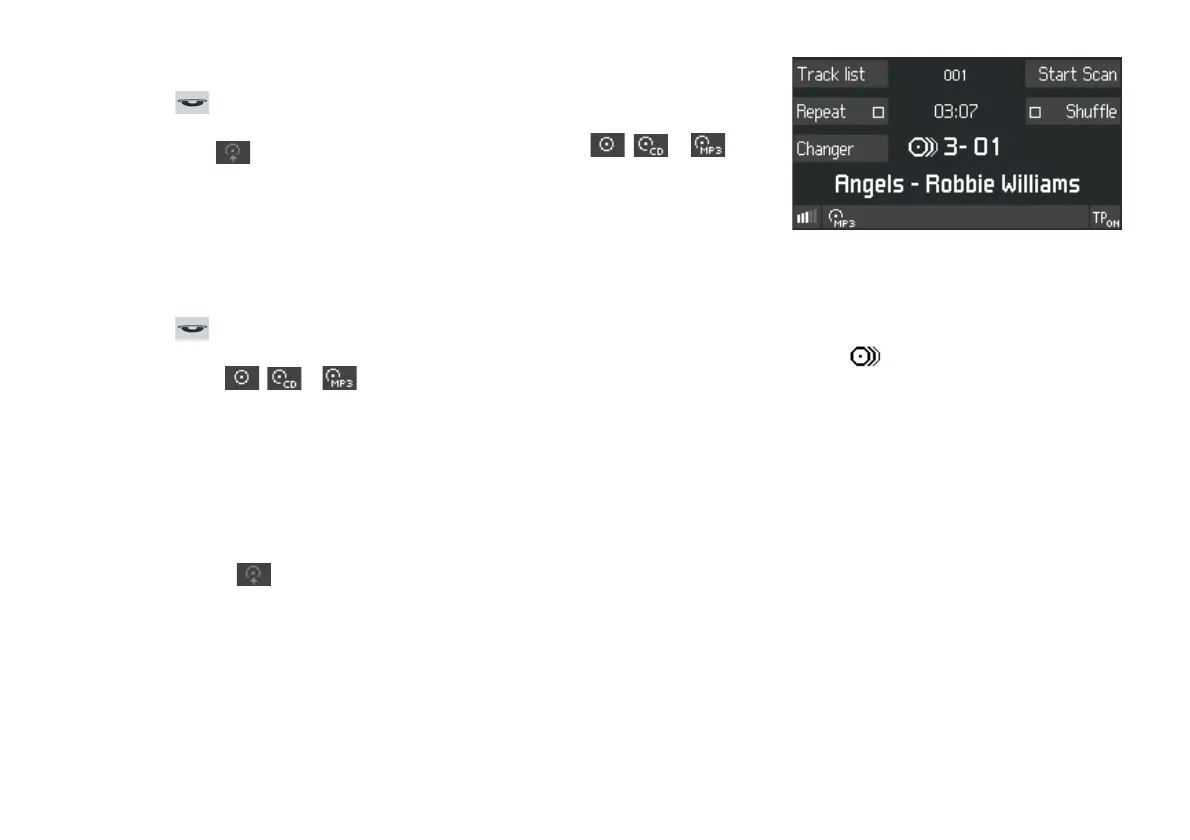
The number of the CD (e.g. 3) and the number of
the track currently being played (e.g.
01) are
shown on the display next to the changer symbol
sy mbol . Below this is the track name (audio
CDs with CD Text) or the file name (MP3 CDs).
For MP3 CDs the name of the folder containing the
current track is also displayed above the playing
time (e.g. 001).
1. Press the
Changer list SoftKey.
The CD list will be displayed.
2. Turn the rotary/push knob to select the desired
CD and press to confirm.
The CD will loaded and played back.


 To Next Page