32 Telephone mode (optional)
Extended telephone functions
1. Press the button.
2 Press the button.
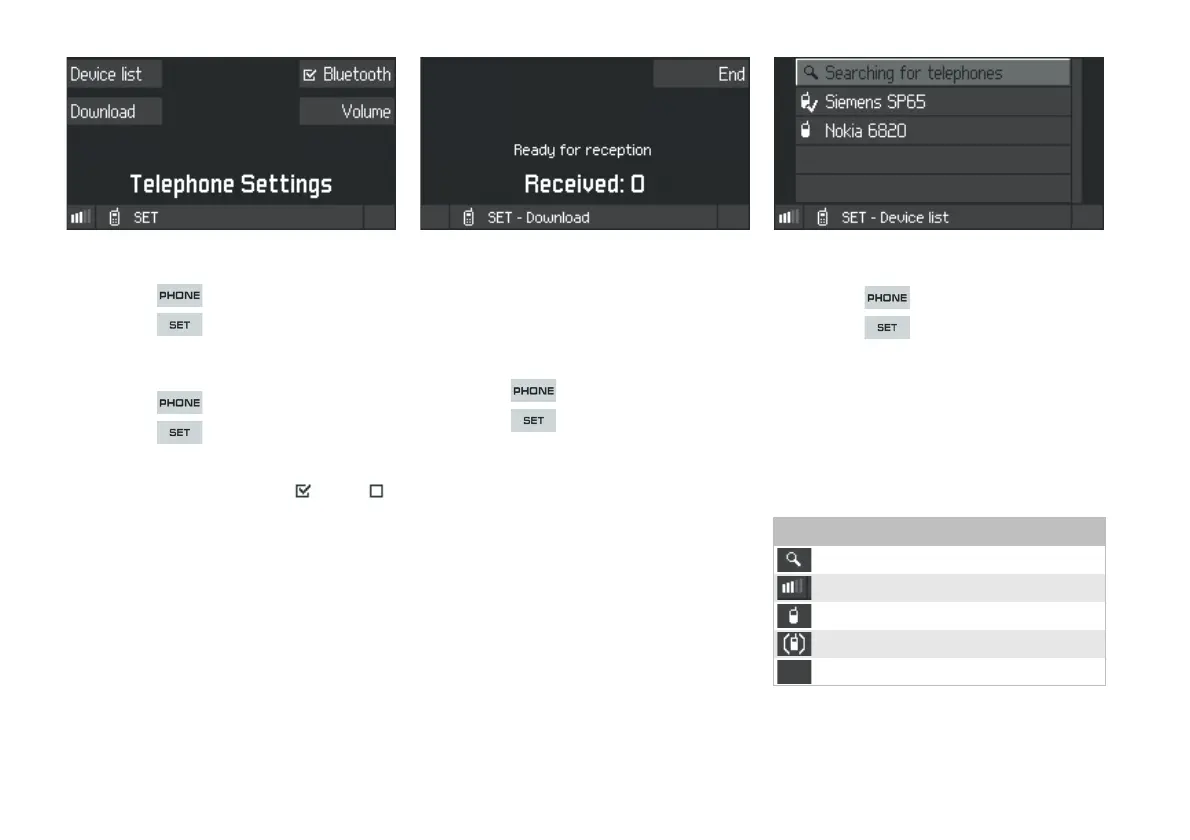
Switching Bluetooth ON and OFF
1. Press the button.
2. Press the button.
3. Press the
Bluetooth SoftKey.
Bluetooth is now switched ON or OFF .
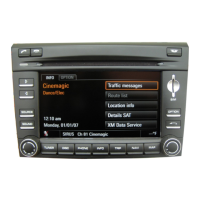
Receiving electronic business cards
(vCards)
The CDR30 must be connected to a mobile
telephone in order to receive electronic business
cards (vCards).
1. Press the button.
2. Press the button.
3. Press the
Download SoftKey.
The CDR30 is now ready to receive electronic
business cards. This will cause the connection
with the mobile telephone to be temporarily
suspended.
4. Use the mobile telephone to send one or more
electronic business cards to the CDR30 (refer
to the instruction manual for the mobile
telephone).
The CDR30 will display how many electronic
business cards have already been received.
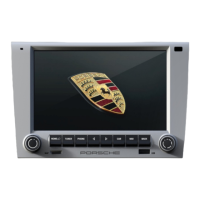
Device list
f Press the button.
f Press the button.
f Press the
Device list SoftKey.
A list of previously authorised mobile
telephones that are in range of the CDR30 will
be displayed on opening the Device list. Mobile
telephones that have not been authorised will
only be displayed when
Searching for
telephones
is activated (top entry).
Device list symbols
Search for telephones
Authorised and connected
Authorised and in range
Authorised and not in range
Not authorised


 To Next Page