Telephone mode (optional) 33
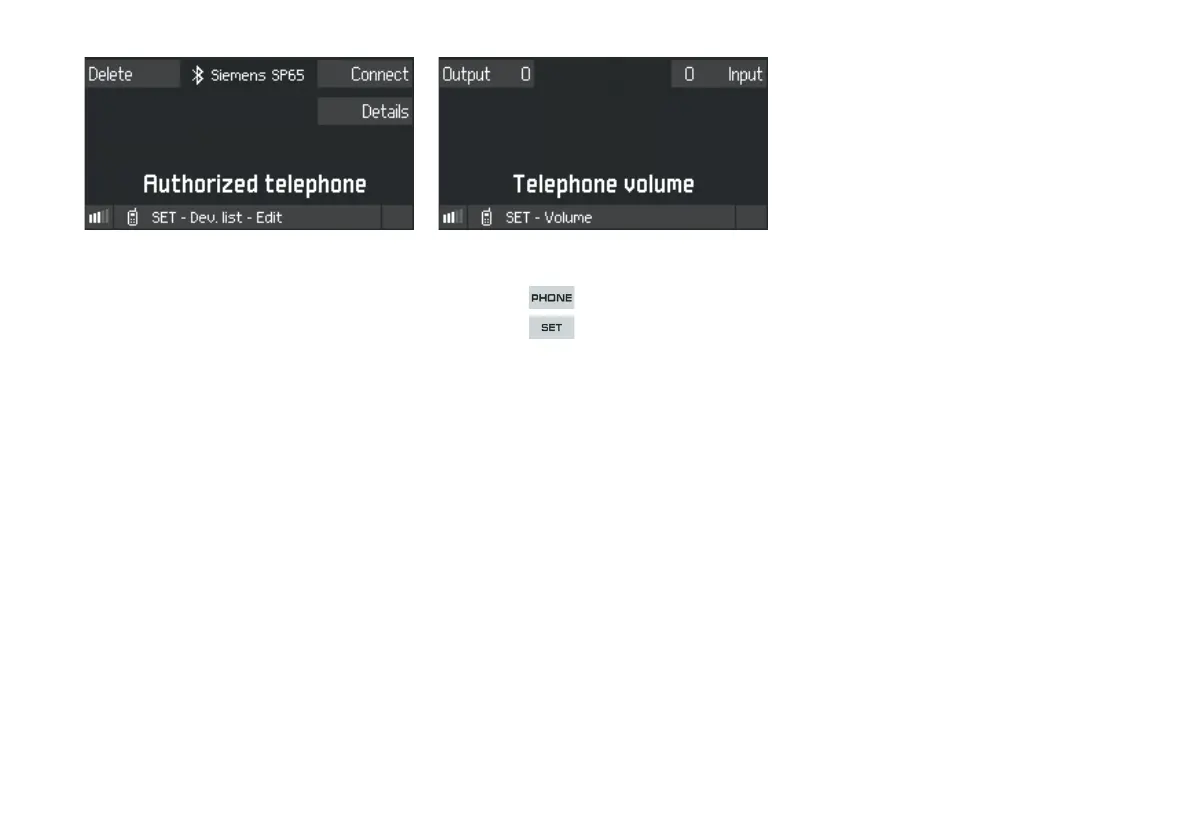
Further options are available for each device in the
Device list:
f Select the mobile telephone from the Device
list and press to confirm.
Deleting a mobile telephone
1. Press the
Delete SoftKey.
2. At the prompt, confirm with
Yes or cancel with
No.
Connecting a mobile telephone
f Press the
Connect SoftKey.
The CDR30 will connect automatically to the
mobile telephone selected.
Showing Details for a mobile telephone
f Press the
Details SoftKey.
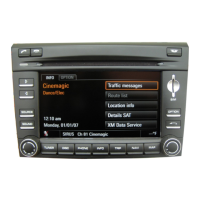
Adjusting the volume
f Press the button.
f Press the button.
f Press the
Volume SoftKey.
Adjusting the Output volume
1. Press the
Output SoftKey.
2. Turn the rotary/push knob to select the desired
value and press to confirm.
Adjusting the Input volume
1. Press the
Input SoftKey.
2. Turn the rotary/push knob to select the desired
value and press to confirm.


 To Next Page