User interface 5
User interface
SoftKeys
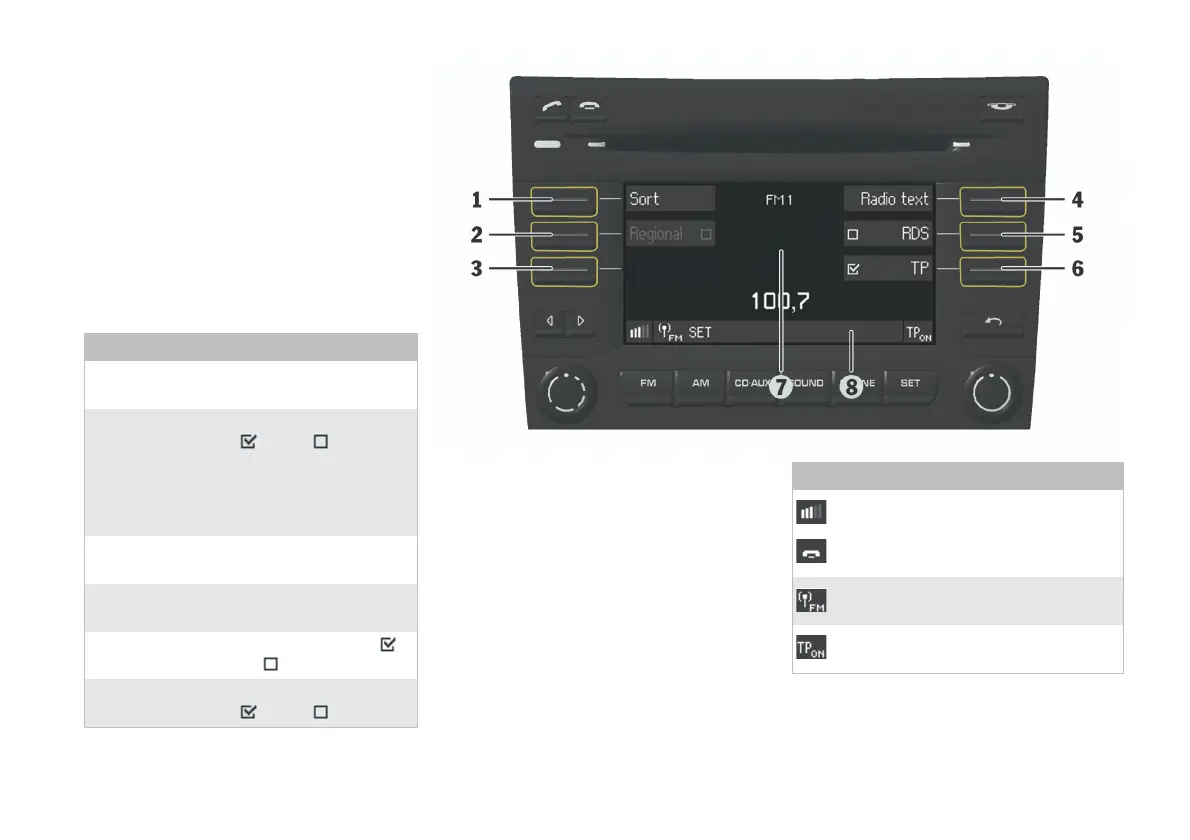
The CDR30 has six SoftKeys that perform
different functions depending on the current view
shown on the display. The function that each
SoftKey performs is shown on the display directly
next to the SoftKey.
The following section shows an example display
view with an explanation of the corresponding
SoftKey functions.
SoftKey Function
1 Sort Open the submenu for the
Station sort settings.
2 Regional Switch regional programming
ON of OFF . (Where a
SoftKey is shown in grey this
means that function is not
currently available and can
therefore not be activated.)
3 SoftKey has no function
assigned in this menu.
4 Radio text Open the Radio text
submenu.
5 RDS Switch RDS function ON
of OFF .
6 TP Switch Traffic announcement
ON of OFF .
Display
The central area of the display (7) shows the most
important information for the active operating
mode (e.g. station name).
The Status bar (8) in the lower section of the
display contains symbols and shows the menu
path to indicate which menu is currently selected
(here:
Menu - Settings). The following table
describes the symbols that can be seen on the
status bar in the illustration:
Symbols in the status bar
Telephone mode indicator (optional).
Appearance varies according to the type
of telephone used.
Active operating mode: FM radio.
Traffic announcement switched ON and
supported by the radio broadcaster.


 To Next Page