Telephone mode (optional) 31
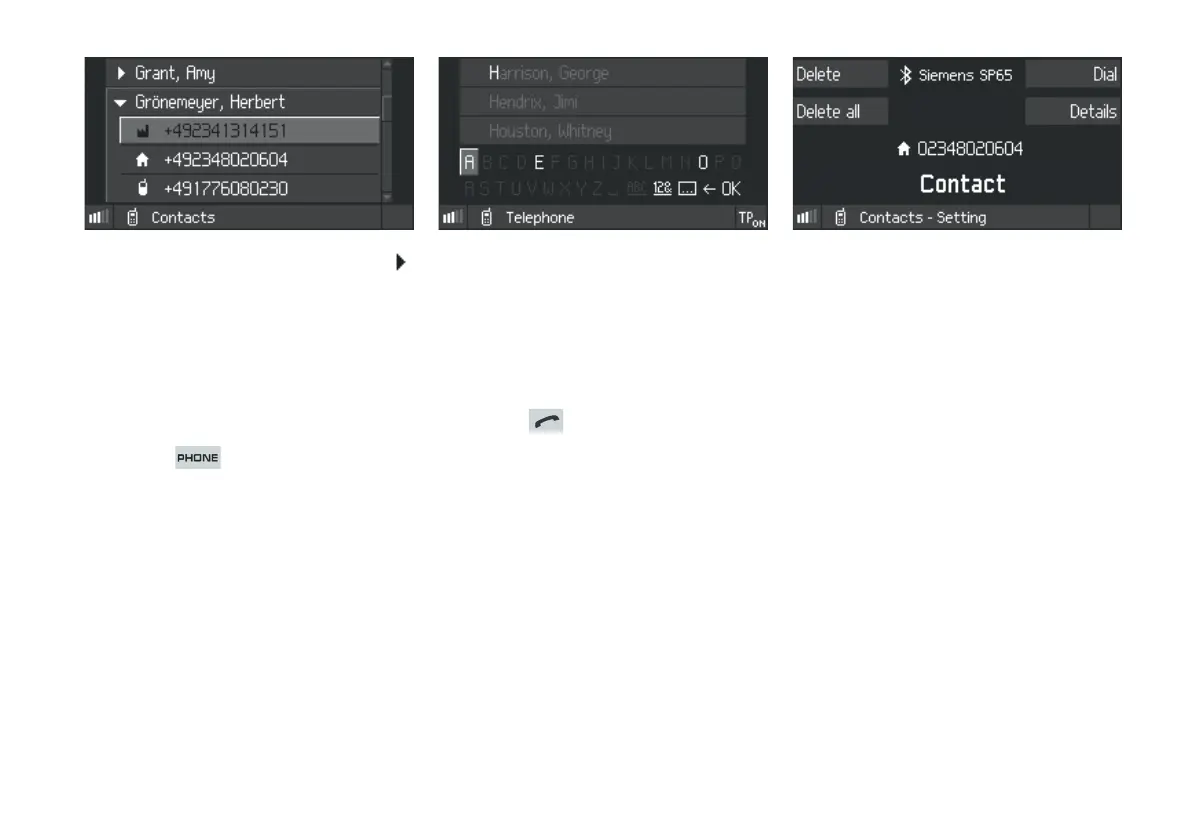
Entries that are marked with the Detail symbol
can be expanded:
f Select a contact with the Detail symbol from
the list and press to expand.
Searching for a contact
The search function is only available if the
Contacts list contains more than five entries.
1. Press the button.
2. Press the
Contacts SoftKey.
3. Select
Search (top entry) and press to
confirm.
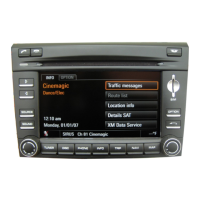
The Search screen will appear:
4. Use the rotary/push knob to select the first
few letters of the name required in sequence.
The CDR30 will only display those letters for
which there is a corresponding entry in the
Contacts list. The CDR30 will select the entry
automatically as soon as there is a unique
match.
5. Press the button to begin the call if
required.
Contacts options
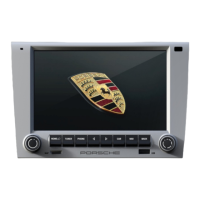
Further options are available for the individual
entries in the Contacts list. The Contacts options
are accessed as follows:
f Select an entry from the Contacts list and
press to confirm.
Dial
f Select the Dial SoftKey to call the number
displayed.
Details
f Press the
Details SoftKey to display the details
of a particular entry.
Delete an entry
1. Press the
Delete SoftKey to delete an entry.
2. At the prompt, confirm with
Yes or cancel with
No.
Delete all entries
1. Press the
Delete all SoftKey to delete all
entries in the Contacts list.
2. At the prompt, confirm with
Yes or cancel with
No.


 To Next Page