12
To allow the tool to run without continually pressing the trigger (C), Fig. 8,
press the trigger (C) into the handle and engage the switch locking button (D)
on the side of the handle. While holding the button in, slowly release the
trigger. To stop the tool, squeeze trigger into handle and release.
To avoid personal injury or damage to finished work always
allow motor to come to a COMPLETE STOP before putting it down.
USING THE ROUTER
IMPORTANT: Before using the tool, consider the workpiece. Depending on
the material, more than one cut may be necessary to avoid overloading the
motor. Before beginning the cut on the actual workpiece, make a sample cut
on a piece of scrap lumber. This action will show exactly how the cut will look,
and will enable you to check dimensions.
Always secure the work to a stable surface prior to routing.
Generally, the workpiece should be secured to the bench by clamps. When
routing edges, the router should be held firmly down and against the work by
both guiding knobs.
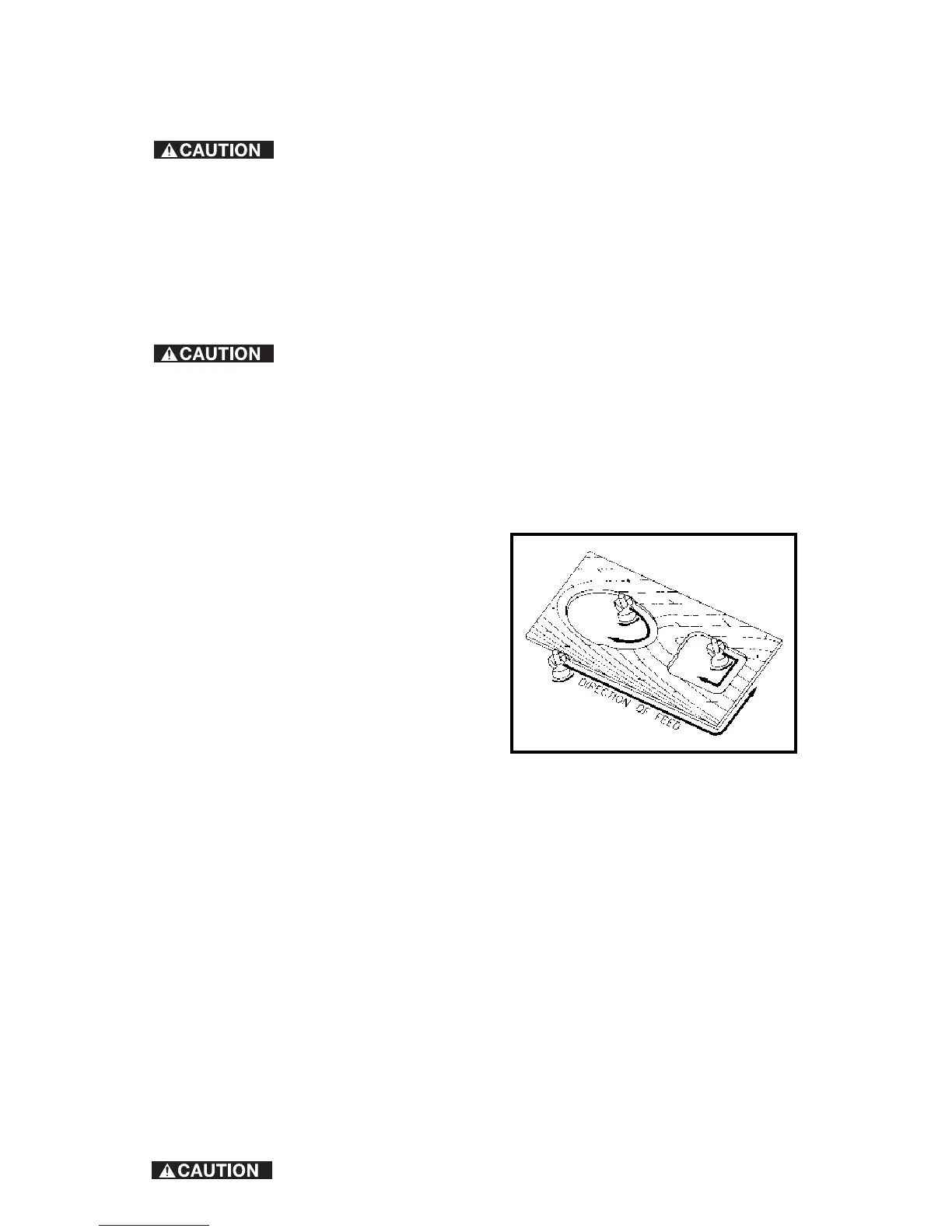
Since the cutter rotates clockwise (when viewing router from top), move the
router from left to right to obtain a more efficient cutting. (Fig. 9).
When working on the inside of a templet, move the router in clockwise
direction. When working on the outside of a templet, move the router in a
counter-clockwise direction.
WARNING: Avoid “Climb-Cutting”
(cutting in direction opposite that
shown in Fig. 9). “Climb-Cutting”
increases the chance for loss of control
resulting in possible personal injury.
When “Climb-Cutting” is required
(backing around a corner), exercise
extreme caution to maintain control of
the router.
The speed and depth of cut will depend
largely on the type of work material.
Keep the cutting pressure constant, but do not use so much pressure that the
motor speed slows excessively. More than one pass at various settings may
be necessary.
When making cuts on all four edges of the workpiece, start the first cut on the
end of the piece across the grain to minimize chipping of the wood at the end
of a cut.
THE EDGE GUIDE
An edge guide is available as an accessory to aid in straight edge planing,
parallel grooving, dado or slotting operations.
To attach, insert the guide rods (A) Fig. 10 in holes in the base, and secure it
with screws (B). The guide (C) is adjusted on the rods and secured in position
with thumb screws (D).
TEMPLET GUIDES
A wide variety of templet guides are available for use in pattern and templet
routing operations. Fig. 11 shows a typical combination bit, templet guide, and
locknut.
DISCONNECT TOOL FROM POWER SOURCE.
Fig. 9







 To Next Page