EasyManua.ls Logo

Porter-Cable 7548 - Selecting the Blade; Installing the Blade

Porter-Cable 7548
16 pages
Print Icon
To Next Page IconTo Next Page
To Previous Page IconTo Previous Page
Loading...
OPERATING
INSTRUCTIONS
FOREWORD
Model
7548
and
7648
Bayonet
Saws
are
designed
for
cutting
materials
of
the
following
MAXIMUM
thickness:
Wood
2-1/2";
Aluminum
3/4";
Steel
1/4".
SELECTING
THE
BLADE
To
obtain
best
results
with
your
Porter-Cable
bayonet
saw,
it
is
important
that
you
use
the
right
blade
for
the
job.
You
will
not
only
get
better
performance,
but
your
blades
will
last
longer
and
a
smoother
cut
will
result.
A
wide
assortment
of
Porter-Cable
blades
is
listed
in
the
back
of
this
manual.
It
is
strongly
recommended
that
you
obtain
a
full
assortment
so
you
will
always
have
the
correct
blade
at
hand
for
any
job
you
might
choose
to
do.
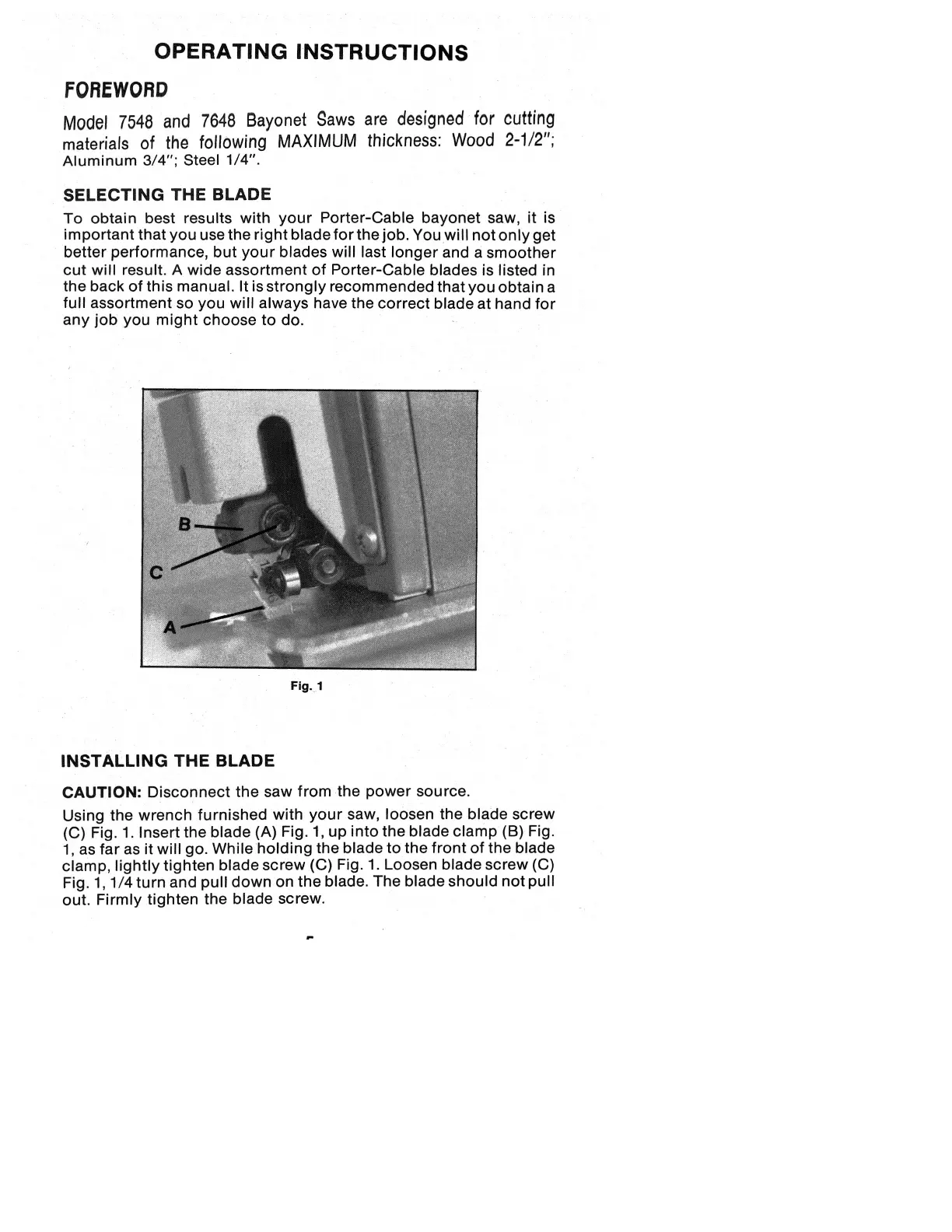
Fig.
1
INSTALLING
THE
BLADE
CAUTION:
Disconnect
the
saw
from
the
power
source.
Using
the
wrench
furnished
with
your
saw,
loosen
the
blade
screw
(C)
Fig.
1.
Insert
the
blade
(A)
Fig.
1,
up
into
the
blade
clamp
(B)
Fig.
1,
as
far
as
it
will
go.
While
holding
the
blade
to
the
front
of
the
blade
clamp,
lightly
tighten
blade
screw
(C)
Fig.
1.
Loosen
blade
screw
(C)
Fig.
1,1/4
turn
and
pull
down
on
the
blade.
The
blade
should
not
pull
out.
Firmly
tighten
the
blade
screw.

Related product manuals