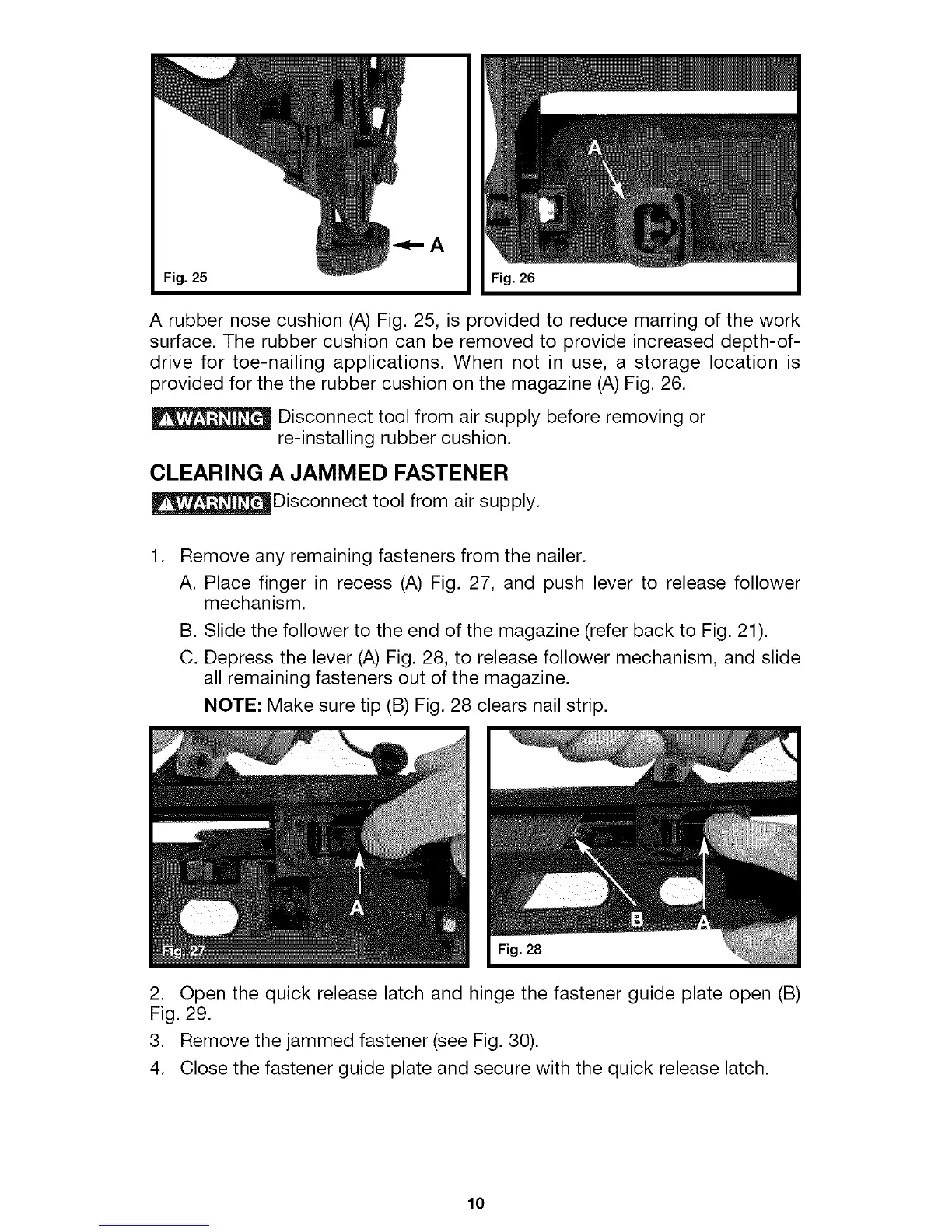
Fig. 25 Fig. 26
A rubber nose cushion (A) Fig. 25, is provided to reduce marring of the work
surface. The rubber cushion can be removed to provide increased depth-of-
drive for toe-nailing applications. When not in use, a storage location is
provided for the the rubber cushion on the magazine (A) Fig. 26.
Disconnect tool from air supply before removing or
re-installing rubber cushion.
CLEARING A JAMMED FASTENER
_Disconnect tool from air supply.
1.
Remove any remaining fasteners from the nailer.
A. Place finger in recess (A) Fig. 27, and push lever to release follower
mechanism.
B. Slide the follower to the end of the magazine (refer back to Fig. 21).
C. Depress the lever (A) Fig. 28, to release follower mechanism, and slide
all remaining fasteners out of the magazine.
NOTE: Make sure tip (B) Fig. 28 clears nail strip.
:ig. 28
2. Open the quick release latch and hinge the fastener guide plate open (B)
Fig. 29.
3. Remove the jammed fastener (see Fig. 30).
4. Close the fastener guide plate and secure with the quick release latch.
10



 To Next Page