GAM Quick Installation Guide
Positron Access Solutions 8 Document 180-0204-001 R03
Important note: When connecting the SFP+ port to a Passive Optical Network
(PON) fiber connection, please make sure to use an Optical Network Unit (ONU)
approved by the OLT vendor you are using.
1.2.3 G.hn Ports
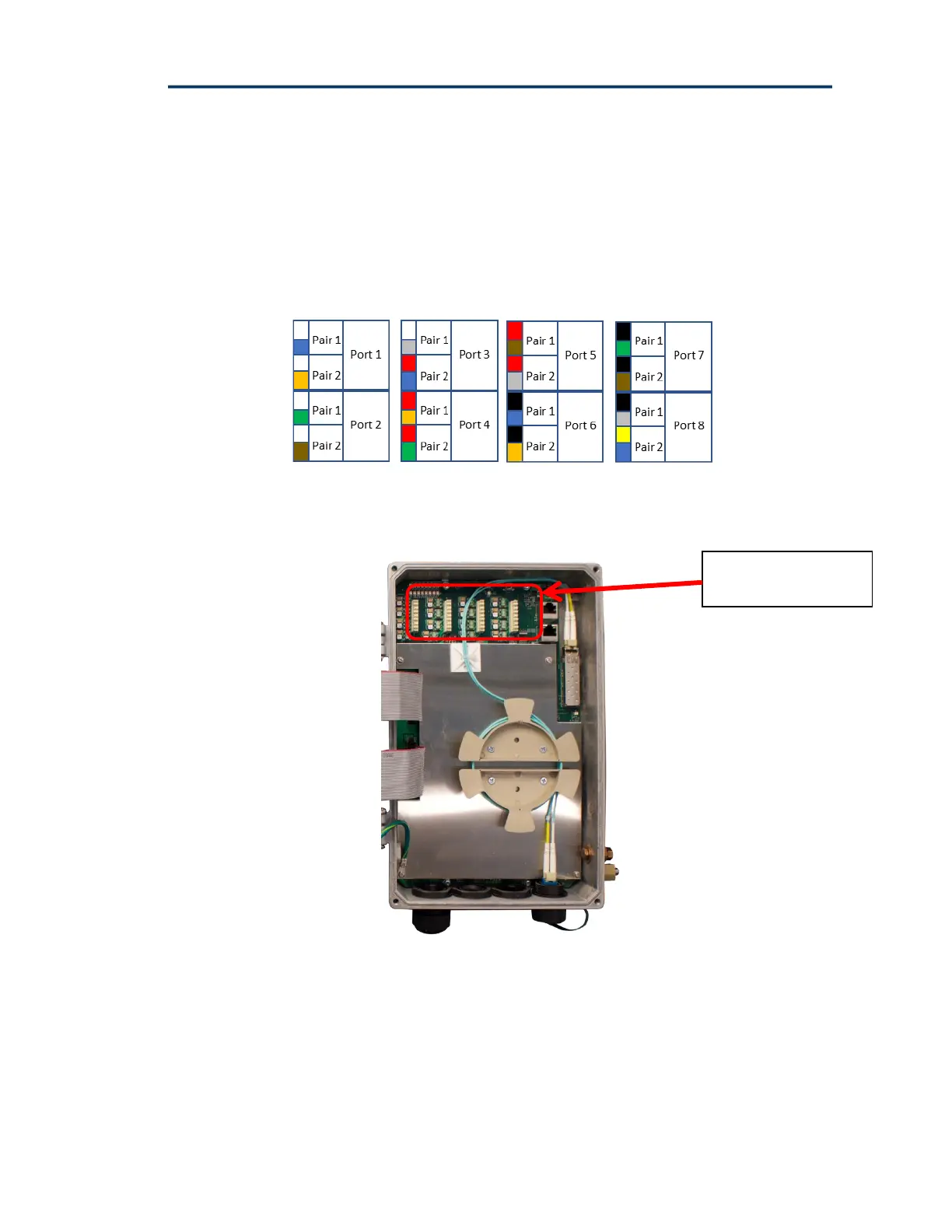
The GAM-8-MRX has 8 G.hn ports and the GAM-4-MRX has 4 G.hn ports.
110 Punch-down blocks are used to connect the copper pairs to each of the G.hn
ports. You can connect either a single pair (SISO mode) or two (2) pairs (MIMO
mode) per port. The 110 Punch-down blocks are located at the top left portion
inside the GAM IP67 enclosure.
Note: fast and resettable lightning protection is pre-installed on the GAM
motherboard for each copper pair.
Figure 3: Inside view of GAM-8-MRX with 110 Punch-down Block



 To Next Page
 Loading...