6
Battery installation
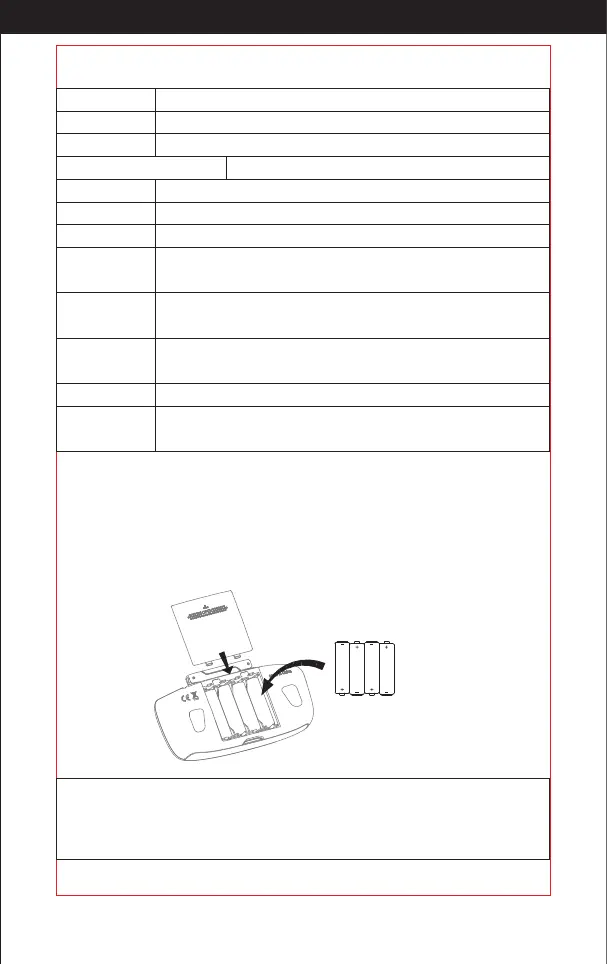
Open the battery cover on the back side of the transmitter and put 4 * AA
batteries(not included)into the box in accordance with electrode instructions,
showing as picture 1
Picture 1
showing as picture 1
4*1.5V
Alkaline Batteries
High / middle /
low speed
Short press the key to switch the high/ middle/low speed mode.
GPS switch
Click the key to turn on/off the function of GPS.
Key function
Left stick
Right stick
Trimmer
mode key
Power switch
To control the drone up / down / turn left / turn right.
To control the drone forward / backward / left side flying / right side flying.
Press down the key, pull the stick to the direction that needs trimming,
then it can turns to the direction you want. Release to exit.
Push power switch from left to right to turn on the drone.
Video Click this button once, it starts to record, and click again to exit.
Encircling key Click the key to enter encircling function, click again to exit.
Gimbal adjustment key
Slide the key to adjust the camera angle up and down.
The following key
Click the key to enter following function, click again to exit.
One key return
When GPS mode, click this button, then the drone starts to return.
During returning and click this button again to exit from returning.
Photo
Click this button once to a photo. Click this button constantly, it takes
several photos.
1. Make sure the electrodes are correct.
2. Do not mix up the new batteries with
the old ones.
3. Do not mix different kinds of batteries.
4. Do not charge the non rechargeable battery.
Notice:
http://www.ipotensic.com



 To Next Page