PSN-64:11
PSN-106, PSN-64, PSB-10 • 5403590 • REV A • 12/09
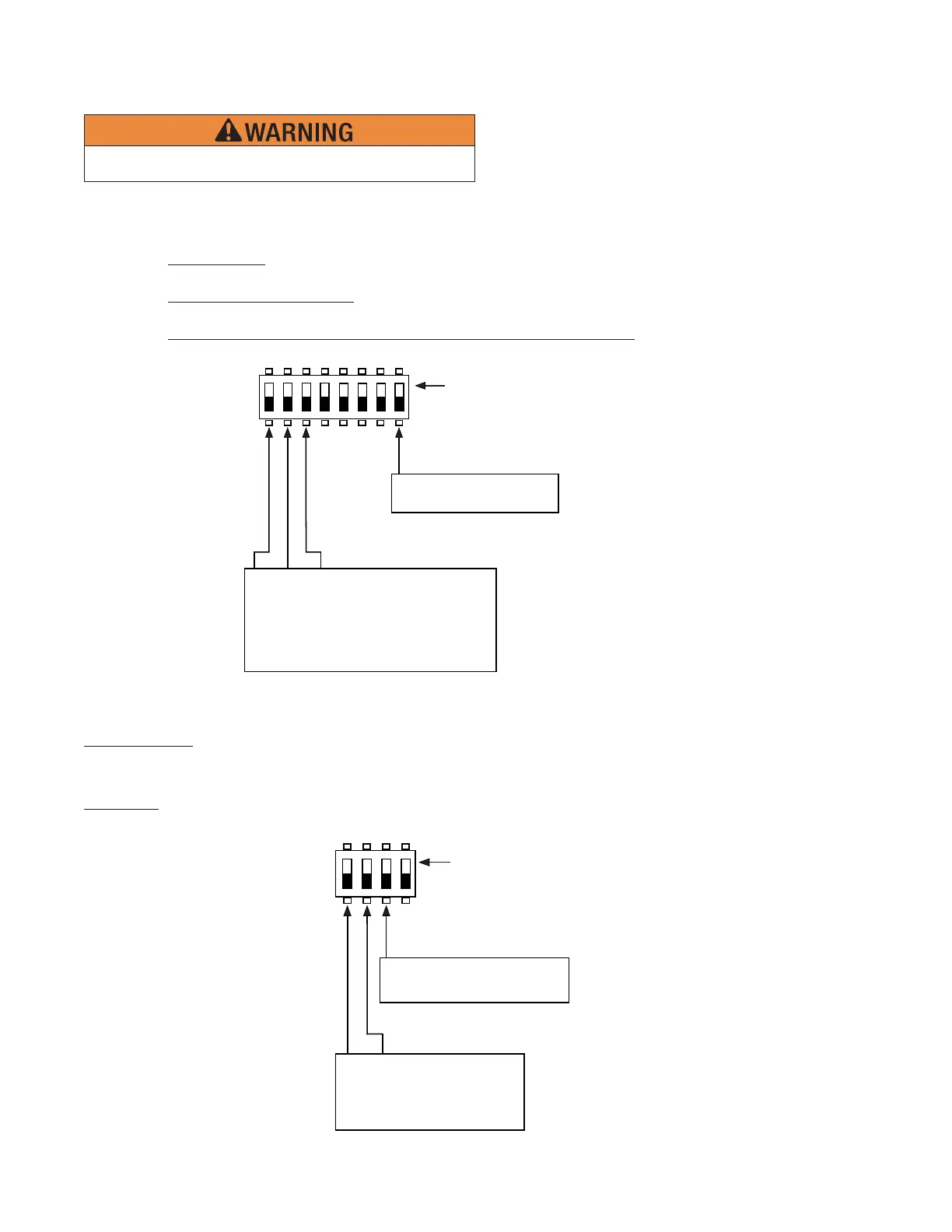
Dip Switch Programming
up position = ON
S7
1
8
DWG# 3590-15
OFF = Normal
ON = Slow Debounce
Input 2 Trigger Type
Input 1 Trigger Type
OFF OFF OFF = Normal
ON OFF OFF = Slow Debounce
OFF ON OFF = Potter Sync
ON ON OFF = Gentex® Sync
OFF OFF ON = System Sensor® Sync
ON OFF ON = Wheelock® Sync
Input Trigger Type
(Selects the behavior of trigger inputs.)
Normal Trigger• : Trigger input is sampled at a high rate. Used for simple DC Power triggers, as well as for sync
follow and pass-thru mode. A NAC confi gured as constant output will follow triggered and immediately activate.
Slow Debounce (Slow Trigger)• : Allows a non-standard trigger signal to be used for activation. The slower response allows
the outputs to remain active when the trigger signal is changing. This trigger will operate with ANSI Temporal Code 3.
Synchronization Triggers (Potter, Gentex®, Wheelock®, System Sensor®)• : Used with QuadraSync to maintain
synchronization of devices from different manufacturers.
up position = ON
1
4
OFF OFF = 1 Hour
ON OFF = 3 Hours
OFF ON = 6 Hours
ON ON = 30 Hours
OFF = Bulk with NAC
ON = Bulk only
AC Delay
Supervision
DWG# 3590-1
Bulk Supply Options
AC Report Delay:
Selects number of hours to delay before activating the general trouble relay in response to a low AC condition. Note that the Low
AC relay is activated immediately.
Supervision:
This should always be in the OFF position to allow supervision of the wiring between the 24 VDC bulk supply board and the
NAC control board.
NAC control board global options
Remove power before servicing or changing DIP switch
programming selections



 To Next Page