1.
INTRODUCTION
The PowerUSB-SMART is a programmable power strip using an attached computer
and also can be used as
a standalone power strip. It can be used for calendar-date-based power on-off, frequency-based
power on-
off, timer-based power on-off, and load-based power on-off. The unit also can measure how much power is
consumed at any given time, total power consumed (in terms of dollars), and TV on times per day.
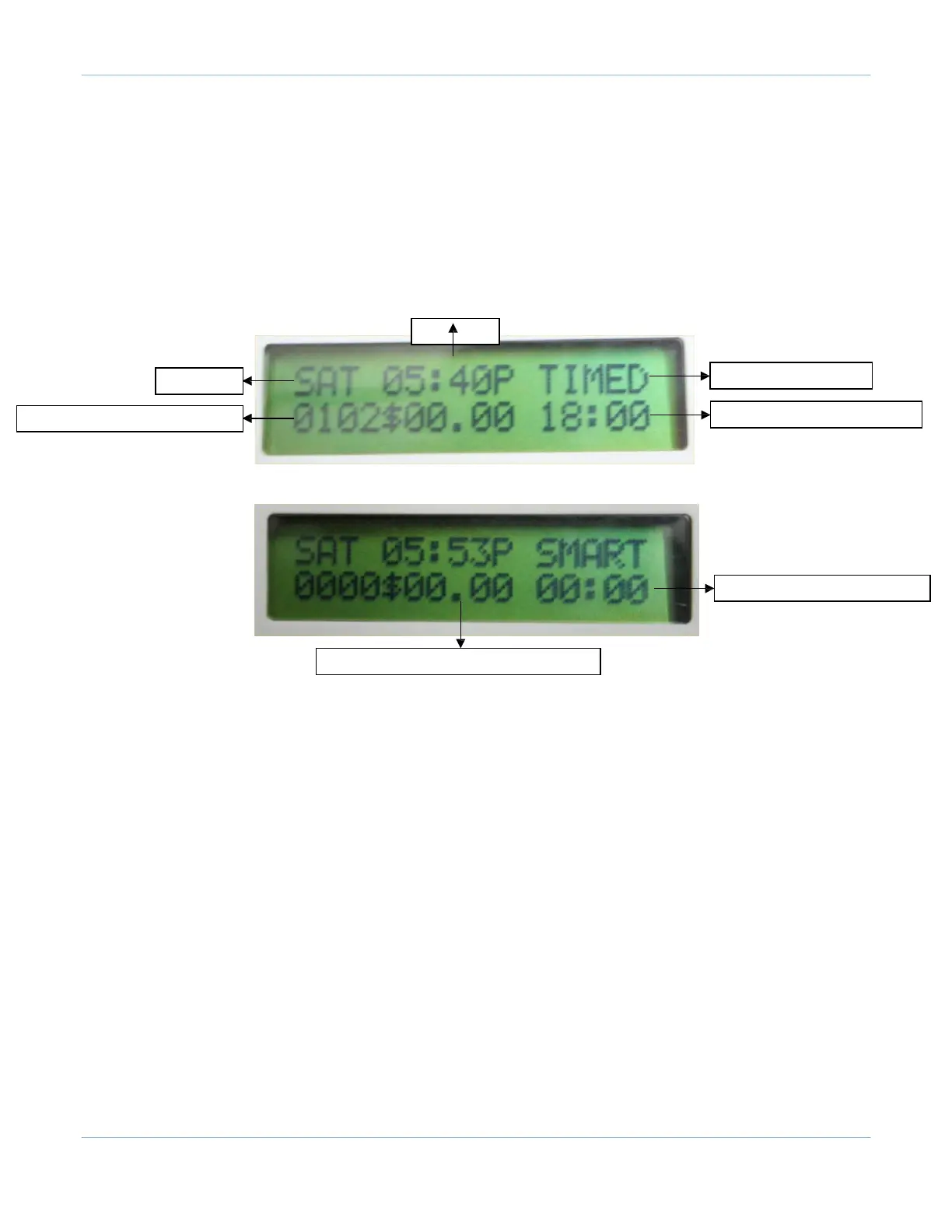
The PowerUSB-SMART comes with an alpha-numeric LCD display. As illustrated below, the LCD displays
the day of the week, the current time, the selected mode, power consumption information, and mode-
specific information.
Current Time
Day of the week
Currently Selected Mode
Current Power Consumption in milliamps
Mode Specific: Next On-Off Time
Mode Specific: TV On time for today
Total Power Consumption in $ (units x price per unit)
The PowerUSB unit can work in the following modes, which can be changed using the push button switch
located on the
side of the unit:
TIMED: Calendar-based power on-off at certain times of the day or with a certain frequency.
SMART: Switches on controlled outlets when the master load is high (for example, when the DVD
outlet is switched on while the TV is
also on.)
SMART2: Similar to the SMART mode. Outlet 1 is always kept on for the DVR, etc.
TIMER: Countdown timer allowing an outlet to be switched off after a certain amount of time.
ALL ON: All the outlets will be switched on. This mode can also be used with direct computer control.
1.1
TIMED
In the Timed mode, outlets can be programmed to power on or off two times per day for weekdays and two
times
per
day for weekend days. By default, programmed times are turned on during evenings and for the
whole day during weekdays. The times can be reprogrammed by connecting the unit to the computer and
using the
PowerUSB software (see section 2). All controlled outlets are off by default and come on only during
these
programmed periods. Mode-specific information on the LCD displays the time when the next power on-
off change is



 To Next Page