PowerFix PEK 2.3 A1
English - 11
Inserting/replacing the batteries
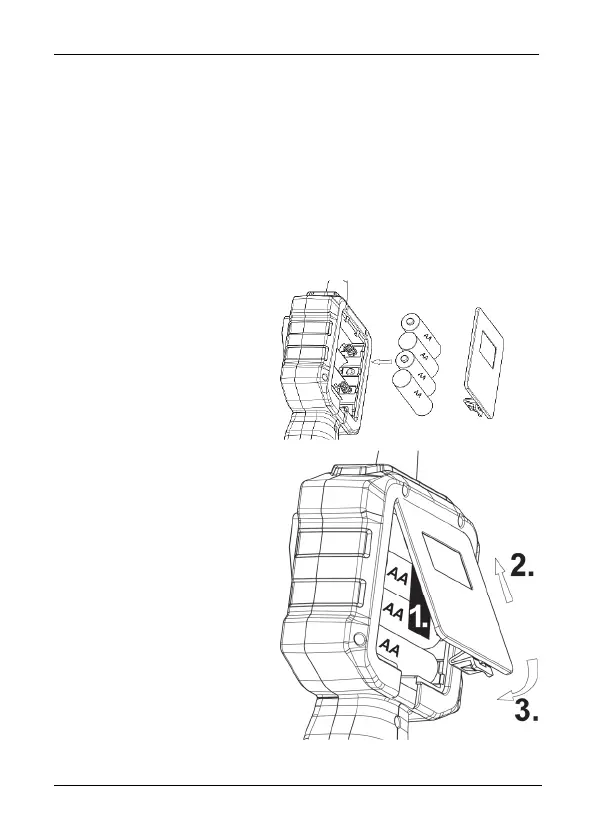
Ensure that the camera is switched off. The battery compartment [8] is located
at the back of the device.
Remove the battery compartment cover by pressing the release mechanism and
lifting the cover upwards. The ribbon in the battery compartment is intended to
facilitate the subsequent removal of the batteries. When inserting the batteries,
make sure that this ribbon runs completely under all 4 batteries and that you
can still access the end of the ribbon after the batteries have been inserted.
Insert 4 x 1.5V AA / LR6
batteries with the correct polarity
in the battery compartment.
Please note the markings in the
battery compartment and on the
batteries.
1. The end of the ribbon should
lie smoothly between the
batteries and battery
compartment cover.
2. Close the battery
compartment by first inserting the
two plastic tabs of the battery
compartment cover into the slots
provided for this purpose on the
housing of the endoscope
camera.
3. Then press it downwards until
it audibly engages.



 To Next Page
 Loading...