PowerFleet
®
VAC4 and VAC4S Hardware User’s Guide
Understand and Manually Set “Idling” for Internal Combustion Vehicles
(Not applicable for JPT, P-Plug and VDI cable installations)
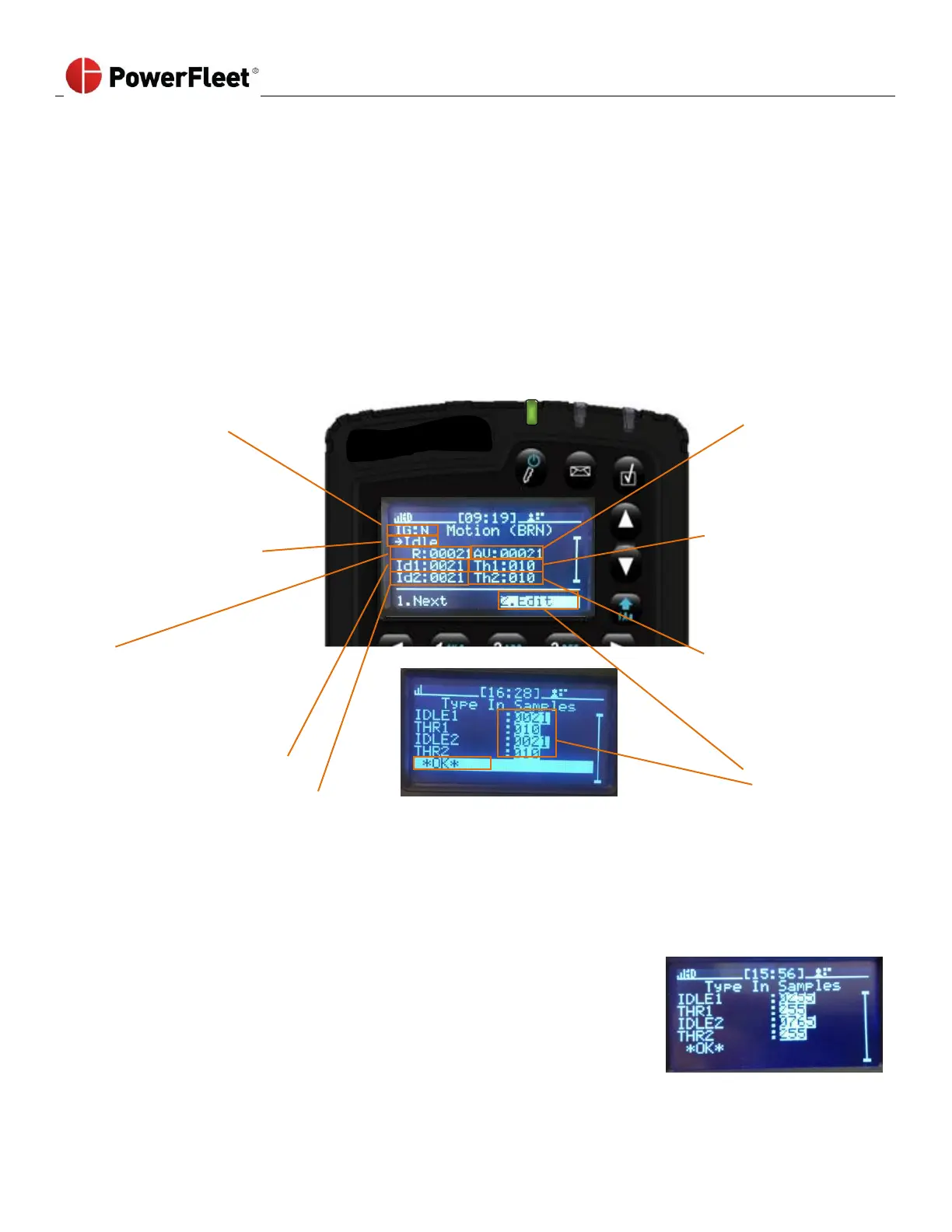
The VAC determines the state of the vehicle (engine off, idling or motion) by configuring two ‘engine off’ ranges based
on voltage sampling of the “BRN” wire connection. The two engine off ranges will typically differ when the “BRN”
connection voltage changes between key-on accessories and key-off while the engine is not running. In other scenarios
the two idle ranges may be identical.
1. Log into the vehicle.
2. On the first menu screen, select HARDWARE.
3. Scroll down to the second page of the menu screen.
4. On the “Hardware” sub-menu, select ENGINE.
Current gear state
(N = Neutral,
G = In gear)
MUST BE VALIDATED
VIA TEST DRIVE AFTER
CHANGING SETTINGS
Current value
evaluated versus
engine off ranges
to determine
engine state
Current engine state
(‘Idle’ = Engine off,
‘EngOn’ = Idling)
Threshold above
and below Id1
center point that
equals the
‘engine off’ range
“Raw” value currently
being measured by
sensor
Threshold above
and below Id1
center point that
equals the
‘engine off’ range
Center point for first
‘engine off’ setting range
Center point for second ‘engine off’ setting range
Select EDIT which opens a new screen where you can type in the required values between 0 and 1023
(center point) and between 0 and 255 (range). This method is a last resort and would be used in a trial-and-
error scenario with assistance from PowerFleet Support.
Center point for 1st engine off setting.
Range around (+/-) the “IDLE1” setting that makes the engine off threshold.
Center point for 2nd engine off setting.
Range around (+/-) the “IDLE2” setting that makes the engine off threshold.
Vehicle engine is off when AV is between 0 and 510 (255 ± 255) or 510 and
1020 (765 ± 255).



 To Next Page