20
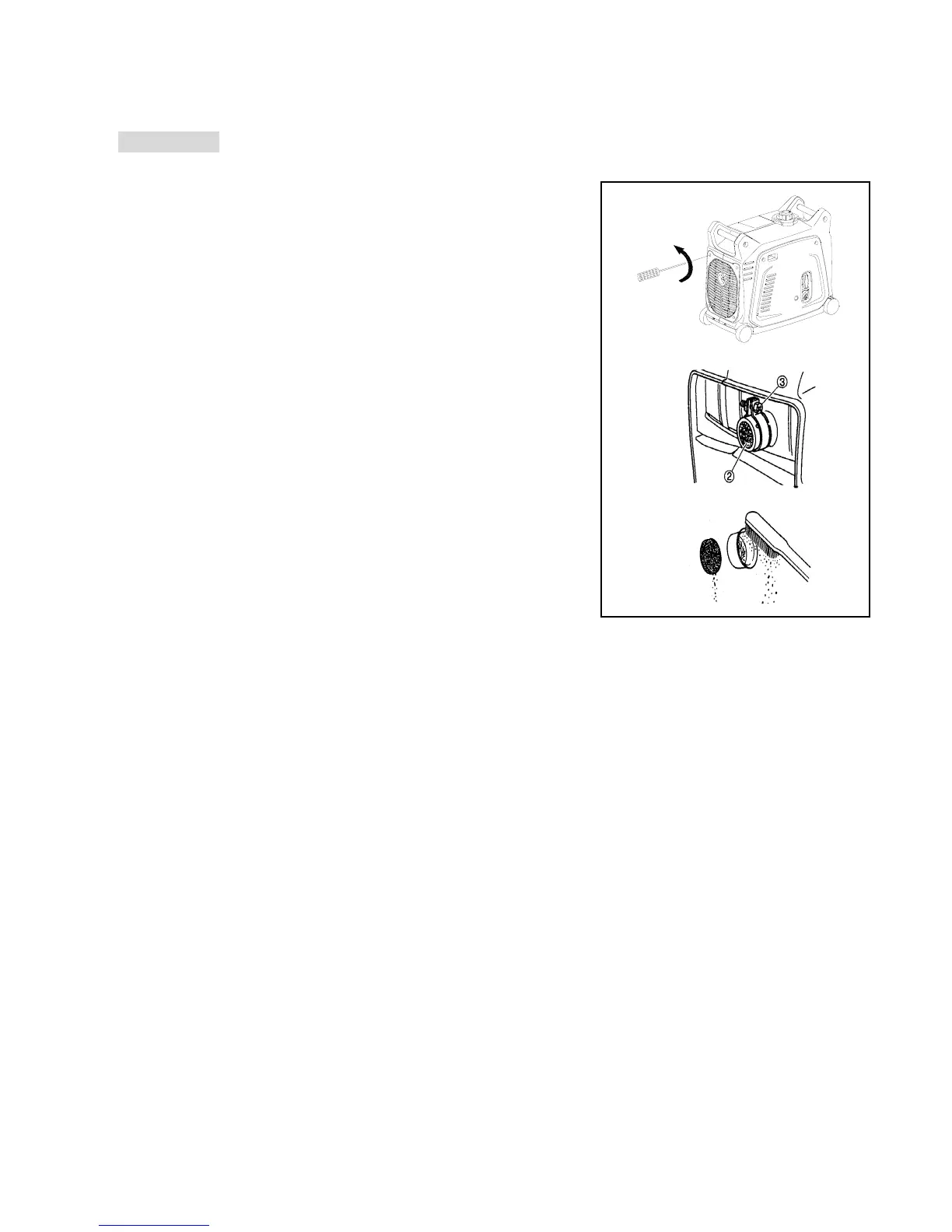
6)MUFFLER SCREEN
WARNING
z Please note that the engine and muffler will be very hot after the
engine has been running.
1. Remove the side cover.
2. Remove the muffler screen.
3. Use a flathead screw driver to remove the spark arrester from the
muffler.
4. Remove the carbon deposits on the muffler screen and spark
arrester by using a wire brush.
5. Replace the muffler screen once completed.
6. Replace the side cover once completed.
8.TROUBLE SHOOTING
1)If the engine won’t start:
1. Fuel Systems
If there is no fuel supplied to combustion chamber:
z Check the fuel in the fuel tank – refill if necessary.
z Check the fuel in the fuel tank, if there is sufficient fuel ensure that the fuel tank cap air vent knob is in the
“ON” position and the fuel cock knob is in the “ON” position.
z Check the fuel line – if this is clogged then clean it properly.
z Check the carburetor – if clogged then clean it properly.
z 2.Engine Oil System
If there is insufficient oil:
z Check the oil level – if it is too low then add engine oil.
3. Electrical Systems:
Poor Spark:
z If the spark plug is dirty, wet or has carbon build up – Remove carbon build up, clean and dry properly.
z Faulty ignition system – Contact GenTech Industries.
4. Insufficient Compression:


 To Next Page