EasyManua.ls Logo

PowerMaster RSG 2000 - User Manual

Default Icon
13 pages
Print Icon
To Next Page IconTo Next Page
Loading...
1
Powermaster Model RSG 2000
INSTALLATION MANUAL
CAREFULLY READ THIS ENTIRE MANUAL FIRST BEFORE PROCEEDING!
LEAVE THIS MANUAL WITH END USER FOR FUTURE REFERENCE AFTER INSTALLATION IS COMPLETE
(LAST PAGE SHOULD BE FILLED OUT AND RETAINED BY INSTALLER FOR FUTURE USE)
THE FOLLOWING INFORMATION SHOULD BE RECORDED AT TIME OF INSTALLATION:
Date: ____________ Serial #:__________________________ Wiring Diagram #:___________________
THE OPERATOR SERIAL # IS LOCATED ON THE REAR INTERIOR WALL OF THE OPERATOR
ENCLOSURE. THE WIRING DIAGRAM IS LOCATED IN THE LEFT INTERIOR WALL OF THE
OPERATOR ENCLOSURE WITH THE DIAGRAM # AT THE LOWER RIGHT- HAND CORNER OF
PAGE.
THE ABOVE INFORMATION SHOULD BE GIVEN IN ALL CORRESPONDENCE REGARDING
THE OPERATOR TO INSURE FAST SERVICE WHEN ORDERING PARTS OR REQUESTING
INFORMATION.
The above identified unit is rated in the following class:
[ X ] Class I- Residential Vehicular Gate Operator -A vehicular gate operator (or system) intended for use
in a home of one to four single family dwellings, or a garage or parking area associated therewith.
[ X ] Class II- Commercial/General Access Vehicular Gate Operator -A vehicular gate operator (or system)
intended for use in a commercial location or building such as a multifamily housing unit (five or more
single family units), hotel, garages, retail store or other building servicing the general public.
[ X ] Class III- industrial/limited Access Vehicular Gate Operator -A vehicular gate operator (or system)
intended for use in an industrial location or building such as a factory or loading dock area or other
locations not intended to service the general public.
[ X ] Class IV Restricted Access Vehicular Gate Operator -A vehicular gate operator (or system) intended
for use in a guarded industrial location or building such as an airport area or other restricted access locations
not servicing the general public, in which unauthorized access is prevented via supervision by security
personnel.
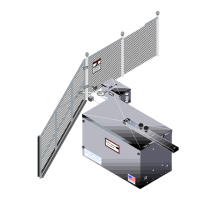
Attach large warning signs provided to each side of gate in the most conspicuous place. Mount control
station and smaller warning placard together within sight of the gate opening.
Attach large warning signs
provided to each side of gate in
the most conspicuous place.
Mount control station and smaller
warning placard together within
sight of the gate opening.
Question and Answer IconNeed help?

Do you have a question about the PowerMaster RSG 2000 and is the answer not in the manual?

Summary

SAFETY INSTRUCTIONS FOR SLIDE GATE OPERATING SYSTEMS

SYSTEM DESIGNER SAFETY INSTRUCTIONS

Safety precautions and responsibilities for gate system designers.

INSTALLER SAFETY INSTRUCTIONS

Before Installation

Pre-installation checks and preparations for gate operators.

During Installation

Procedural steps and safety measures during gate operator installation.

After Installation

Post-installation responsibilities and user handover procedures.

END-USER SAFETY WARNINGS

SAFETY WARNINGS FOR OPEN-ROLLER GATES AND ORNAMENTAL GRILLE-TYPE GATES

INSTALLATION INSTRUCTIONS

General instructions for installing gate operators on specific gate types.

INSTALLATION LAYOUT

OPERATOR INSTALLATION

DRIVE CHAIN ROUTING

MANUAL DISCONNECT

ELECTRICAL CONNECTIONS

HIGH VOLTAGE WIRE GAUGE; DISTANCE CHART

Chart for selecting appropriate wire gauge based on distance for electrical runs.

MASTER;SLAVE INSTALLATION

Configuration and wiring for master/slave gate operator setups.

THREE BUTTON STATION CONNECTION

Wiring instructions for connecting a standard three-button control station.

PRIMARY OBSTRUCTION SENSING DEVICE

Details on the primary sensing system to detect obstructions.

SECONDARY OBSTRUCTION SENSING DEVICES

CONTACT SENSOR INSTALLATION

Installation of contact safety sensors like electric edges.

NON CONTACT SENSOR INSTALLATION

Installation of non-contact safety sensors like photo eyes.

RADIO CONTROL INSTALLATION

TIMER TO CLOSE FEATURE

LIMIT ADJUSTMENT PROCEDURE

SERVICE AND MAINTENANCE

CONNECTION OF ADDITIONAL ACCESSORIES

SINGLE BUTTON CONNECTION

How to connect a single button for gate operation.

RADIO CONTROL CONNECTION

Connecting radio controls for open-only or open/close operation.

CARD READER, KEYPAD, TELEPHONE ENTRY CONNECTION

Connecting access control devices like card readers or keypads.

EXIT LOOP CONNECTION

Wiring an exit loop to activate gate opening.

REVERSE LOOP CONNECTION

Connecting a reverse loop for safety during closing.

SHADOW LOOP CONNECTION

Connecting a shadow loop for swing gate operation.

PowerMaster RSG 2000 Specifications

General IconGeneral
BrandPowerMaster
ModelRSG 2000
CategoryGate Opener
LanguageEnglish

Related product manuals