EasyManua.ls Logo

PowerPro Technology 56101 - User Manual

PowerPro Technology 56101
28 pages
Print Icon
To Next Page IconTo Next Page
Loading...
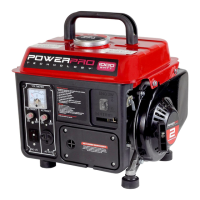
2-Stroke 900 Rated Watt Generator
Item # 56101
Owner’s Manual
Manual del Propietario
FEATURES:
1000 Surge Watt Output
900 Rated Watt Output (7.5Amps at 120Volts)
2 HP Single Cylinder 2-Stroke Engine
One (1) 120Volt AC Receptacle
One (1) 12Volt DC Receptacle
Circuit Reset for AC Receptacle
Circuit Reset for DC Receptacle
One (1) Gallon Fuel Tank
Fuel Mix 50 to 1 (Gasoline to Oil)
Five (5) Hours Run Time at Half Load
EPA and CARB Certified
Low Noise Generator
Spark Arrestor

Questions and Answers

  • J
    Justin PattersonAug 1, 2025
    How to fix a PowerPro Technology 56101 that will not start?
    • T
      thomas12Aug 1, 2025
      If your PowerPro Technology Portable Generator won't start, several factors could be the cause. First, make sure the engine switch is set to the "on" position. Next, check that the fuel valve is also in the "on" position. Ensure the choke is closed. Verify that the generator has fuel; if not, add fuel. If the fuel is old or contaminated, replace it. Lastly, inspect the spark plug and air cleaner; clean them if dirty, or replace the air cleaner if necessary.
  • C
    Cory RowlandAug 10, 2025
    What to do if my PowerPro Technology Portable Generator runs but has no electrical output?
    • H
      Hailey SerranoAug 10, 2025
      If your PowerPro Technology Portable Generator runs but provides no electrical output, start by checking the circuit reset button. Wait two minutes, then push it to the "on" position. If that doesn't work, the issue might be with the connecting wires or cables; if you're using an extension cord, try a different one. It's also possible that a connected electrical device is faulty; try connecting a different device to troubleshoot.
  • M
    Mary KeithAug 20, 2025
    Why does my PowerPro Technology Portable Generator run but not support all connected electrical devices?
    • A
      Amy McphersonAug 20, 2025
      If your PowerPro Technology Portable Generator runs but doesn't support all the connected devices, it could be overloaded or there may be a short in one of the devices. Here's how to troubleshoot: * Turn off all electrical devices. * Unplug all electrical devices. * Turn off the generator. * Wait several minutes. * Restart the generator. * Try connecting fewer electrical loads to the generator. Also, try disconnecting any faulty or short-circuited electrical loads.

Summary

Safety Information

Safety Symbols and Meanings

Explains hazard alert symbols and their corresponding meanings for safe operation.

General Safety Procedures

Carbon Monoxide Hazards

Critical warnings about using the generator indoors and the risks of carbon monoxide poisoning.

Important Safety Instructions

Package Contents

Lists all items included with the generator and advises checking for completeness and damage.

Generator Components

Component Location and Function

Identifies and explains the purpose of various controls and parts of the generator unit.

Generator Preparation

Mixing Fuel for 2-Stroke Engines

Details the correct fuel-to-oil ratio (50:1) and fuel specifications for the 2-stroke engine.

Starting the Generator

Initial Start Procedure

Provides a step-by-step guide for starting the generator for the first time.

Using the Generator

AC Usage and Wattage Requirements

Explains how to connect devices based on their wattage, considering generator capacity and surge requirements.

Stopping the Generator

Maintenance and Care

Spark Plug Maintenance

Instructions for inspecting, cleaning, and gapping the spark plug for proper engine ignition.

Troubleshooting

Warranty Statement

PowerPro Technology 56101 Specifications

General IconGeneral
Rated Watts5000
Starting Watts6250
Fuel TypeGasoline
Power Output120/240V
Engine Type4-Stroke OHV
Starting MethodRecoil
Outlet Types1x 120/240V 30A

Related product manuals