5
OPERATION
Charger LED display
Power LED -
Green color LED to indi-
cate Power is connect to
charger
STATUS LED -
Green color LED to indica-
te that the battery is char-
ging. Red color LED to in-
dicate a charging failure,
battery problem or reverse
polarity.
FIG.2
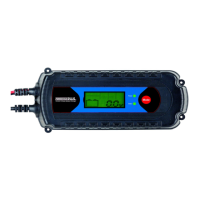
Charger LCD display
The unit is built-in with LCD display for showing charger status:BUTTON AND MODE
FIG.3
MODE BUTTON:
The Mode button on unit is used to select the 9 different battery charger mode
as below.
1. “12V/STD/SLOW” Mode
Slow charge (Max. 2A Charging Current) with Standard or
GEL lead acid battery
2. “12V/STD/FAST” Mode
Fast charge (Max. 7.2A Charging Current) with Standard or
GEL lead acid battery.
3. “12V/AGM/DEEP/FAST” Mode
Fast charge (Max. 7.2A Charging Current) with AGM type
lead acid battery.
4. “12V/LI/FAST” Mode
Fast charge (Max. 7.2A Charging Current) with Lipo4 battery.
Reverse
Connection
Fail in
Charging
12/24V
Supply Mode
Recondition
Mode
Charging Stage
Battery
Level
Slow Charge
Mode
Lipo4
Battery
GEL / Stan-
dard Battery
Battery
Voltage
Read Out
Fast Charge
Mode
AGM
Battery


 To Next Page