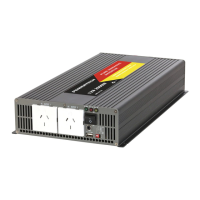
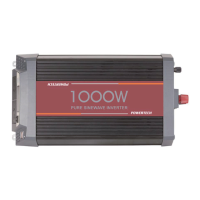
This document is an instruction manual for the Powertech MI5740, a 2000W 12VDC to 230VAC Pure Sine Wave Inverter.
Function Description
The Powertech MI5740 is a pure sine wave inverter designed to convert 12VDC (direct current) power from a battery source into 230VAC (alternating current) power, suitable for powering various electronic devices and appliances. Unlike modified sine wave inverters, pure sine wave inverters produce an output waveform that is identical to or closely replicates normal AC mains power. This makes them ideal for a wide range of applications, especially for sensitive electronics and motorized devices, as pure sine wave power can extend product lifetime and ensure quieter operation. The inverter is designed to provide reliable power for devices that would typically not work well or at all with modified sine wave inverters, such as laser printers, photocopiers, magneto-optical hard drives, some fluorescent lights with old-type ballasts, power tools with variable speed controllers, AC motors, sewing machines with speed/microprocessor control, and battery chargers. It also reduces audible and electrical noise (buzzing) in fans, fluorescent lights, audio amplifiers, and TVs, and prevents crashes and glitches in computers and monitors.
Important Technical Specifications
AC Input (Output from Inverter):
- Continuous Power: 2000W
- Surge Power: 4000W
- Max Constant Power Start: 2400W for 10 seconds
- Output Wave Form: Pure Sine Wave (THD<3%)
- Output Frequency: 50Hz+/-3Hz
- Voltage: 230VAC
DC Output (Input to Inverter):
- Input Voltage: 12VDC
- Voltage Range: 10V-15V
- Low Voltage Alarm: 10.5V+/-0.5V
- Low Voltage Shut Down: 10V+/-0.5V
- Over Voltage Shut Down: 15V+/-0.5V
Protection Features:
- Over Thermal Protection: Shuts off output automatically when temperature exceeds 75°C.
- Short Circuit Protection: Features reverse polarity protection via an external fuse.
- Cooling Fan: Automatically runs when temperature is ≥45°C.
Environmental & Efficiency:
- Working Temperature: -10°C to +50°C
- Working Humidity: 20%-90% RH Non-Condensing
- Storage Temperature Range: -30°C to +70°C
- Converting Max Efficiency: 90% (Full Loading) / 95% (1/3 Loading)
- No Load Consumption: <1.2A
Physical Characteristics:
- Product Size: 320 x 220 x 92mm
- Net Product Weight: 4.65kg
Usage Features
Installation and Placement:
- The inverter should be placed on a reasonably flat surface, either horizontally or vertically.
- It is crucial to keep the inverter dry and not expose it to rain or moisture. Operation in wet conditions is dangerous.
- Avoid dusty environments and ensure the fan is kept clean.
- Do not install the inverter in the engine compartment due to potential contamination, excessive heat, and the risk of sparks near petrol fumes. A dry, cool mounting location is recommended.
- Maintain at least 2 inches (5cm) of air space on all sides for proper ventilation and heat dissipation.
- Avoid placing the inverter near heating vents, radiators, direct sunlight, or flammable materials. Ideal operating temperature is between 10°C and 30°C.
- Do not install inverters in unvented battery compartments.
- Do not expose the inverter to temperatures exceeding 40°C.
- Never connect live AC power to the inverter's AC outlets, even if the inverter is switched off, as this will damage the unit.
Operation:
- AC Output: The inverter features multiple AC output sockets for connecting devices.
- USB Port: Includes a USB port for charging or powering compatible devices.
- Power Switch: An on-board power switch controls the inverter.
- Indicator Lights: Provides visual feedback on the inverter's status (e.g., Green LED for normal operation, Red LED for faults).
- Remote Control: The inverter comes with a remote control kit for convenient operation.
- To use the remote, the inverter's on-board switch must be set to "Off" (no lights showing).
- Plug the white remote cable into the "Telephone" type socket on the front panel.
- Press and hold the remote button for about 1 second to turn the inverter on; the green light on the remote unit will illuminate.
- To turn off, press and hold the remote button until the green light goes out.
- Note: If the inverter is switched on via the remote and then the on-board switch is also set to "ON," the remote's green light will stay on. Pressing the remote's on-off button will turn off the remote's light, but the inverter will remain on, and further remote button presses will have no effect.
Troubleshooting (based on LED Indicator and Tone):
- 1 beep (Green LED solid on): Working normally.
- 2 beeps (N/A): Undervoltage warning. Solution: Check battery input.
- 3 beeps (Red LED solid on): Undervoltage protection. Solution: Check battery input.
- 4 beeps (Red LED solid on): Overvoltage protection. Solution: Check battery input.
- 5 beeps (Red LED solid on): Overheat protection. Solution: Ensure appropriate ventilation; leave unit off until it cools down.
- Continuous beep (N/A): Inverter overload protection. Solution: Ensure load is within the inverter's rating; turn unit off for 10 seconds to reset.
Maintenance Features
General Maintenance:
- Keep the inverter dry and free of dust. Regularly clean the fan to ensure proper airflow and prevent overheating.
- The manufacturer is not responsible for injuries due to misuse.
- Safety Warning: High voltages are present inside the inverter. Do not open the inverter case while power is connected. Any internal adjustment is prohibited and will void the warranty.
Warranty Information:
- The product is guaranteed to be free from manufacturing defects for a period of 12 months.
- During this period, Electus Distribution will repair, replace, or refund faulty products or those not fit for their intended purpose.
- The warranty does not cover modified products, misuse, abuse contrary to instructions, packaging label, change of mind, or normal wear and tear.
- The goods come with guarantees under Australian Consumer Law, entitling consumers to replacement or refund for major failures and compensation for other foreseeable loss or damage, or repair/replacement if goods fail to be of acceptable quality and the failure is not major.
- To claim warranty, contact the place of purchase with a receipt or other proof of purchase. Additional information may be required.
- Expenses related to returning the product for warranty claims are typically borne by the customer.
- The warranty benefits are in addition to other rights and remedies under Australian Consumer Law.


 To Next Page
 General