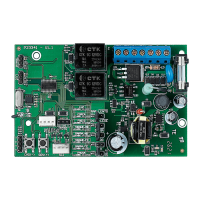
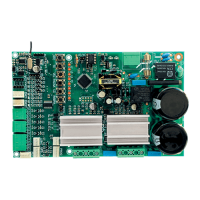
27
CHART: COMMAND SETTINGS
Quick configuration guide. In order to enter programming mode, one mu close the
‘JPROG’ jumper on the board.
BUTTON FUNCTION
SET Add or erase remote controls
CMD Command received when opening
FORCE Strength (Electronic clutch)
PAUSE TIME Automatic closing time
OPEN RAMP Opening ramp
CLOSE RAMP Closing ramp
TORQUE RAMP Ramp Torque (Strength)
BRAKE Brake
LIGHT Courtesy light time
ERASING ALL REMOTE CONTROLS
Erases and boots the memory in order to add new remote controls.
Inructions:
1. The gate mu be ill;
2. Close the ‘JPROG’ jumper;
3. Press and release the ‘SET’ button on the control board (once);
4. ‘N5’ (TX) LED mu remain lit;
5. Press the ‘SET’ button on the control board and keep it pressed for 10 seconds;
6. ‘N8’ LED mu remain lit, indicating that all remote controls have been erased
from the memory;
7. In order to finish, open the ‘JPROG’ jumper.
ADDING REMOTE CONTROLS
It adds new remote controls to the control board, so that they can trigger it.
Inructions:
1. The gate mu be ill;
2. Close the ‘JPROG’ jumper;
3. Press and release the ‘SET’ button (once);
4. ‘N5’ (TX) LED mu remain lit;
5. Press the button of the remote control one wants to add and keep it pressed;
6. ‘N8’ LED mu remain flashing;
7. Press and release the ‘SET’ button on the board to confirm the operation;
8. ‘N8’ LED flashes once (button already added), blinks twice (button already ad-
ded and new synchronization for a Rolling Code Remote control) or three times
(memory full);
9. Release the button of the remote control;
10. Go back to ep 3 to add a new button of the remote control;
11. In order to finish, open the ‘JPROG’ jumper.
COMMAND RECEIVED DURING OPENING
Permission for a command from either a pushbutton or a remote control to be accep-
ted during the opening maneuver.
Inructions:
1. The gate mu be ill;
2. Close the ‘JPROG’ jumper;
3. Press and release the ‘CMD’ button on the board (once) to show the current
adjument.
4. Press and release the ‘CMD’ button as many times as necessary until one reaches
the desired adjument;
5. In order to finish, open the ‘JPROG’ jumper.
LED indications:
• ‘N1’ flashing = Function disabled.
• ‘N1’ lit = Function enabled.
STRENGTH (ELECTRONIC CLUTCH)
In order to assure the efficiency of this security sensor device, proceed as follows:


 To Next Page
 Loading...