III.3 Starting the Machine
1. Connect the line cord to a 220 - 240 VAC, 1 Phase power source. Turn on the
Safety Disconnect Switch on the left side of the machine. Using the proper
key, make certain the [EMERGENCY STOP] button is not locked in. Press
the green [On] button (designated on the button by the numeral I).
2. The power indicator (between the green and red buttons) will light.
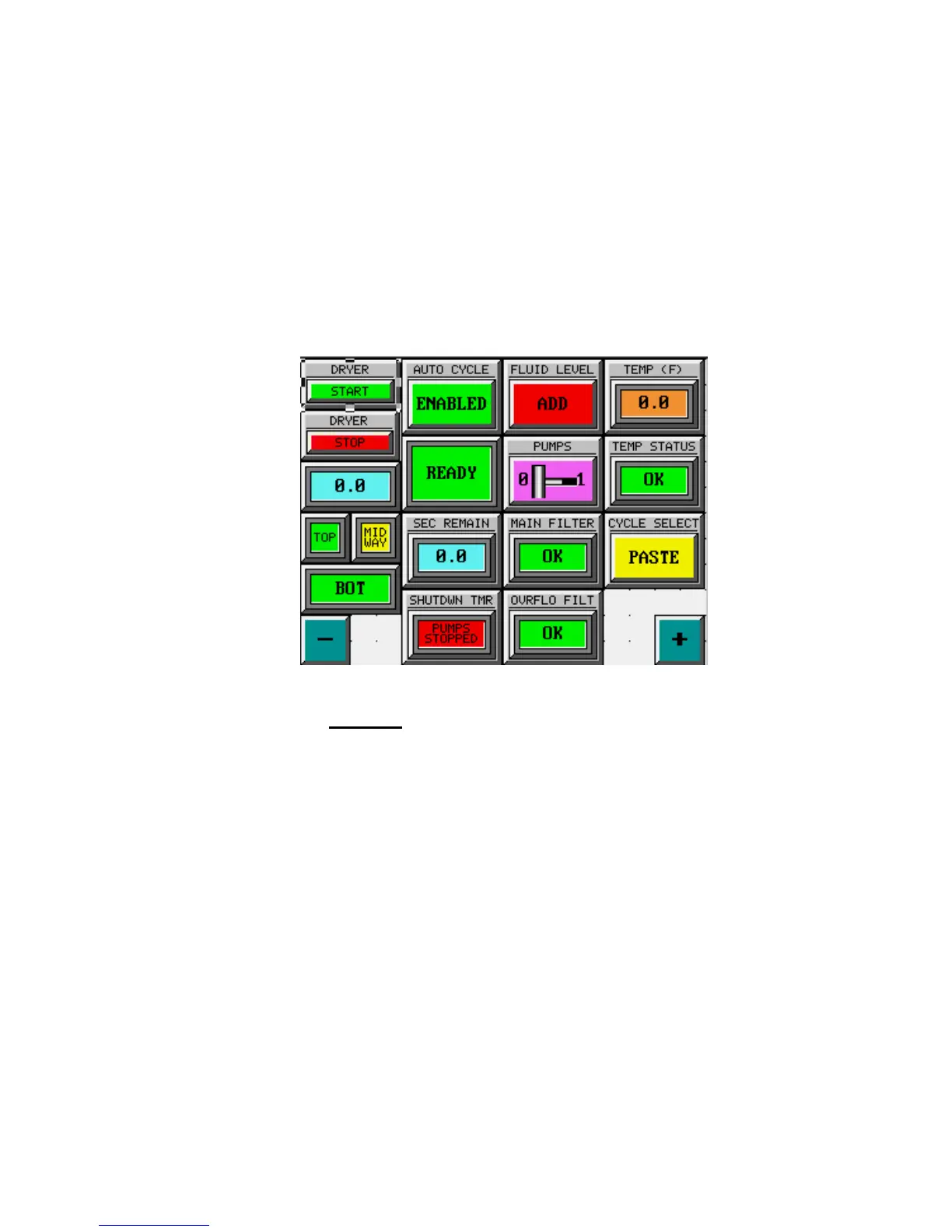
3. After the touchscreen initializes, the following Operations screen will then
appear:
FIG. 4: OPERATIONS SCREEN
This screen shows the machine’s operational status at a glance and contains all
necessary controls to run automatic cleaning cycles.
The [TEMP (F)] indicator reports the measured temperature of the cleaning fluid in
degrees Fahrenheit.
The [TEMP STATUS] indicator reflects the conditions of the indicators on the
“Fluid Temperature” Screen. If the fluid temperature is either low or high, this
indicator will display [LO/HI]. This condition does not prevent operation.
The [CYCLE SELECT] Pushbutton allows the user to select either the [PASTE]
Cycle or the [GLUE] Cycle. Each of these is independently programmable for any
desired length of time.



 To Next Page